TL;DR

Get audio and creator gear delivered free with Prime
- Fast, free delivery on millions of items
- Prime Video, Amazon Music and more included
- Member-only deals all year
An XDA Developers article published Oct. 24 describes using the free Android app Musicolet to play locally stored FLAC and other audio files through Android Auto. The setup works from phone storage without a streaming connection, though the files must first be copied to the phone; the app does not stream directly from a NAS.
An XDA Developers contributor says the free Android music player Musicolet lets drivers browse and play music stored on their phones through Android Auto, avoiding mobile-data use for playback. The setup is aimed at listeners who keep personal collections of files such as FLAC albums and want to hear them in the car without relying on streaming services or a steady internet connection.
In an article published Oct. 24, contributor Dhruv Bhutani describes copying music from a network-attached storage device, or NAS, to his phone and letting Musicolet scan the files into a library. He says the player supports formats including FLAC, MP3, AAC, ALAC and Opus, allowing him to use existing files without converting them first. The app organizes music for browsing by categories such as artist, album, folder and playlist.
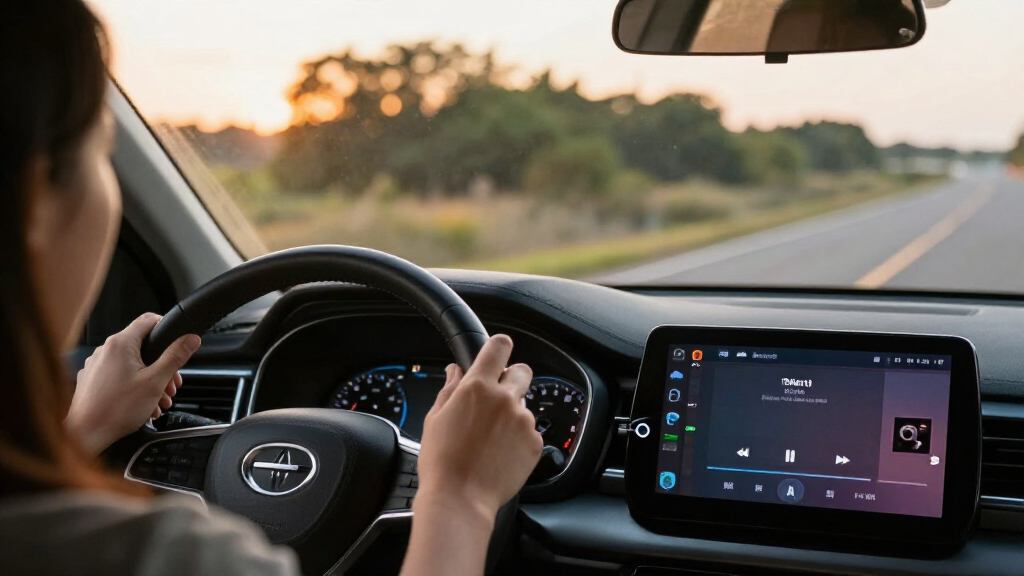
Once the phone is connected to Android Auto, Bhutani says Musicolet can be opened on the car display to browse the library and select music. Playback uses files already on the phone, so the listening itself does not require an internet connection. He also describes features including playlist creation and a tag editor for correcting metadata and album artwork.
The method has a clear limitation: Bhutani says Musicolet does not provide SMB access or music streaming from a NAS. Music must be transferred to the phone before it can be played this way. His account describes his own use of the app; it is not an independent test of every device, car or Android Auto configuration.
I Play My FLAC Library in Android Auto Without Touching My Data Plan
An XDA Developers contributor describes using Musicolet to play audio files stored on a phone through Android Auto. The music plays offline once the files have been copied to the device.
From NAS to car stereo
The described setup uses a copy of selected music on phone storage. Musicolet scans those files into a browsable library, which can then be opened through Android Auto.
Choose music
Select albums or folders from your personal collection.
Copy to phone
Transfer files from the NAS or another source before driving.
Scan library
Let Musicolet find and organize stored audio files.
Connect & play
Open Musicolet on the Android Auto display and browse.
Built around files you already own
Bhutani says Musicolet is a free Android player that supports several common formats and organizes tracks for browsing. His account describes personal use; it is not an independent compatibility test.
Local and offline
Playing audio files already stored on the phone does not require an internet connection, according to the article.
Browse your way
The library can be browsed by artist, album, folder, or playlist. The account also mentions playlist creation.
Edit tags and artwork
A tag editor can help correct music metadata and album artwork for a more organized collection.
Offline playback has a preparation step
The method can avoid mobile data during playback, but it depends on what is already on the phone. Any network use involved in obtaining or transferring music depends on the transfer method.
Copy first. Listen later.
Bhutani says Musicolet does not provide SMB access or stream music directly from a NAS. Keep enough selected music on the phone for the drive you have planned.
One album can take space.
Bhutani says his daily plan includes 2 GB of data and estimates a standard FLAC album at about 300–400 MB. Streaming data varies with service settings, audio quality, and listening time.
Local music complements streaming
In the contributor’s routine, Spotify remains useful for discovering music while Musicolet serves deliberate, album-based listening from a personal collection.
Prepared collection
Stored files can play offline through the described setup. This can help on long drives or where mobile coverage is weak.
Streaming catalog
Online services still provide discovery and broader catalogs. This method does not replace those services or fetch the NAS library automatically.
Run through the setup
The source does not identify the phone, Android version, vehicle, or Android Auto version used. Check your own setup before relying on it for a trip.
What to know
Can Musicolet play local FLAC files through Android Auto?
Bhutani says it supports FLAC playback and can be browsed through Android Auto when files are on the phone. The article does not establish compatibility across vehicles or devices.
Does playback use mobile data?
Playing files already stored on the phone does not require internet access. Copying or downloading them beforehand may use data, depending on the transfer method.
Can it stream directly from a NAS?
No NAS streaming or SMB access is described. Files need to be copied to phone storage first.
Are all formats independently tested?
The article lists FLAC, MP3, AAC, ALAC, and Opus. It does not independently test every format or report whether support varies by device.
Source: XDA Developers · Dhruv Bhutani · Published Oct. 24, 2026
Offline Music on the Road
For drivers with a sizable local collection, playing files stored on a phone can reduce reliance on mobile coverage and streaming data. That can matter on long drives or in areas where connections are weak, and it gives listeners access to their own albums without having to subscribe to or open a streaming service for playback.
Bhutani says his daily plan allows 2GB of data per day and estimates that a standard FLAC album can occupy about 300–400MB. Those figures are his personal plan and estimate, not a universal measure of streaming consumption: how much data streaming uses depends on service settings, audio quality and listening time. The practical point is that local playback avoids using mobile data for the music itself, though downloading or copying files to a phone may require a connection or other transfer method.
The approach also supports a split listening routine. Bhutani says he continues to use Spotify for music discovery while using Musicolet for more deliberate, album-based listening. That makes the app a complement to streaming in his account, rather than a replacement for services that offer online catalogs.
USB-C flash drive for transferring FLAC music to Android phone
As an affiliate, we earn on qualifying purchases.
As an affiliate, we earn on qualifying purchases.
From NAS to Car Stereo
Bhutani describes a personal collection of MP3 and FLAC files that has followed him across devices. At home, he uses Navidrome to stream the collection to connected speakers; when traveling, he has also carried an older iPod. The car remained a harder case because Android Auto makes streaming services accessible but, in his experience, did not make his personal local library as straightforward to use.
His Musicolet setup is based on copying selected folders to phone storage, rather than accessing the NAS over the car connection. The article says the app can scan and organize the files after transfer. This distinction matters: the solution provides offline access to music that has been prepared on the phone, not an automatic connection to the home library while driving.
The article presents Musicolet as a free app available through Google Play and focuses on its local playback and Android Auto functions. It does not provide a technical comparison with other players or report tests across different phones, vehicles or versions of Android Auto.
“I wanted to bring my high-res audio library with me, but I also wanted to get around the limitations of local music listening in my car.”
— Dhruv Bhutani, XDA Developers contributor
Device Support and Transfer Limits
The article does not specify which phone, Android version, vehicle or Android Auto version Bhutani used, so compatibility across setups is not established. It also does not report independent testing of playback quality, library size limits or behavior with every listed file format.
Musicolet’s lack of NAS streaming and SMB support means listeners must transfer files to the phone in advance. The article does not detail how much storage the setup requires, which transfer methods work best, or whether every user’s preferred NAS app can copy files directly to phone storage. Its data-avoidance claim applies to playback of local files, not to any network use involved in obtaining or transferring the music.
Prepare Files Before Driving
For anyone following the approach described, the next steps are to install Musicolet, copy selected audio files onto the phone, allow the app to scan them, and connect the phone to Android Auto. Users can then check whether their library and playlists appear on the car display before relying on the setup for a trip.
No product announcement, update or broader rollout is reported in the source. The account is a practical description of one contributor’s setup, and questions about device-specific compatibility remain. Drivers will need to confirm that the app works with their own phone and vehicle and keep enough music stored locally for the listening they plan to do offline.
Key Questions
Does Musicolet play local FLAC files through Android Auto?
According to Dhruv Bhutani’s XDA Developers account, Musicolet supports FLAC playback and can be browsed through Android Auto when the files are stored on the phone. Compatibility may vary by device and setup; the article does not report testing across vehicles.
Does this method use mobile data while music plays?
Playback of files already stored on the phone does not require an internet connection, according to the article. Copying or downloading the files beforehand may involve data depending on the transfer method.
Can Musicolet stream music directly from a NAS?
No NAS streaming or SMB access is described. Bhutani says Musicolet does not offer those features, so users need to copy music to phone storage before playing it through this setup.
Which audio formats does the article say Musicolet supports?
Bhutani lists FLAC, MP3, AAC, ALAC and Opus. The source does not independently test every format or specify whether support varies by device.
Source: XDA Developers
Halloween Picks
halloween
As an affiliate, we earn on qualifying purchases.