
Choosing the right mouse for music production requires balancing precision with long-term comfort, as producers often spend hours manipulating waveforms and arranging tracks. The Logitech Ergo M575S stands out as the top pick for its ability to keep your wrist neutral while providing the fine control needed for detailed editing. For those who prioritize raw speed and macro-heavy workflows, the Logitech G502 Hero remains a strong contender despite its gaming origins, while the ProtoArc EM01 NL offers a budget-friendly trackball solution for smaller desks. The main tradeoff in this category is between the wrist-saving benefits of trackballs and the direct, intuitive control of traditional mice. Continue reading to see which model fits your studio setup and physical needs.

Get audio and creator gear delivered free with Prime
- Fast, free delivery on millions of items
- Prime Video, Amazon Music and more included
- Member-only deals all year
Complete the kit


Key Takeaways
- Trackball mice significantly reduce repetitive strain injuries by isolating movement to the thumb or fingers, a critical factor for producers editing long sessions.
- Programmable buttons are more valuable than high DPI for music production, allowing users to map keyboard shortcuts like ‘Split at Cursor’ directly to the mouse.
- Wired mice still hold an advantage for zero-latency precision during detailed waveform editing, though modern wireless protocols have largely closed this gap.
- Ergonomic vertical designs offer a middle ground, keeping the arm in a handshake position without requiring the learning curve of a trackball.
- Multi-device switching is a growing standard, enabling producers to control both their DAW on a desktop and a mobile device for reference or communication.
| Ergonomic Wireless Trackball Mouse with Adjustable Angle and Rechargeable Battery |  | Best for Adjustable Trackball Comfort | Movement detection: Trackball | Connectivity: Bluetooth, USB | Buttons: 8 | VIEW ON AMAZON | See Our Full Breakdown |
| Logitech G502 Hero Wired Gaming Mouse – Black |  | Best for Programmable DAW Shortcuts | Connectivity: USB wired | Sensor: HERO 16K optical | DPI range: 200–25,600 | VIEW ON AMAZON | See Our Full Breakdown |
| ProtoArc EM01 NL Wireless Trackball Mouse, Rechargeable Thumb Control, Gray |  | Best for Multi-Device Trackball Use | Movement detection: Thumb-controlled trackball | Connectivity: 2.4G wireless, Bluetooth | Adjustable angle: 0–20° | VIEW ON AMAZON | See Our Full Breakdown |
| Lekvey Ergonomic Vertical Wireless Mouse with Rechargeable Battery |  | Best for a Familiar Vertical-Mouse Layout | Movement detection: Optical | Connectivity: Radio frequency via USB receiver | Buttons: 6 | VIEW ON AMAZON | See Our Full Breakdown |
| TECKNET Wireless Mouse, Bluetooth Rechargeable, 3-Device Switching, 6 DPI Levels |  | Best for Switching Between Studio Devices | Connectivity: Bluetooth, USB-A, wireless | Device switching: Up to 3 devices | Buttons: 7 | VIEW ON AMAZON | See Our Full Breakdown |
| Logitech Ergo M575S Wireless Bluetooth Trackball Mouse – Black Silver Ball |  | Best for Desk-Space-Conscious Producers | Connectivity: Bluetooth or Logi Bolt USB receiver | Movement detection: Thumb-controlled trackball | Buttons: 2 | VIEW ON AMAZON | See Our Full Breakdown |
| Logitech M510 Full-Size Ambidextrous 2.4 GHz Wireless Mouse |  | Best for Shortcut-Friendly Conventional Control | Connectivity: 2.4 GHz wireless via Logitech Unifying receiver | Sensor: Laser | Maximum sensitivity: 1000 DPI | VIEW ON AMAZON | See Our Full Breakdown |
| Nulea M501 Wireless Trackball Mouse – Ergonomic Thumb Control, 4 DPI Levels |  | Best Multi-Device Trackball Value | Connectivity: Bluetooth and 2.4 GHz USB receiver | Movement detection: Thumb-controlled trackball | Buttons: 6; not programmable | VIEW ON AMAZON | See Our Full Breakdown |
| TECKNET Wireless Trackball Mouse, Bluetooth Mouse with Ergonomic Design, Black |  | Best for a More Upright Trackball Grip | Connectivity: Bluetooth and 2.4G USB | Movement detection: Optical trackball control | Buttons: 6 | VIEW ON AMAZON | See Our Full Breakdown |
| ProtoArc EM11 NL Wireless Ergonomic Vertical Mouse, Rechargeable, Black |  | Best Vertical Mouse for Small-to-Medium Hands | Connectivity: Bluetooth and 2.4G USB-A receiver | Design: Vertical ergonomic mouse | DPI levels: 1000, 1600, and 2400 | VIEW ON AMAZON | See Our Full Breakdown |
| Nulea Wireless Trackball Mouse Ergonomic RGB 44mm Index Finger Control |  | Best for Index-Finger Trackball Control | Movement detection: Trackball | Trackball size: 44 mm | Connectivity: Bluetooth, USB | VIEW ON AMAZON | See Our Full Breakdown |
| Logitech Ergo M575S Wireless Bluetooth Trackball Mouse – Graphite Blue Ball |  | Best for Long Editing Sessions | Movement detection: Trackball | Connectivity: Bluetooth, USB | Buttons: 2 | VIEW ON AMAZON | See Our Full Breakdown |
| Uineer Bluetooth Mouse, Tri-Mode Wireless, Rechargeable, 3-Device Switch |  | Best for Switching Between Studio Devices | Movement detection: Optical | Connectivity: Bluetooth, 2.4GHz wireless via USB | Device switching: 3 devices | VIEW ON AMAZON | See Our Full Breakdown |
| Kensington Expert Wireless Trackball Mouse (K72359WW) Black | 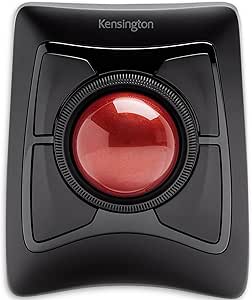 | Best for Large-Ball Precision | Trackball size: 55 mm | Tracking technology: Optical | Connectivity: Bluetooth LE, 2.4GHz USB nano receiver | VIEW ON AMAZON | See Our Full Breakdown |
| Logitech Signature M550 Full Size Wireless Mouse – Large, Black |  | Best for Quiet, Conventional Mouse Use | Movement detection: Optical | Connectivity: Bluetooth, USB | Buttons: 3 | VIEW ON AMAZON | See Our Full Breakdown |
| mouse for music production | Connectivity | Buttons | Movement detection | Maximum sensitivity |
|---|---|---|---|---|
| Ergonomic Wireless Trackball M | Bluetooth, USB | 8 | Trackball | 4800 DPI |
| Logitech G502 Hero Wired Gamin | USB wired | — | — | — |
| ProtoArc EM01 NL Wireless Trac | 2.4G wireless, Bluetooth | 6 | Thumb-controlled trackball | 1600 DPI |
| Lekvey Ergonomic Vertical Wire | Radio frequency via USB receiver | 6 | Optical | 1600 DPI |
| TECKNET Wireless Mouse | Bluetooth, USB-A, wireless | 7 | — | 4800 DPI |
| Logitech Ergo M575S Wireless B | Bluetooth or Logi Bolt USB receiver | 2 | Thumb-controlled trackball | 2000 DPI |
| Logitech M510 Full-Size Ambide | 2.4 GHz wireless via Logitech Unifying receiver | 7 | — | 1000 DPI |
| Nulea M501 Wireless Trackball | Bluetooth and 2.4 GHz USB receiver | 6; not programmable | Thumb-controlled trackball | — |
| TECKNET Wireless Trackball Mou | Bluetooth and 2.4G USB | 6 | Optical trackball control | 1200 DPI |
| ProtoArc EM11 NL Wireless Ergo | Bluetooth and 2.4G USB-A receiver | 7 | — | — |
| Nulea Wireless Trackball Mouse | Bluetooth, USB | 6 | Trackball | 1600 DPI |
| Logitech Ergo M575S Wireless B | Bluetooth, USB | 2 | Trackball | 2000 DPI |
| Uineer Bluetooth Mouse | Bluetooth, 2.4GHz wireless via USB | 6 | Optical | 2400 DPI |
| Kensington Expert Wireless Tra | Bluetooth LE, 2.4GHz USB nano receiver | 4 | — | — |
| Logitech Signature M550 Full S | Bluetooth, USB | 3 | Optical | — |
More Details on Our Top Picks
Ergonomic Wireless Trackball Mouse with Adjustable Angle and Rechargeable Battery
The defining advantage for music production is the combination of a thumb-controlled trackball and an adjustable 0°/18° angle: I can move the pointer without shifting the mouse across a crowded desk, which suits sessions with a keyboard, controller, and audio interface close at hand. Its eight buttons and adjustable sensitivity offer more control options than the simpler Lekvey vertical mouse, although the supplied information does not say those buttons are programmable for DAW commands. Bluetooth and USB connectivity also make it easier to share between a studio computer and another device. The tradeoff is a real trackball learning curve, and its Mac driver is not compatible with Mac OS. I’d choose it over the ProtoArc EM01 NL for its stated higher maximum sensitivity and extra buttons, but not if straightforward setup matters most.
Pros:- Trackball movement needs little desk space, useful beside MIDI controllers and other studio gear.
- Adjustable 0°/18° angle lets users choose between a flatter and more tilted hand position.
- Bluetooth and USB connectivity support more than one connection method.
- Eight buttons, adjustable DPI, quiet clicks, and a rechargeable battery suit long work sessions.
Cons:- Trackball control can take one to two weeks to feel familiar.
- The driver is not compatible with Mac OS, limiting software-based customization for Mac users.
- The supplied data does not confirm that its buttons can be assigned to DAW shortcuts.
Best for: Right-handed producers with limited desk space who want an adjustable trackball and switch between a studio computer and another device.
Not ideal for: Mac users who need driver-based customization, or producers who want familiar mouse movement without a trackball learning period.
- Movement detection:Trackball
- Connectivity:Bluetooth, USB
- Buttons:8
- Maximum sensitivity:4800 DPI
- Hand orientation:Right
- Wireless range:33 feet
- Dimensions:5.36 × 3.94 inches
- Weight:12.64 ounces
- Compatible operating systems:Windows 8–11, macOS 10.10 or later, Chrome OS, Android 5.0 or later
Our verdict“Choose this if you want a space-saving trackball with adjustable tilt and multiple connection options, and can accommodate its learning curve.”
Logitech G502 Hero Wired Gaming Mouse – Black
For producers who want mouse buttons to handle repeated editing commands, the G502 Hero has the clearest advantage in this group: 11 programmable buttons and customizable profiles give it more explicit shortcut potential than the TECKNET mouse, whose buttons are listed as non-programmable. That can reduce trips to menus for actions such as editing or navigation, provided the chosen software and button assignments support the workflow. Its wired USB connection avoids battery management, while adjustable weights let users tune how substantial it feels during precise pointer work. This is a conventional optical mouse, not a desk-saving trackball like the ProtoArc EM01 NL, so it needs room to move. I would skip it if cable-free placement, quiet operation, or a simple setup matters more than assigning controls; its gaming-oriented customization can also add setup work.
Pros:- Eleven programmable buttons provide more stated shortcut options than the non-programmable TECKNET.
- Customizable profiles can support different control layouts.
- Wired USB connection avoids charging or replacing mouse batteries.
- Adjustable weights allow users to change the mouse’s feel.
Cons:- The USB cable restricts placement and can add clutter around studio equipment.
- Gaming-oriented profiles and customization may require extra setup for DAW use.
- Its right-handed shape and moving-mouse design may not suit every user or a crowded desk.
Best for: Producers who want a conventional right-handed mouse with programmable buttons for frequently used DAW commands and have a clear desk area.
Not ideal for: Users who need a wireless mouse, prefer trackball control in a crowded studio, or want simple controls without profile customization.
- Connectivity:USB wired
- Sensor:HERO 16K optical
- DPI range:200–25,600
- Programmable buttons:11
- Lighting:RGB
- Weight system:Up to five 3.6 g weights
- Hand orientation:Right
- Power:Wired
Our verdict“Pick the G502 Hero if programmable controls matter more to your DAW workflow than wireless freedom or a compact trackball footprint.”
ProtoArc EM01 NL Wireless Trackball Mouse, Rechargeable Thumb Control, Gray
The EM01 NL suits a producer who wants to keep a trackball on a compact studio desk and switch among a computer, laptop, or mobile device. Its Bluetooth and 2.4G wireless options give it a different connection mix from the first trackball in this roundup, which lists Bluetooth and USB; the ProtoArc also specifies an adjustable tilt range up to 20°. Those features support flexible placement and a more tailored hand position, while quiet clicks are useful when monitoring or recording nearby. Its stated 1600 DPI maximum is lower than the 4800 DPI listed for the first trackball, so it offers less headroom for users who favor very fast pointer movement. The six buttons are not described as programmable, and the ball and rollers need cleaning. Choose it for comfort and device switching, not shortcut customization.
Pros:- Bluetooth and 2.4G wireless connections suit different studio setups.
- Adjustable 0–20° angle supports varied hand positions.
- Quiet main clicks are a good fit for shared rooms and recording environments.
- Rechargeable design avoids disposable batteries.
Cons:- Its 1600 DPI maximum is lower than the 4800 DPI stated for the Ergonomic Wireless Trackball in this roundup.
- Trackball rollers need cleaning to maintain smooth movement.
- The scroll wheel and side buttons are not silent, and six buttons are not listed as programmable.
Best for: Right-handed producers who want a rechargeable thumb trackball, adjustable tilt, and wireless connection options for several devices.
Not ideal for: Users who prioritize high maximum DPI, programmable DAW controls, or a mouse that needs little routine cleaning.
- Movement detection:Thumb-controlled trackball
- Connectivity:2.4G wireless, Bluetooth
- Adjustable angle:0–20°
- Buttons:6
- Maximum sensitivity:1600 DPI
- Hand orientation:Right
- Battery:Rechargeable lithium-ion
- Compatible devices:Desktop computer, laptop, smartphone, tablet
Our verdict“Choose the EM01 NL if you want a tilt-adjustable, multi-device trackball and can trade higher DPI and programmable controls for a quieter, comfort-focused setup.”
Lekvey Ergonomic Vertical Wireless Mouse with Rechargeable Battery
The Lekvey is the straightforward comfort pick for producers who want a vertical handshake grip without learning trackball control. Unlike the ProtoArc EM01 NL, it uses optical movement, so pointer control follows familiar mouse movement rather than a thumb-rotated ball. Its rechargeable battery is listed for up to 150 hours, and the USB receiver offers a simple wireless connection for a studio computer. That makes it a practical option for long editing sessions, but its six buttons are not programmable in the supplied data, so it has less stated DAW-shortcut potential than the Logitech G502 Hero. The Lekvey also connects by radio frequency rather than offering the listed Bluetooth and 2.4G flexibility of the ProtoArc. Its vertical shape can take time to adjust to, and Mac users lose forward/back button support.
Pros:- Vertical handshake design offers an alternative to a conventional flat mouse.
- Rechargeable battery is listed for up to 150 hours of use.
- Adjustable DPI supports different pointer speeds.
- USB receiver provides plug-and-play setup without drivers.
Cons:- Six buttons are not listed as programmable, limiting direct DAW shortcut assignment.
- Forward/back buttons are not compatible with Mac OS.
- The vertical shape may take adjustment and offers no trackball-style stationary control.
Best for: Right-handed producers who want a rechargeable wireless mouse with a vertical grip and familiar optical pointer movement.
Not ideal for: Producers who need programmable DAW shortcuts, Bluetooth connectivity, or forward/back buttons on Mac OS.
- Movement detection:Optical
- Connectivity:Radio frequency via USB receiver
- Buttons:6
- Maximum sensitivity:1600 DPI
- Hand orientation:Right
- Battery life:Up to 150 hours
- Wireless range:10 meters
- Dimensions:5 × 3 inches
- Weight:3.36 ounces
Our verdict“Choose the Lekvey if you prefer familiar optical tracking in a vertical shape, but look elsewhere for programmable controls or Mac button support.”
TECKNET Wireless Mouse, Bluetooth Rechargeable, 3-Device Switching, 6 DPI Levels
The TECKNET is the most practical fit here for producers who move between a DAW computer and other devices: it supports three-device switching across Bluetooth and USB-A connections. Its side scroll wheel can help with horizontal movement in timelines or wide editing windows, a capability the Lekvey’s listed specs do not include. Six DPI levels let users adjust pointer speed without relying on a single setting, and the rechargeable battery is listed for up to three months. The limitation for DAW control is clear: its seven buttons are non-programmable, so it cannot match the G502 Hero’s stated shortcut flexibility. The side wheel may also lack support in older software versions. I’d choose it for device switching and navigation, rather than for custom command mapping or a stationary trackball workflow.
Pros:- Switches among three devices using Bluetooth and USB-A connections.
- Side scroll wheel can assist with horizontal navigation in timelines and wide windows.
- Six DPI levels offer several pointer-speed settings.
- Rechargeable battery is listed for up to three months, with quiet operation.
Cons:- Seven buttons are non-programmable, so the mouse offers less stated shortcut customization than the G502 Hero.
- Side-scroll support may be limited in older software versions.
- Conventional mouse movement needs desk space, unlike the ProtoArc EM01 NL trackball.
Best for: Producers who regularly switch a single mouse among a studio computer, laptop, and another compatible device, and value horizontal scrolling.
Not ideal for: Users who want programmable DAW shortcuts, a trackball to save desk space, or guaranteed side-wheel support in older software.
- Connectivity:Bluetooth, USB-A, wireless
- Device switching:Up to 3 devices
- Buttons:7
- Maximum sensitivity:4800 DPI
- DPI settings:6 levels
- Battery life:Up to 3 months
- Wireless range:33 feet
- Weight:173 g
- Hand orientation:Right
Our verdict“Pick the TECKNET if you switch among studio devices and want horizontal scrolling, but not if custom DAW button assignments are a priority.”
Logitech Ergo M575S Wireless Bluetooth Trackball Mouse – Black Silver Ball
For music production, the Ergo M575S earns its place by keeping pointer control in your thumb, so you can work through long editing sessions without repeatedly moving your forearm. Its stationary trackball also suits crowded desks and small control surfaces where a conventional mouse has little room to travel. Compared with the Nulea M501, this model offers simpler two-button control rather than six buttons, but it brings a notably long stated battery life and a clear connection choice between Bluetooth and the included Logi Bolt receiver. The tradeoff is less onboard shortcut flexibility: full customization requires Logi Options+, and the right-handed shape rules out left-handed users. I’d choose it for steady DAW navigation, not for extensive custom macros or fast, multi-button workflows.
Pros:- Thumb-operated trackball needs little desk space and works on varied surfaces.
- Ergonomic design can reduce forearm movement during long editing sessions.
- Connects by Bluetooth or the included Logi Bolt receiver.
- Uses one included AA battery with stated battery life of up to 18 months.
Cons:- Two-button layout offers fewer direct shortcuts than the Logitech M510 or Nulea M501.
- Full customization requires the Logi Options+ app.
- Right-handed shape limits its fit for left-handed producers.
Best for: Right-handed producers with limited desk space who want stationary cursor control and long battery life for everyday DAW editing.
Not ideal for: Left-handed users or producers who need many customizable mouse shortcuts, since it has two buttons and full customization depends on Logi Options+.
- Connectivity:Bluetooth or Logi Bolt USB receiver
- Movement detection:Thumb-controlled trackball
- Buttons:2
- Maximum sensitivity:2000 DPI
- Battery:1 included AA battery
- Stated battery life:Up to 18 months
- Compatibility:Windows and macOS
- Wireless range:10 meters
Our verdict“Choose the Ergo M575S if saving desk space and limiting arm movement matter more than extra buttons or left-hand support.”
Logitech M510 Full-Size Ambidextrous 2.4 GHz Wireless Mouse
The Logitech M510 is the conventional-mouse pick for producers who want more controls under their hand without adopting a trackball or vertical grip. Its seven-button layout, including Back/Forward, side scrolling, and zoom, gives more ways to handle editing and browsing actions than the two-button Logitech Ergo M575S. The full-size contoured shape and rubber grips also suit long sessions at a fixed workstation. That comfort comes with a compromise: the M510 needs room to move, so it is less practical on a crowded desk than either trackball. Its 1000 DPI ceiling may also feel limiting for users who prefer very fast pointer movement across a large display. I’d pick it for straightforward, programmable-style control, while checking software support before relying on custom actions in a DAW.
Pros:- Seven-button layout adds side scrolling, zoom, and Back/Forward controls.
- Contoured body and soft rubber grips suit extended desk sessions.
- Stated battery life of up to two years reduces battery changes.
- Unifying receiver can pair multiple compatible Logitech devices.
Cons:- Requires desk space for conventional mouse movement, unlike the M575S and Nulea M501 trackballs.
- Laser tracking is not reliable on glass or mirrored surfaces.
- The full-size shape may be bulky, particularly for left-handed users.
Best for: Producers who prefer a traditional full-size mouse and want extra buttons and side scrolling for editing, browsing, and general workstation tasks.
Not ideal for: Users with cramped desks, glass work surfaces, or a preference for a left-handed fit; the mouse needs movement space, its sensor is unreliable on glass, and the shape may feel bulky.
- Connectivity:2.4 GHz wireless via Logitech Unifying receiver
- Sensor:Laser
- Maximum sensitivity:1000 DPI
- Buttons:7
- Battery:2 included AA batteries
- Stated battery life:Up to 2 years
- Wireless range:10 meters
- Compatibility:Windows 10/11, macOS, Linux, and Chrome OS
Our verdict“Choose the M510 if you want a familiar full-size mouse with more physical controls and have room to move it.”
Nulea M501 Wireless Trackball Mouse – Ergonomic Thumb Control, 4 DPI Levels
The Nulea M501 makes sense for a producer who wants trackball control and frequent switching between a studio computer, laptop, or tablet. It connects to as many as three devices over Bluetooth or a 2.4 GHz USB receiver, a more flexible setup than the Logitech Ergo M575S, which offers a simpler two-button design. Its adjustable DPI gives some choice over cursor speed, while the rechargeable battery avoids disposable cells. For DAW work, the stationary ball helps when a keyboard, controller, or mixer crowds the desk. The tradeoff is that its six buttons are described as programmable-style, but the supplied information says they are not programmable; don’t buy it expecting assignable shortcuts. Charging also depends on the included cable, and the right-handed layout excludes left-handed users.
Pros:- Connects to up to three devices through Bluetooth or a 2.4 GHz receiver.
- Stationary thumb trackball suits tight desks and varied working surfaces.
- Adjustable DPI lets users choose a cursor speed that suits their workflow.
- Rechargeable battery avoids replacing disposable cells.
Cons:- Buttons are not programmable, limiting custom DAW shortcut workflows.
- Charging requires the included cable; fast chargers are not supported.
- Right-handed design is unsuitable for left-handed users.
Best for: Right-handed producers who regularly switch among up to three computers or tablets and want a rechargeable trackball for a compact studio desk.
Not ideal for: Users who need truly programmable DAW shortcuts, left-handed control, or charging through a fast charger.
- Connectivity:Bluetooth and 2.4 GHz USB receiver
- Movement detection:Thumb-controlled trackball
- Buttons:6; not programmable
- DPI adjustment:4 levels
- Device connections:Up to 3
- Battery:Rechargeable lithium-ion
- Wireless range:10 meters
- Compatibility:Windows and macOS
Our verdict“Choose the M501 for a rechargeable, multi-device trackball, but skip it if assigning custom mouse shortcuts is a priority.”
TECKNET Wireless Trackball Mouse, Bluetooth Mouse with Ergonomic Design, Black
The TECKNET Wireless Trackball stands out from the flatter thumb-trackball options with a stated 16-degree vertical angle, aimed at a more natural hand posture. For music production, that shape may appeal to medium- and large-handed users who spend long periods editing without wanting a conventional mouse to roam across the desk. It also supports connections to as many as three devices and offers adjustable DPI, giving it more setup flexibility than the Logitech Ergo M575S. The compromises are practical: its right-handed fit and medium-to-large sizing will not suit every hand, and trackball control has a learning curve if you are used to moving a mouse. The listed battery life is 24 hours, so it is a less compelling choice for users who prioritize long intervals between charges.
Pros:- Stated 16-degree angle supports a more upright hand position.
- Connects to up to three devices using Bluetooth and 2.4G wireless.
- Adjustable DPI gives users a choice of cursor sensitivity.
- Rechargeable 500mAh battery avoids disposable cells.
Cons:- Designed for medium to large hands and may not fit smaller users.
- Trackball control requires adjustment for users accustomed to a standard mouse.
- Listed battery life is 24 hours, shorter than the stated endurance of the Ergo M575S and M510.
Best for: Medium- to large-handed, right-handed producers who want an angled trackball and need to switch among several devices.
Not ideal for: Small-handed or left-handed users, and anyone unwilling to adapt to thumb-trackball control or charge the mouse regularly.
- Connectivity:Bluetooth and 2.4G USB
- Movement detection:Optical trackball control
- Buttons:6
- Maximum sensitivity:1200 DPI
- Battery capacity:500mAh rechargeable
- Listed battery life:24 hours
- Wireless range:34 feet
- Dimensions:5 × 4 inches
Our verdict“Choose the TECKNET if an angled, multi-device trackball suits your hand; skip it if you want a familiar mouse feel or longer stated battery life.”
ProtoArc EM11 NL Wireless Ergonomic Vertical Mouse, Rechargeable, Black
The ProtoArc EM11 NL offers a different route to lower wrist movement than the trackballs in this roundup: its vertical grip changes how the hand rests, while the cursor still moves through mouse movement. That makes it a more familiar starting point for producers who are wary of learning thumb-ball control, though it needs more desk travel than the Nulea M501. The EM11 NL connects to up to three devices by Bluetooth or USB-A receiver and has three DPI settings, useful when moving between a laptop and a larger studio display. It is sized for small to medium hands, unlike the TECKNET trackball’s stated medium-to-large fit. The tradeoffs are a learning period for the upright grip, limited button customization, and a stated battery life of about one month.
Pros:- Vertical shape supports a more natural wrist posture.
- Connects to up to three devices through Bluetooth and USB-A.
- Three DPI settings cover common cursor-speed preferences.
- Rechargeable 500mAh battery uses USB-C.
Cons:- The vertical grip takes time to get used to.
- Buttons are not all programmable, limiting customized DAW controls.
- Stated battery life is approximately one month, and Mac back/forward buttons are not supported.
Best for: Small- to medium-handed producers who want a vertical grip, prefer conventional cursor movement over a trackball, and use multiple devices.
Not ideal for: Users who need assignable mouse controls, longer stated battery intervals, or a desk setup where any conventional mouse movement is difficult.
- Connectivity:Bluetooth and 2.4G USB-A receiver
- Design:Vertical ergonomic mouse
- DPI levels:1000, 1600, and 2400
- Buttons:7
- Battery capacity:500mAh
- Battery life:Approximately 1 month
- Dimensions:5.43 × 2.72 inches
- Compatibility:Windows 8/10, Mac OS X 10.12+, and Android 4.3+
Our verdict“Choose the EM11 NL if you want a vertical, multi-device mouse sized for smaller hands and prefer it to a trackball’s thumb control.”
Nulea Wireless Trackball Mouse Ergonomic RGB 44mm Index Finger Control
For music production, the Nulea M505 suits a desk where mouse movement is limited and long editing sessions make wrist comfort a priority. Its 44mm index-finger trackball lets me move the cursor without sliding the body across a crowded surface, which can be handy beside a MIDI keyboard or control surface. Adjustable sensitivity supports a choice between precise edits and quicker movement, though its stated maximum of 1600 DPI is lower than the Logitech Ergo M575S’s 2000 DPI. The Nulea also adds customizable RGB lighting and a rechargeable battery, but battery-life figures differ between the product description and specifications. Its right-handed layout and wireless-only connection narrow its appeal, so left-handed producers or anyone needing a wired fallback should choose another option.
Pros:- Index-finger trackball keeps the mouse body stationary on crowded production desks
- Adjustable DPI supports both fine cursor placement and faster navigation
- Rechargeable design avoids routine disposable-battery replacement
- Customizable RGB lighting offers visual personalization
Cons:- Right-handed shape excludes left-handed producers
- Maximum sensitivity of 1600 DPI is below the Logitech Ergo M575S’s stated 2000 DPI
- Wireless-only design offers no wired fallback, and battery-life claims vary across the supplied product data
Best for: Right-handed producers with limited desk space who prefer moving a trackball with their index finger during detailed DAW editing.
Not ideal for: Left-handed users, producers who need a wired connection, or buyers who want higher stated sensitivity than 1600 DPI.
- Movement detection:Trackball
- Trackball size:44 mm
- Connectivity:Bluetooth, USB
- Buttons:6
- Hand orientation:Right
- Maximum sensitivity:1600 DPI
- Wireless range:10 m
- Battery:Rechargeable lithium-ion; product data lists battery life as up to 45 days in the description and 90 days in specifications
Our verdict“Choose the Nulea M505 if you want a space-saving, right-handed index-finger trackball and do not need a wired option.”
Logitech Ergo M575S Wireless Bluetooth Trackball Mouse – Graphite Blue Ball
The Logitech Ergo M575S is a strong fit for producers who want a familiar thumb-operated trackball and minimal mouse movement during extended arrangement or automation work. Its 18-month battery life means fewer interruptions than the rechargeable Nulea M505, while the 2000 DPI maximum gives it a higher stated sensitivity. The thumb-control layout can free up desk space, but it will not suit everyone: producers who prefer steering with an index finger may find the Nulea’s 44mm ball more natural. Customizing the buttons fully requires Logi Options+, and the supplied compatibility information lists Windows and macOS rather than Linux. Trackball upkeep is another small routine. I would pick this for a stable, low-movement DAW setup, not for someone seeking broad operating-system support or extensive onboard controls.
Pros:- Thumb-operated trackball limits mouse movement on a crowded studio desk
- Specified battery life of up to 18 months reduces battery-change interruptions
- 2000 DPI maximum sensitivity exceeds the Nulea M505’s stated 1600 DPI
- Made with recycled plastic, according to the product description
Cons:- Full button customization requires Logi Options+
- Supplied operating-system compatibility is limited to Windows and macOS
- Trackball may need cleaning to maintain consistent tracking
Best for: Windows or macOS producers who want a thumb-operated trackball, long battery life, and a compact workstation setup.
Not ideal for: Linux users, producers who prefer index-finger trackball control, or anyone who wants full button customization without companion software.
- Movement detection:Trackball
- Connectivity:Bluetooth, USB
- Buttons:2
- Hand orientation:Right
- Maximum sensitivity:2000 DPI
- Battery life:Up to 18 months
- Battery:1 AA battery, included
- Supported operating systems:Windows, macOS
Our verdict“Pick the Ergo M575S for a compact Windows or macOS DAW setup where thumb control and long battery life matter more than customization without software.”
Uineer Bluetooth Mouse, Tri-Mode Wireless, Rechargeable, 3-Device Switch
The Uineer takes a conventional optical-mouse approach, but its three-device switching is useful when a producer moves between a DAW computer, laptop, and tablet. Bluetooth and 2.4GHz wireless options give it more connection flexibility than the trackball-only Nulea M505, and its 2400 DPI maximum is the highest stated sensitivity among these five picks. That can help with precise pointer placement, though sensitivity alone does not add DAW-specific controls or replace a dedicated trackball for users trying to minimize arm movement. The rechargeable battery has a visible level indicator, a practical detail for avoiding an unexpected interruption mid-session. Its shape is right-handed, and there is no wired mode, so this is a better match for producers who value device switching and broad OS support than for left-handed users or wired-only studios.
Pros:- Tri-mode wireless connectivity supports switching among multiple devices
- 2400 DPI maximum sensitivity is higher than the other listed models’ stated maximums
- Rechargeable battery includes a visible level indicator
- Broad listed compatibility includes Windows, macOS, Linux, Android, and iOS 13 or later
Cons:- Right-handed design does not suit left-handed producers
- No wired connection option
- Conventional optical tracking requires moving the mouse body, unlike the Nulea and Logitech trackballs
Best for: Right-handed producers who regularly switch one mouse between a DAW workstation, laptop, and compatible mobile device.
Not ideal for: Left-handed producers, users who want a wired connection, or those seeking a stationary trackball to limit arm movement.
- Movement detection:Optical
- Connectivity:Bluetooth, 2.4GHz wireless via USB
- Device switching:3 devices
- Buttons:6
- Hand orientation:Right
- Maximum sensitivity:2400 DPI
- Weight:3.53 oz
- Dimensions:4.65 × 3.22 in
Our verdict“Choose the Uineer if you need a rechargeable, high-sensitivity mouse that can switch among several studio devices.”
Kensington Expert Wireless Trackball Mouse (K72359WW) Black
The Kensington Expert is the most distinctive choice here for producers who want a larger trackball and a dedicated scroll control for moving through long sessions or project lists. Its 55mm ball and optical tracking provide a different feel from the thumb-controlled Logitech Ergo M575S, while the scroll ring gives scrolling its own control instead of relying on a standard wheel. An included wrist rest may also suit long editing blocks, and its ambidextrous design avoids the right-hand limitation found on the Nulea M505 and Uineer. The tradeoff is a larger footprint: at 3.5 × 6.1 × 8 inches, it takes more room than compact trackballs. It also runs on two AA batteries and does not list Linux support. I would favor it for deliberate, stationary control, not for a minimalist or highly portable setup.
Pros:- Large 55mm ball offers a distinct control surface for stationary cursor movement
- Scroll ring provides a dedicated way to navigate long sessions and lists
- Ambidextrous design can work for either hand
- Includes a wrist rest and supports Bluetooth or a 2.4GHz USB receiver
Cons:- Large dimensions take up more desk space than the Logitech Ergo M575S
- Requires two AA batteries
- Supplied operating-system list does not include Linux
Best for: Producers who want a large, ambidextrous trackball with a dedicated scroll ring for navigating long DAW sessions.
Not ideal for: Small-desk or travel setups, Linux users, and producers who prefer a compact thumb-controlled trackball like the Logitech Ergo M575S.
- Trackball size:55 mm
- Tracking technology:Optical
- Connectivity:Bluetooth LE, 2.4GHz USB nano receiver
- Buttons:4
- Hand orientation:Ambidextrous
- Dimensions:3.5 × 6.1 × 8 in
- Power:2 AA batteries, included
- Warranty:3 years
Our verdict“Choose the Kensington Expert if a large ambidextrous trackball and scroll ring matter more than desk space and portability.”
Logitech Signature M550 Full Size Wireless Mouse – Large, Black
For producers who would rather use a standard mouse than adapt to a trackball, the full-size Logitech Signature M550 offers a straightforward fit, especially for larger hands. Its silent clicks keep repeated editing and menu work quieter in shared rooms or while monitoring audio at low levels. The SmartWheel is designed for precise or faster scrolling, which helps when moving through long timelines and plugin lists. Compared with the Uineer, the M550 is less suited to switching among three devices; compared with the Logitech Ergo M575S, it requires moving the mouse across the desk rather than keeping the body stationary. Its two-year battery-life specification and Bluetooth or USB connectivity make it a low-maintenance everyday option, but it is right-handed and has only three buttons. Producers seeking trackball ergonomics or extra controls should look elsewhere.
Pros:- Full-size shape is designed for larger hands
- Silent clicks reduce mouse noise during recording or quiet monitoring
- SmartWheel supports both precise and faster scrolling
- Specified battery life of up to 24 months and Bluetooth or USB connectivity
Cons:- Requires moving the mouse body, unlike the Kensington Expert or Logitech Ergo M575S trackballs
- Right-handed design excludes left-handed users
- Three buttons offer fewer controls than the six-button Uineer
Best for: Right-handed producers with larger hands who want quiet clicks and a familiar mouse for editing in a shared or audio-sensitive space.
Not ideal for: Producers who want a stationary trackball, multi-device switching, left-handed support, or more than three buttons.
- Movement detection:Optical
- Connectivity:Bluetooth, USB
- Buttons:3
- Hand orientation:Right
- Battery life:Up to 24 months
- Battery:1 AA battery, included
- Wireless range:30 ft
- Weight:111.2 g
Our verdict“Pick the M550 if you want a quiet, full-size conventional mouse and do not need trackball control or extra buttons.”

How We Picked
I evaluated these mice based on three primary criteria relevant to audio engineers: ergonomic health, workflow efficiency, and build longevity. I prioritized devices that reduce wrist rotation and grip tension, as carpal tunnel and tendonitis are common occupational hazards in music production. Features like programmable buttons were weighed heavily, as the ability to map specific DAW commands (such as ‘Mute’, ‘Solo’, or ‘Loop’) reduces reliance on the keyboard and speeds up arrangement tasks.
The ranking logic favors trackballs and vertical mice for their health benefits, placing them above standard gaming mice unless the user specifically requires high-speed polling rates for visualizer synchronization. I also considered noise levels, as clicking sounds can interfere with recording sessions, and battery life, since downtime during a mix session is unacceptable. Products were compared against their direct competitors to highlight distinct advantages, ensuring that each recommendation serves a specific type of producer, from the bedroom hobbyist to the professional studio engineer.
| mouse for music production | Movement detection | Hand orientation |
|---|---|---|
| Ergonomic Wireless Trackball M | Trackball | Right |
| Logitech G502 Hero Wired Gamin | — | Right |
| ProtoArc EM01 NL Wireless Trac | Thumb-controlled trackball | Right |
| Lekvey Ergonomic Vertical Wire | Optical | Right |
| TECKNET Wireless Mouse | — | Right |
| Logitech Ergo M575S Wireless B | Thumb-controlled trackball | — |
| Logitech M510 Full-Size Ambide | — | — |
| Nulea M501 Wireless Trackball | Thumb-controlled trackball | — |
| TECKNET Wireless Trackball Mou | Optical trackball control | — |
| ProtoArc EM11 NL Wireless Ergo | — | — |
| Nulea Wireless Trackball Mouse | Trackball | Right |
| Logitech Ergo M575S Wireless B | Trackball | Right |
| Uineer Bluetooth Mouse | Optical | Right |
| Kensington Expert Wireless Tra | — | Ambidextrous |
| Logitech Signature M550 Full S | Optical | Right |
Factors to Consider When Choosing Mouse For Music Production
Selecting the right peripheral for music production goes beyond basic cursor movement. It involves choosing a tool that supports your specific workflow habits while protecting your physical health over years of use.Trackball vs. Standard Mouse for DAW Efficiency
Traditional mice require you to move your entire forearm, which can lead to shoulder fatigue during long mixing sessions. Trackball mice eliminate this by keeping your hand stationary while you control the cursor with your thumb or index finger. This design is particularly beneficial for producers who spend hours scrolling through long timeline arrangements or zooming into micro-edits. However, trackballs have a learning curve; your muscle memory will feel off for the first few days. If you rely heavily on drag-and-drop actions for audio clips, you may find the lack of physical resistance on a trackball makes precise placement slightly harder than on a traditional mouse.
The Importance of Programmable Buttons in Audio Workflows
Standard mice usually offer just two buttons and a scroll wheel, which limits your efficiency in a complex DAW like Ableton Live or Pro Tools. Programmable buttons allow you to map frequent commands—such as quantize, cut, or duplicate—to the mouse, reducing the need to reach for keyboard shortcuts. This is where gaming mice like the Logitech G502 shine, offering extensive macro capabilities that can be repurposed for audio tasks. However, be cautious of mice with too many small buttons; accidental clicks on a side button can ruin a take if they are mapped to destructive actions. Look for software that allows you to create distinct profiles for different applications.
Wireless Latency and Interference in Studio Environments
Producers often worry that wireless mice will introduce lag or interference, especially in studios crowded with Wi-Fi routers and other Bluetooth devices. Modern 2.4GHz wireless technology and Bluetooth 5.0+ have largely mitigated these issues for general cursor movement. Unless you are doing frame-perfect visual editing alongside your audio, the slight delay in wireless mice is imperceptible. The real concern is battery life and connection stability. A mouse that disconnects mid-session or dies during a mixdown is a liability. Prioritize models with robust battery indicators and quick-charge capabilities to keep your workflow uninterrupted.
Vertical Ergonomics and Wrist Health
If you are not ready to switch to a trackball, a vertical mouse offers a significant ergonomic upgrade by keeping your hand in a neutral ‘handshake’ position. This reduces the pronation of the forearm, which is the primary cause of carpal tunnel syndrome in mouse users. While they do not reduce arm movement as effectively as trackballs, they are easier to adapt to and provide better precision for clicking small UI elements in plugin interfaces. The tradeoff is that vertical mice often have a steeper learning curve for scrolling and may feel bulkier on smaller desks. They are best suited for users who experience mild wrist discomfort but still prefer the tactile feedback of a traditional mouse.
Build Quality and Noise Considerations for Recording
In a recording environment, the sound of your mouse clicks can be picked up by sensitive studio microphones. Mechanical switches, common in gaming mice, often produce a loud, sharp click that can ruin a quiet take. Look for mice with silent switches or dampened button mechanisms if you record vocals or acoustic instruments near your computer. Additionally, build quality matters for longevity; plastic shells can crack under the pressure of intense editing sessions. Metal accents or reinforced casings, while adding weight, often indicate a more durable product that will survive years of daily professional use.
Frequently Asked Questions
Do I need a high-DPI mouse for music production?
No, high DPI is rarely necessary for music production and can actually hinder precision. Most DAW interfaces and plugin windows do not require the extreme sensitivity needed for fast-paced gaming. A DPI range of 800 to 1600 is typically sufficient for most users, allowing for smooth cursor movement without jumping across the screen. In fact, lower DPI settings often provide better control when zooming into waveforms for sample-level editing. Focus on sensor accuracy and tracking consistency rather than maximum speed.
Is a wired mouse better than wireless for mixing?
For most modern producers, the difference in latency between wired and high-quality wireless mice is negligible. You will not notice any delay during standard editing, arranging, or mixing tasks. Wired mice offer the benefit of never needing to charge, which removes one variable from your workflow. However, wireless mice provide a cleaner desk setup, which can reduce cable clutter and distractions. If you do not have USB ports readily available or prefer a minimalist studio aesthetic, a reliable wireless model with long battery life is a practical choice.
Can I use a gaming mouse for music production?
Yes, gaming mice are excellent for music production if you leverage their programmable buttons. The main advantage is the ability to map complex keyboard shortcuts to mouse clicks, speeding up your workflow. However, gaming mice are often designed with aggressive aesthetics and loud switches, which may not fit a professional studio environment. You may also find that the extra weight and shape are less ergonomic for long sessions compared to dedicated office or ergonomic mice. If you choose a gaming mouse, look for models with silent switches and customizable software profiles.
How do I clean a trackball mouse to keep it working smoothly?
Trackball mice require regular maintenance because the ball collects skin oils and dust, which can create drag and affect cursor precision. To clean it, remove the ball using the release mechanism and wipe both the ball and the internal sensor with a microfiber cloth. For stubborn residue, use a small amount of isopropyl alcohol on the cloth, but avoid getting liquid inside the sensor housing. Cleaning it every few weeks will keep the movement smooth and prevent the cursor from jumping or lagging during critical editing moments.
Which mouse is best for left-handed producers?
Left-handed options are limited in the ergonomic and trackball categories, as most designs are right-hand dominant. The Logitech M510 is a standout choice because it features a true ambidextrous design, allowing left-handed users to use all buttons comfortably. Alternatively, some vertical mice offer a mirrored version, but these are rare. If you cannot find a dedicated left-handed trackball, a symmetrical wireless mouse like the M510 or a standard mouse with a left-handed profile is the most practical solution. Check for software that allows you to remap buttons to suit your dominant hand.
Conclusion
Choosing the right mouse for music production depends largely on your physical needs and workflow style. For the best overall balance of health and precision, the Logitech Ergo M575S is the superior choice, offering a trackball design that reduces strain without sacrificing control. If you are on a tighter budget but still want the benefits of a trackball, the ProtoArc EM01 NL provides excellent value and reliable performance. For producers who prioritize speed and macro-heavy workflows, the Logitech G502 Hero remains a powerful, albeit less ergonomic, option. Beginners or those experiencing mild wrist discomfort should consider the Lekvey Ergonomic Vertical Mouse for its accessible design and affordable price point. Ultimately, the best mouse is the one that allows you to work longer without pain, so prioritize ergonomics over raw specifications.
Halloween Picks

Kalolary 11 ft Halloween Inflatable Archway Ghost House Tunnel

HOPOCO Halloween Pumpkin Fog Machine with 12 LED Colors & Remote Control

JOYIN 5-Foot Halloween Animatronic Drinking Skeleton
As an affiliate, we earn on qualifying purchases.