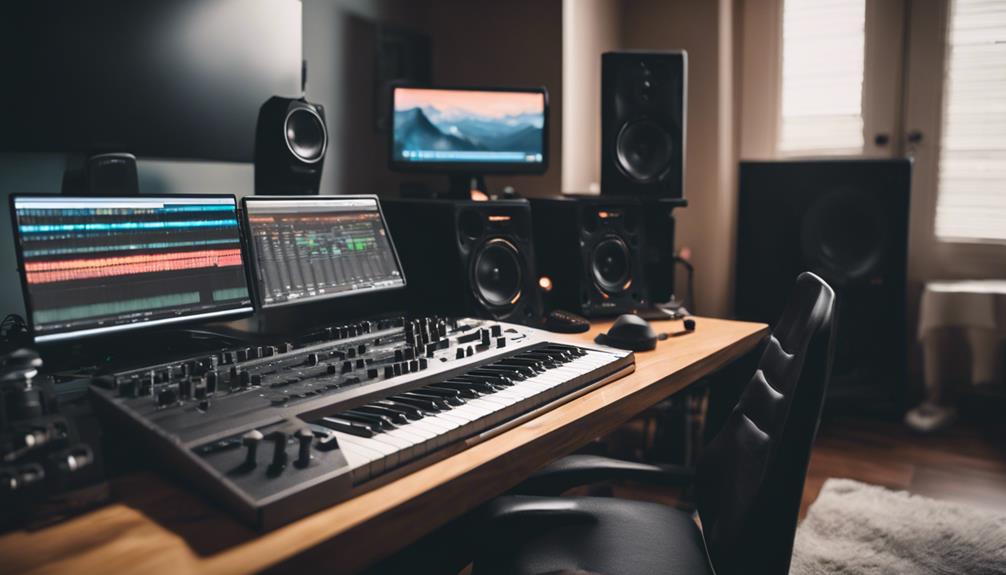
The Samsung BAR Plus 128GB is my best overall flash drive for music production, pairing a stated read speed of up to 400MB/s with a rugged metal casing. The SanDisk Ultra Flair 128GB is a strong alternative for fast reads, while the PNY Attaché X 256GB suits producers who want more room for project files. The main tradeoffs are transfer speed, capacity, durability, and whether a basic USB 2.0 drive is sufficient for occasional file shuttling. A flash drive can help move sessions and samples, but it should not replace a dedicated working drive or backup system. Read on for the full comparison and guidance on choosing a drive that fits your studio workflow.

Get audio and creator gear delivered free with Prime
- Fast, free delivery on millions of items
- Prime Video, Amazon Music and more included
- Member-only deals all year
Complete the kit


Key Takeaways
- Samsung BAR Plus 128GB leads for a durable everyday carry: its metal casing and stated 400MB/s read speed give it an edge over the plastic USB 2.0 options, though the speed claim is read-focused.
- SanDisk Ultra Flair prioritizes quick file access: its stated read speed of up to 150MB/s makes it a more performance-oriented pick than the USB 2.0 drives, but it does not match the Samsung‘s stated read figure.
- Capacity separates the PNY Attaché X from the smaller picks: its 256GB capacity is useful for larger sample libraries and session transfers, while a 32GB or 64GB drive can be easier to dedicate to a single task.
- USB 2.0 bundles suit distribution, not speed-sensitive workflows: the multi-drive packs provide spares for file handoffs, but their USB 2.0 interface is a weaker fit for frequent transfers of large projects.
- Drive format and backup habits matter as much as the model: compatibility with studio computers and a second copy of important sessions can prevent more workflow trouble than choosing a higher-capacity thumb drive alone.


| flash drive for music production | Interface | Capacity | Write speed | Read speed |
|---|---|---|---|---|
| Amazon Basics 128 GB Ultra Fas | USB 3.1 | 128 GB | Up to 30 MB/s | Up to 130 MB/s |
| Swivel Design 16GB USB Flash D | USB 2.0 | 16GB | 6x | 16 MB/s |
| 8GB USB Flash Drive 10 Pack Bu | USB 2.0 | — | — | — |
| SamData 32GB USB Flash Drives | USB 2.0 | 32GB per drive | 8 MB/s | 18 MB/s |
| SanDisk 128GB Ultra Flair USB- | USB 3.0 | 128GB | 4 MB/s | Up to 150MB/s |
| 128GB USB Flash Drive by Aiibe | USB 2.0 | 128 GB | 12 MB/s | 25 MB/s |
| PNY 256GB Attaché X USB 3.2 Ge | USB 3.2 Gen 1 | 256 GB | Not specified | Up to 130 MB/s |
| 2 Pack 64GB USB Flash Drive US | USB 2.0 | 64 GB per drive | 8 MB/s | 60 MB/s |
| USB Flash Drive 32GB Blue | USB 2.0 | 32 GB | 8 MB/s | 10 MB/s |
| Samsung BAR Plus 128GB USB 3.1 | USB 3.2 Gen 1 | 128 GB | Up to 200 MB/s | Up to 400 MB/s |
| USB Flash Drive | USB 2.0 | 32 GB | 30 MB/s | — |
| PNY 128GB Turbo Attaché 3 USB | USB 3.0 | 128 GB per drive | Up to 100 MB/s | Up to 100 MB/s |
| SamData 128GB USB Flash Drive | USB 2.0 | 128 GB | 8 MB/s | 20 MB/s |
| SIMMAX 32GB USB 2.0 Flash Driv | USB 2.0 | 32 GB | 9–11 MB/s | 18 MB/s |
More Details on Our Top Picks
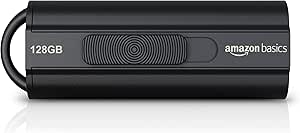
Amazon Basics 128 GB Ultra Fast USB 3.1 Flash Drive, Retractable, High-Speed Data Transfer Storage Device, Black
The Amazon Basics 128GB USB 3.1 is a practical middle ground for producers who want one drive for project files, sample libraries, and music transfers without stepping up to a higher-capacity model. Its listed 130MB/s read speed can make loading or copying files quicker than with the USB 2.0 SamData 32GB pair, while the stated 30MB/s write speed is more relevant when saving sessions and audio to the drive. The retractable connector also avoids a separate cap to lose. The tradeoff is that the SanDisk Ultra Flair lists faster reads, and this drive’s 128GB capacity may feel tight for large sample collections. Its default FAT32 format also limits individual files to 4GB unless reformatted, so check your workflow before using it for large exports.
Pros:- 128GB capacity provides room for projects and music without relying on several small drives.
- Listed read speed of up to 130MB/s is faster than the USB 2.0 options in this group.
- Retractable connector avoids a loose cap and helps protect the plug during transport.
- Compatible with Windows and Mac OS.
Cons:- Listed 30MB/s write speed is modest for repeated transfers of large sessions or sample libraries.
- Default FAT32 format cannot store individual files larger than 4GB.
- Actual transfer speeds depend on the host device and conditions.
Best for: Home producers who want a single portable drive for moderate-sized project folders, stems, and music transfers across Windows and Mac computers.
Not ideal for: Producers moving large sample libraries or single files over 4GB without reformatting, or anyone prioritizing the highest listed read speed.
- Capacity:128 GB
- Interface:USB 3.1
- Read speed:Up to 130 MB/s
- Write speed:Up to 30 MB/s
- Connector design:Retractable
- Color:Black
- Dimensions:2.2 x 0.8 x 0.5 inches
Our verdict“Choose this retractable 128GB drive for everyday production-file storage, but reformat it if your work includes files larger than 4GB.”
Swivel Design 16GB USB Flash Drive with Keychain, USB 2.0 Portable Thumb Drive
This 16GB USB 2.0 swivel drive is best viewed as a small handoff or emergency-transfer tool, not a main production drive. Its keychain attachment and metal swivel cover make it easy to keep with a set of keys, while broad Windows, Mac, and Linux support suits sharing files between different computers. That portability is its main advantage over the larger Amazon Basics 128GB drive, which is a better fit for keeping a broader project archive. The capacity here can hold selected stems, reference tracks, or a modest project folder, but it leaves little room for growing sample libraries. Its USB 2.0 interface and listed 16MB/s read speed also make large transfers slower than with the USB 3.x options in this roundup. There is no stated write speed in MB/s, so buyers should not assume rapid session saves.
Pros:- Keychain attachment makes it easy to carry as a small transfer drive.
- Metal swivel cover stays attached and protects the connector when not in use.
- Supports a broad range of Windows, Mac, and Linux operating systems.
- Plug-and-play use avoids a software setup step for basic file transfers.
Cons:- 16GB capacity is restrictive for sample libraries and accumulating project archives.
- USB 2.0 and a listed 16MB/s read speed lag behind the USB 3.x drives in this roundup.
- No waterproof or shockproof protection is specified.
Best for: Producers who need a keychain-ready drive for carrying a few reference tracks, stems, or small projects between computers.
Not ideal for: Anyone keeping full sessions, large sample collections, or frequent large exports on one drive; its 16GB capacity and USB 2.0 interface are limiting.
- Capacity:16GB
- Interface:USB 2.0
- Read speed:16 MB/s
- Write speed:6x
- Connector design:Metal swivel cap with keychain
- Supported operating systems:Windows 2000/XP/Vista/7/8/10/11, Mac OS 9.X and above, Linux
- Dimensions:2.25 x 0.75 x 0.41 inches
Our verdict“Pick this drive for carrying a small set of production files, not as the primary storage for a growing music workflow.”
8GB USB Flash Drive 10 Pack Bulk USB 2.0 Thumb Drives with Swivel Design
The 10-pack of 8GB swivel drives serves a different production need from the single-drive picks: handing out small, separated files to collaborators, students, or performers. Ten individual drives can keep reference mixes, short stems, or session handoffs apart, and the LED activity indicator shows when a transfer is underway. Compared with the SamData 32GB two-pack, each drive has much less room, but this set supplies more individual destinations for small files. Its USB 2.0 connection and listed 4–15MB/s write range are a poor match for routinely copying large sessions or sample libraries. The FAT32 format also limits individual files to 4GB unless changed, and the stated usable capacity is about 90% of the advertised amount. I’d choose this for distribution, not as working storage.
Pros:- Ten separate drives make it convenient to distribute files to multiple people.
- Swivel metal casing protects the connector without a removable cap.
- LED indicator provides a visible sign of transfer activity.
- USB-A compatibility and plug-and-play operation suit straightforward file handoffs.
Cons:- Each drive has only 8GB capacity, limiting use to small projects and selected files.
- USB 2.0 transfer speeds, including a listed 4–15MB/s write range, are slow for large audio folders.
- FAT32 limits individual files to 4GB unless reformatted, and usable capacity is listed at about 90% of advertised capacity.
Best for: Music teachers, workshop leaders, and producers who need separate drives for distributing small reference files or project handoffs to several people.
Not ideal for: Producers who need one spacious, fast drive for large sessions, samples, or repeated high-volume transfers.
- Capacity per drive:8GB
- Quantity:10 drives
- Interface:USB 2.0
- Transfer speeds:Write: 4–15 MB/s; read: 10–30 MB/s
- Format:FAT32
- Design:Swivel metal casing with LED indicator
- Compatibility:Devices with a USB-A port
Our verdict“Choose this set when you need many low-capacity drives for distributing small production files rather than storing your own full projects.”
SamData 32GB USB Flash Drives 2 Pack – Black and Blue
The SamData 32GB two-pack makes sense when separating two modest collections matters more than transfer speed. The black and blue drives can be assigned to different clients, projects, or stages of a session, reducing the chance of mixing files across work. Each has more capacity than the 8GB drives in the 10-pack, though the Amazon Basics 128GB drive is a stronger choice for keeping a larger archive in one place. These SamData drives use USB 2.0, with listed speeds of 18MB/s read and 8MB/s write, so repeated transfers of large multitrack sessions may take patience. Their rotating metal clips avoid loose caps, and LED indicators show transfer activity. Their small bodies are easy to carry, but also easy to misplace; I would label them before relying on them for separate projects.
Pros:- Two drives in different colors make it easier to separate projects or file types.
- 32GB per drive offers more room than the 8GB bulk-pack drives.
- Rotating metal clips protect the connectors without removable caps.
- LED indicators show transfer activity.
Cons:- USB 2.0 with listed 8MB/s write speed is slow for frequent large audio transfers.
- 32GB per drive may not cover larger sample libraries or a long-term project archive.
- Compact bodies can be easy to misplace.
Best for: Producers who want two color-coded drives for modest project folders, client handoffs, or separating reference audio from session files.
Not ideal for: Anyone regularly moving large sessions or sample libraries, or anyone who needs a single high-capacity drive for an expanding archive.
- Capacity:32GB per drive
- Quantity:2 drives
- Interface:USB 2.0
- Read speed:18 MB/s
- Write speed:8 MB/s
- Connector design:Capless rotating metal clip
- Additional feature:LED indicator
- Colors:Black and blue
Our verdict“Choose the SamData pair for simple color-coded storage of two modest projects, but look to a faster, higher-capacity drive for larger sessions.”
SanDisk 128GB Ultra Flair USB-A Flash Drive, Up to 150MB/s Read Speeds
The SanDisk Ultra Flair 128GB suits producers who value quick file access and want a metal-bodied drive with password protection for portable project files. Its listed 150MB/s read speed is higher than the Amazon Basics 128GB model’s 130MB/s, which may help when retrieving or copying stored audio to a computer. The caveat is its stated 4MB/s write speed: saving large sessions or loading a substantial sample collection onto the drive could be much slower than the read figure suggests. That makes it a better retrieval and handoff option than a write-heavy production drive. Both models offer 128GB, but the Amazon Basics drive lists a much higher write speed and a retractable connector. Password protection adds a privacy feature, though Mac protection requires a software download, and optimal performance depends on a USB 3.0 port.
Pros:- Listed read speed of up to 150MB/s exceeds the Amazon Basics 128GB model’s stated read speed.
- 128GB capacity accommodates a moderate collection of production files.
- Metal casing provides a sturdier-feeling body than the small swivel-plastic designs in this group.
- Password protection with 128-bit AES encryption is available.
Cons:- Listed 4MB/s write speed is a major limitation for large session and sample transfers.
- Optimal performance requires a USB 3.0 port.
- Mac password protection requires a software download.
Best for: Producers who frequently retrieve or share stored files and want metal construction plus password protection for portable project data.
Not ideal for: Producers who often write large sessions or sample libraries to the drive, or who need strong write performance and do not want password software setup on Mac.
- Capacity:128GB
- Interface:USB 3.0
- Read speed:Up to 150MB/s
- Write speed:4 MB/s
- Casing:Metal
- Security:Password protection with 128-bit AES encryption
- Connector type:USB-A
- Dimensions:0.26 x 1.67 x 0.52 inches
Our verdict“Pick the Ultra Flair for retrieving and protecting portable project files, but choose the Amazon Basics 128GB drive for the stated write-speed advantage.”
128GB USB Flash Drive by Aiibe – Portable USB 2.0 Memory Stick for PC and Laptop
The Aiibe 128GB makes sense for producers who need room for project backups, stems, or sample libraries but do not regularly move them between sessions. Its USB 2.0 interface is the main compromise: listed read and write speeds of 25 MB/s and 12 MB/s respectively mean large libraries can take noticeably longer to copy than on the Samsung BAR Plus or PNY Attaché X. The retractable connector is handy for carrying it loose in a laptop bag, and plug-and-play compatibility keeps setup simple across supported devices. Compared with the two-pack USB 2.0 drives in this lineup, Aiibe offers more capacity on one stick, but gives up the convenience of separating files across two drives. Pick it for occasional storage, not as a fast working drive for frequent sessions.
Pros:- 128GB capacity leaves room for multiple projects and audio exports.
- Retractable connector avoids a separate cap that can be lost.
- Plug-and-play design supports use across multiple devices and operating systems.
- Light 7 g body is easy to carry with a laptop.
Cons:- USB 2.0 and listed speeds of 25 MB/s read and 12 MB/s write are slow beside the USB 3.x options.
- No stated encryption or other security features for sensitive session files.
- Small body can be awkward to grip when connecting or removing.
Best for: Home producers who want a single 128GB drive for occasional project backups, exported stems, or less frequently accessed samples.
Not ideal for: Producers who regularly transfer large sample libraries or multitrack sessions, since its USB 2.0 speeds make repeated copying slow.
- Capacity:128 GB
- Interface:USB 2.0
- Read speed:25 MB/s
- Write speed:12 MB/s
- Design:Retractable, capless connector
- Color:Green
- Dimensions:0.4 × 2.6 × 0.4 in
- Weight:7 g
Our verdict“Choose the Aiibe for affordable-feeling 128GB storage and occasional backups, but skip it if fast sample transfers are part of your routine.”
PNY 256GB Attaché X USB 3.2 Gen 1 Flash Drive
For producers who want substantial capacity without stepping up to the Samsung BAR Plus, the PNY Attaché X is the lineup’s clearest fit for large sample libraries and project archives. Its 256GB capacity doubles the space of the 128GB Aiibe and Samsung, while the listed 130 MB/s read speed should make loading or copying files less of a wait than on the USB 2.0 picks. That read figure is not a promise of matching write performance: the product data gives no specific write speed, so I would not choose it on the assumption that large session backups will write at 130 MB/s. The sliding collar protects the connector without a loose cap, but its Type-A plug limits direct use with newer computers that only have USB-C. It is a strong capacity-first choice, not the fastest documented option here.
Pros:- 256GB capacity provides more room than the 128GB Aiibe and Samsung drives.
- Listed read speed of up to 130 MB/s is a substantial step up from USB 2.0 options.
- Sliding collar protects the connector without a detachable cap.
- Compatible with Type-A USB 3.2, 3.0, and 2.0 devices.
Cons:- Uses USB Type-A, so USB-C-only computers need an adapter.
- No specific write speed is provided, making backup performance harder to judge.
- Actual speeds depend on the host device and its USB port.
Best for: Producers with Type-A-equipped computers who need one drive for sizable sample libraries, project archives, or moving sessions between studios.
Not ideal for: Users with USB-C-only laptops or buyers who need a documented high write speed for frequent large backups.
- Capacity:256 GB
- Interface:USB 3.2 Gen 1
- Read speed:Up to 130 MB/s
- Write speed:Not specified
- Connector:USB Type-A
- Compatibility:PC and Mac with Type-A USB port
- Color:Black and gray
- Design:Sliding collar cap
Our verdict“Pick the PNY Attaché X when 256GB of capacity matters more than a specified fast write speed or direct USB-C connection.”
2 Pack 64GB USB Flash Drive USB 2.0 Thumb Drives Swivel Design – Black
This two-pack of 64GB drives suits producers who prefer to keep active projects and backups separate, or carry one stick between collaborators while leaving another at home. Each drive has enough space for a focused session archive or a selection of samples, but the USB 2.0 connection and listed 8 MB/s write speed make them a poor match for repeatedly copying large libraries. The listed 60 MB/s read speed is higher than the Aiibe’s stated 25 MB/s, though the slow write figure is the more relevant limitation when saving fresh backups. Unlike the 256GB PNY Attaché X, these drives divide storage into two units, which can help with organization but limits each individual drive to 64GB. Their swivel covers protect the connectors and avoid loose caps.
Pros:- Two separate 64GB drives make it easier to split projects and backups.
- Swivel covers protect the connectors without detachable caps.
- Plug-and-play operation supports multiple operating systems and devices.
- Listed 60 MB/s read speed is higher than the Aiibe’s listed read speed.
Cons:- USB 2.0 and 8 MB/s write speed make large backups slow.
- Each drive holds 64GB, less than the 128GB single-drive options.
- No waterproof or shockproof protection is specified.
Best for: Producers who want separate drives for working projects and backup copies, or need to hand off smaller sessions.
Not ideal for: Anyone storing a large sample library on one drive or routinely transferring big audio projects; capacity and write speed are limiting.
- Pack size:2 drives
- Capacity:64 GB per drive
- Interface:USB 2.0
- Read speed:60 MB/s
- Write speed:8 MB/s
- Design:Swivel connector cover
- Color:Black
- Warranty:12 months
Our verdict“Choose this pair for organizing smaller projects across two drives, not for fast transfers or storing a large library in one place.”
USB Flash Drive 32GB Blue
The 32GB Blue USB Flash Drive is best treated as a small hand-off or emergency transfer stick, rather than the main home for a production library. Its keyring loop and LED indicator make it easy to keep track of and see when transfers are active—useful when passing a project between a studio computer and a collaborator’s machine. Capacity is modest beside the 128GB Aiibe, and its listed 10 MB/s read and 8 MB/s write speeds are well below the USB 3.x PNY and Samsung options. One file-system detail matters for audio: it ships in FAT32, which cannot store a single file larger than 4GB unless reformatted. That can complicate transfers of large renders or consolidated sessions. Its metal casing is portable, but the modest speed and capacity keep its role narrow.
Pros:- Keyring loop helps keep the drive attached to keys or a studio bag.
- LED indicator provides a visible cue during file transfers.
- Matte metal casing offers a sturdier feel than a basic plastic stick.
- Works across multiple operating systems without additional drivers, according to the product description.
Cons:- 32GB capacity is limited beside the Aiibe and Samsung 128GB options.
- Listed read and write speeds of 10 MB/s and 8 MB/s are slow for large projects.
- Factory FAT32 format cannot store individual files larger than 4GB without reformatting.
Best for: Students and collaborators who need a compact stick for smaller project folders, MIDI files, presets, or session hand-offs.
Not ideal for: Producers who transfer large audio renders, keep extensive sample libraries, or want to avoid reformatting around FAT32’s 4GB file limit.
- Capacity:32 GB
- Interface:USB 2.0
- Read speed:10 MB/s
- Write speed:8 MB/s
- File system:FAT32 (factory default)
- Color:Blue
- Dimensions:2.19 × 0.68 × 0.32 in
- Features:Keyring loop and LED indicator
Our verdict“Use this drive for smaller project hand-offs and portable essentials, but choose a faster, larger model for sample libraries or large renders.”
Samsung BAR Plus 128GB USB 3.1 Flash Drive, Rugged Metal Casing, 400MB/s, Titan Grey
Among these five, the Samsung BAR Plus is the strongest fit for producers who move large sessions often and want a more protective portable drive. Its listed 400 MB/s read and 200 MB/s write speeds set it apart from the USB 2.0 Aiibe and 32GB Blue drive, and give it a clearer speed profile than the PNY Attaché X, whose write speed is not specified. The tradeoff is capacity: at 128GB, it holds half as much as the 256GB PNY, so a particularly large sample collection may favor that model. Samsung’s metal body is rated to resist water, shock, temperature, magnet, and X-ray exposure, and the five-year warranty adds reassurance for a drive carried between studios. It remains a flash drive, not a replacement for a separate backup or primary production disk.
Pros:- Listed 400 MB/s read and 200 MB/s write speeds outpace the USB 2.0 options.
- 128GB capacity balances room for projects with portable size.
- Metal casing is rated for water, shock, temperature, magnet, and X-ray resistance.
- Five-year warranty and keyring portability suit regular travel between workspaces.
Cons:- 128GB is half the capacity of the PNY Attaché X.
- USB-A connection may require an adapter on USB-C-only computers.
- Read speed is higher than write speed, so large saves will not match the headline read figure.
Best for: Mobile producers who frequently transfer project files and value fast listed speeds, rugged construction, and a long warranty.
Not ideal for: Producers who need the largest single-drive capacity, or who need a drive with a USB-C connector rather than USB-A.
- Capacity:128 GB
- Interface:USB 3.2 Gen 1
- Read speed:Up to 400 MB/s
- Write speed:Up to 200 MB/s
- Color:Titan Grey
- Dimensions:0.6 × 0.6 × 0.5 in
- Durability:Water, shock, temperature, magnet, and X-ray resistance
- Warranty:5 years
Our verdict“Choose the Samsung BAR Plus for frequent, faster transfers and rugged portability, unless your priority is maximum capacity over speed and protection.”
USB Flash Drive, 8GB / 16GB / 32GB, Cute Shape USB Memory Stick, Waterproof, Fast Data Storage Pendrive (32GB, Piano)
The piano-shaped 32GB drive is the most playful pick here, suited to carrying a small set of session files, MIDI projects, or reference tracks rather than a full sample library. Its listed 30 MB/s write speed and USB 2.0 connection make it a slower choice than the USB 3.0 PNY Turbo Attaché 3, especially when moving large audio folders. The waterproof feature adds a measure of everyday protection, but the description does not specify a rating, so I would not treat it as rugged field storage. Compared with the larger-capacity SamData 128GB, this drive offers far less room; its appeal is the piano design and compact project-carrying role. I would skip it if transfer speed or substantial sample storage matters more than appearance.
Pros:- Piano-shaped design is easy to distinguish from other session drives
- Waterproof feature is specified for extra everyday protection
- Plug-and-play compatibility covers older Windows versions, Mac OS, and Linux
- 30 MB/s listed write speed is adequate for occasional project transfers
Cons:- USB 2.0 is slower than the PNY Turbo Attaché 3’s USB 3.0 interface
- 32GB capacity is restrictive for extensive sample libraries and archives
- No waterproof protection rating or ruggedness standard is provided
Best for: Music students and keyboard players who want a small, recognizable drive for session files and MIDI project handoffs.
Not ideal for: Producers moving large sample libraries or backing up many sessions, since 32GB and USB 2.0 limit capacity and transfer pace.
- Capacity:32 GB
- Interface:USB 2.0
- Write speed:30 MB/s
- Additional feature:Waterproof
- Design:Piano cartoon shape
- Compatible systems:Windows 98/98SE through Windows 7, Mac OS 9.0/10.0 or later, Linux kernel 2.4 or later
Our verdict“Choose this piano-themed drive for modest project handoffs and a distinctive design, not for fast transfers or large music libraries.”
PNY 128GB Turbo Attaché 3 USB 3.0 Flash Drive 2-Pack
For moving active projects between a studio computer and a laptop, the PNY Turbo Attaché 3 is the strongest fit in this group. Its USB 3.0 interface and listed speeds of up to 100 MB/s read and write give it a clear pace advantage over the USB 2.0 SamData and piano-shaped drives. The 128GB capacity suits session folders and a useful selection of samples, while the two-drive pack lets me separate current work from a handoff copy. The sliding collar avoids a loose cap, though it does not add encryption or protect files from accidental deletion. These drives are also not a substitute for a backup system. I would choose them over the slower options for frequent transfers, but not if I need built-in security or a capacity larger than 128GB per drive.
Pros:- USB 3.0 with listed read and write speeds up to 100 MB/s
- Two drives make it easier to keep a separate session handoff copy
- Sliding collar means there is no separate cap to misplace
- Compatible with most PC and Mac computers with USB 3.0 ports
Cons:- USB 3.0 performance depends on using a compatible port
- No encryption or other listed data-security feature
- 128GB per drive may not suit large sample libraries or long-term archives
Best for: Producers who regularly transfer multitrack sessions between USB 3.0-equipped PCs or Macs and want a second drive for handoffs.
Not ideal for: Users who need hardware encryption, more than 128GB on one drive, or reliable high speed from USB 2.0 ports.
- Capacity:128 GB per drive
- Pack size:2 drives
- Interface:USB 3.0
- Read speed:Up to 100 MB/s
- Write speed:Up to 100 MB/s
- Design:Cap-less sliding collar
- Compatibility:Most PC and Mac laptops and desktops with USB 3.0 ports
- Color:Silver
Our verdict“Pick this two-drive set for faster project transfers and simple handoffs, provided your computers have USB 3.0 ports and you do not need built-in security.”
SamData 128GB USB Flash Drive – Red, 1 Pack
The SamData 128GB makes sense for producers who need room for archived sessions but do not often move them in a hurry. That capacity is four times the piano-shaped 32GB drive’s, giving it more headroom for project folders and audio exports. The tradeoff is speed: its listed 8 MB/s write and 20 MB/s read figures, along with USB 2.0, make it a poor match for frequent large transfers. A swivel cover keeps the connector protected without a loose cap, and the LED offers a visual activity cue while files move. Compared with the USB 3.0 PNY Turbo Attaché 3, SamData prioritizes capacity over transfer pace; the PNY is better for active session shuttling. I would use this for a secondary archive, not as the only copy of important work.
Pros:- 128GB capacity provides more archive space than the 32GB options
- Swivel design protects the connector without a removable cap
- LED indicator provides a visible transfer-status cue
- Compatibility includes Windows, Mac, and Linux systems
Cons:- USB 2.0 and 8 MB/s listed write speed make large transfers slow
- Some listed capacity is reserved for formatting and system files
- No waterproofing, encryption, or ruggedness feature is specified
Best for: Home-studio producers who want a high-capacity USB 2.0 drive for occasional session archives and file sharing across older computers.
Not ideal for: Producers who routinely transfer large multitrack sessions or sample libraries and need faster USB 3.0 performance.
- Capacity:128 GB
- Interface:USB 2.0
- Write speed:8 MB/s
- Read speed:20 MB/s
- Color:Red
- Dimensions:2.25 × 0.75 × 0.41 inches
- Design:Capless swivel
- Compatibility:Windows, Mac OS, and Linux
Our verdict“Choose SamData for storing a larger project archive on a budget-conscious USB 2.0 workflow, but favor the PNY Turbo Attaché 3 for frequent transfers.”
SIMMAX 32GB USB 2.0 Flash Drive Swivel Thumb Drive Purple
The SIMMAX 32GB is a straightforward choice for handing off a small project folder, a few stems, or session documents—not for carrying a producer’s full working library. Its swivel metal clip protects the connector without a separate cap, and the compact body is easy to keep on a key ring or in a gear pouch. Capacity is the main limitation: the 128GB SamData can hold a much broader archive, while the PNY Turbo Attaché 3 is a better match for faster transfers thanks to USB 3.0. SIMMAX lists USB 2.0 read speed at 18 MB/s and write speed at 9–11 MB/s, so large audio folders will take patience. The one-year warranty is a useful stated detail, but no waterproofing or rugged protection is listed.
Pros:- Swivel metal clip protects the connector without a loose cap
- Compact size suits key rings and portable gear kits
- Compatible with multiple operating systems
- One-year warranty is specified
Cons:- 32GB capacity is limited for large projects and sample collections
- USB 2.0 speeds trail the PNY Turbo Attaché 3 for regular large transfers
- No waterproof or rugged protection is specified
Best for: Mobile musicians and students who need a small, capless drive for sharing modest project files between compatible computers.
Not ideal for: Producers storing large sample libraries, moving large sessions often, or needing water and impact protection.
- Capacity:32 GB
- Interface:USB 2.0
- Write speed:9–11 MB/s
- Read speed:18 MB/s
- Color:Purple
- Dimensions:0.43 × 0.83 × 2.44 inches
- Design:Swivel metal clip
- Warranty:1 year
Our verdict“Pick SIMMAX for portable handoffs of modest project files, but choose a higher-capacity or USB 3.0 drive for larger, more frequent transfers.”

How We Picked
I compared the 14 listed drives by the factors that affect music-production use: stated interface and read-speed information, available capacity, physical design, pack size, and how clearly each product’s listing describes its role. Faster stated read speeds and larger capacities earn attention for transferring sample libraries and session folders; casing and retractable or swivel designs matter when a drive travels between studio and stage. I also weighed whether a model is practical as a dedicated project shuttle, a backup copy, or a low-cost handoff drive.
The ranking favors products with a clearer performance or durability advantage for repeated studio transfers, which puts the Samsung BAR Plus and SanDisk Ultra Flair ahead of the USB 2.0 models. The PNY Attaché X ranks well for its larger 256GB capacity, while the Turbo Attaché 3 two-pack offers flexibility across more than one computer or project. USB 2.0 bundles and basic single drives still have a place for small files and occasional exchanges, but their interface and limited stated performance make them less compelling as primary carriers for large sessions. None of these listings establishes write speeds, so I avoid treating read-speed figures as a guarantee of project-save performance.
| flash drive for music production | Interface |
|---|---|
| Amazon Basics 128 GB Ultra Fas | USB 3.1 |
| Swivel Design 16GB USB Flash D | USB 2.0 |
| 8GB USB Flash Drive 10 Pack Bu | USB 2.0 |
| SamData 32GB USB Flash Drives | USB 2.0 |
| SanDisk 128GB Ultra Flair USB- | USB 3.0 |
| 128GB USB Flash Drive by Aiibe | USB 2.0 |
| PNY 256GB Attaché X USB 3.2 Ge | USB 3.2 Gen 1 |
| 2 Pack 64GB USB Flash Drive US | USB 2.0 |
| USB Flash Drive 32GB Blue | USB 2.0 |
| Samsung BAR Plus 128GB USB 3.1 | USB 3.2 Gen 1 |
| USB Flash Drive | USB 2.0 |
| PNY 128GB Turbo Attaché 3 USB | USB 3.0 |
| SamData 128GB USB Flash Drive | USB 2.0 |
| SIMMAX 32GB USB 2.0 Flash Driv | USB 2.0 |
Factors to Consider When Choosing Flash Drive For Music Production
A flash drive can make it easier to carry sessions, presets, and samples between computers, but the right choice depends on how you use it. I would match capacity and speed to the files you actually transfer, then check compatibility and backup plans before buying. These broader points help avoid paying for features that will not improve your workflow.
Choose Capacity Around Your Transfer Routine
Capacity should reflect what you plan to carry at once, not the biggest library you can imagine collecting. A drive used for a few stems, presets, or a current session may not need the same space as one carrying multisampled instruments or several projects. Leave room for exports and alternate versions, since keeping a session folder intact can include audio, backups, and rendered files. A larger drive can reduce file juggling, but it does not make a good archive by itself. If you keep separate drives for active projects and backups, label them clearly and avoid treating one as the only copy.
Read and Write Speeds Do Different Jobs
Manufacturers often advertise maximum read speed, which describes how quickly files may be retrieved under suitable conditions. Saving or copying new recordings to the drive depends on write performance, and the product listings here do not provide comparable write figures. Large sample libraries can benefit from faster reads, while transferring a freshly recorded session can expose slow writes. Actual results also depend on the computer’s port, file size, and how many small files are involved. Avoid choosing solely from a headline speed number when the work you care about is writing sessions to the drive.
Check Port Compatibility Before Buying
USB-A drives can be convenient for many desktop interfaces and older studio computers, but newer laptops may rely on USB-C ports. An adapter or hub can solve that mismatch, though it adds another item to carry and may occupy a port needed for audio gear. USB 3.x drives can connect to older USB ports, but their transfer rate will be limited by the slower connection. Check the ports on every computer where you expect to use the drive, not just your main workstation. For a shared studio, matching the drive and adapter setup to the least flexible computer can prevent last-minute file-transfer problems.
Treat a Flash Drive as a Shuttle, Not a Work Drive
Thumb drives are handy for moving sessions, stems, and presets, but a dedicated external SSD is generally a more suitable choice for running large projects directly. Repeated project writes can also wear flash storage over time, and a compact drive is easy to misplace. Keep the active project on your main working storage when possible, then use the thumb drive for transfers or an extra copy. Safely eject the device before removing it so pending writes have time to finish. If your workflow depends on a drive remaining connected throughout long sessions, choose a storage device designed for that role instead.
Plan for File-System Compatibility
A drive’s format can affect whether a Mac, Windows PC, sampler, or media player can read and write it. A format supported by both major computer platforms can be convenient, but particular devices may have their own limits for capacity or file systems. Before reformatting, copy any existing contents elsewhere because formatting erases the drive. Large audio files may also behave differently on older formats with file-size limits. Confirm the requirements of your studio hardware and collaborators before deciding on a format, especially when moving sessions between operating systems.
Spend More for a Real Workflow Benefit
Paying for a faster interface or more robust casing makes sense when you transfer large folders often or carry the drive between locations. A premium speed claim has less value if the host computer has a slow port or the drive is only used for a few small presets. For handoffs to collaborators, several modest-capacity drives can be easier to dedicate and label than one drive containing unrelated sessions. Conversely, a larger single drive can simplify moving a full project with its audio and exports. Decide whether your main pain point is transfer time, limited space, or keeping projects separated before paying for extra capacity or rugged styling.
Frequently Asked Questions
Is a USB 2.0 flash drive fast enough for music production?
It can work for presets, small session files, and occasional transfers, but it is a poor fit for repeatedly moving large multitrack projects. USB 2.0 limits transfer potential compared with the faster USB 3.x options in this roundup. The real delay also depends on the drive’s write speed, which is not specified for many of these products. If you are choosing a drive for frequent sample-library or session transfers, I would favor a USB 3.x model with stated performance details. Keep USB 2.0 drives for light handoffs or spare copies rather than making them your main high-volume shuttle.
Can I run a DAW project directly from a flash drive?
You may be able to open a project from a thumb drive, but that does not make it the best location for ongoing production. DAW sessions can generate frequent reads and writes, and the listings here do not provide enough write-speed or sustained-performance information to predict how smoothly a project will run. A drive could also be disconnected or removed accidentally, putting unsaved work at risk. I would keep active sessions on the computer’s internal storage or a suitable external SSD, then use a flash drive to transfer or duplicate files. If you do run a project from one, test the complete session on your own setup before relying on it.
Is 128GB enough for carrying music-production projects?
It can be plenty for a few active sessions, stems, and common presets, but large sample libraries or many high-resolution recordings can use space quickly. The right capacity depends on whether you carry finished exports, raw recordings, and multiple project versions alongside the session files. A 256GB option, such as the PNY Attaché X, gives more room before you need to prune files, while 32GB models make more sense for focused handoffs. Check the combined size of a typical project folder before buying. Leave some free capacity rather than planning to fill the drive completely.
Should I use one flash drive for both projects and backups?
I would avoid relying on a single drive for both roles if it holds the only copy of your work. A flash drive can be lost, damaged, or corrupted, and its compact size makes it especially easy to leave behind at a studio or venue. Keep the primary session on dependable working storage and maintain at least one separate backup copy. If you use a thumb drive as a backup, label it and update it after meaningful project changes. A second copy on another device or in a secure remote location gives better protection than simply buying a higher-capacity thumb drive.
What should I check before sharing a session between Mac and Windows?
Confirm that both computers can read and write the drive’s file system, and check whether the DAW project depends on plug-ins or sample paths that exist on both machines. Copy the full project folder, including audio and any assets the session references, rather than moving only the project file. Large files and older formats can have compatibility limits, so test with a representative session first. Keep an untouched copy before reformatting a drive for cross-platform use, since formatting erases its contents. If a collaborator uses specific studio hardware, verify that device’s supported format and capacity as well.
Conclusion
For most producers who want one durable, fast-reading USB-A drive, I would choose the Samsung BAR Plus 128GB as the best overall option. The PNY Attaché X 256GB is my best value for buyers who prioritize extra capacity for larger project transfers, while the Samsung BAR Plus also earns the best premium spot for its stated speed and metal casing. Beginners who need a straightforward drive for moving modest sessions can start with the Amazon Basics 128GB USB 3.1, while keeping in mind that the listing does not give a comparable speed figure. For specific needs, choose the PNY Turbo Attaché 3 two-pack when separate drives help organize projects, or one of the USB 2.0 multipacks for low-volume handoffs and spares. Whichever you pick, keep a separate backup and do not mistake read-speed claims for guaranteed write performance.
Halloween Picks
halloween
As an affiliate, we earn on qualifying purchases.