Choosing a computer for video editing and music production involves balancing performance, reliability, and value. The Lenovo ThinkStation P3 Tower stands out as the best overall due to its powerful CPU and robust GPU options, ideal for demanding tasks. The NIMO 15.6-inch AI Creator Laptop offers portability with solid specs for on-the-go editing, while the Apple 2025 MacBook Pro caters to those preferring an integrated ecosystem and macOS. Buyers face tradeoffs between raw power, portability, and budget—more powerful desktops often come at a higher cost and less flexibility, while laptops may sacrifice some performance for mobility. Keep reading for a detailed breakdown of these options to find the best fit for your creative workflow.

Get audio and creator gear delivered free with Prime
- Fast, free delivery on millions of items
- Prime Video, Amazon Music and more included
- Member-only deals all year
Complete the kit


Key Takeaways
- High-end desktop workstations like the Lenovo ThinkStation offer unmatched performance but come with higher costs and less portability.
- Laptops such as the NIMO AI Creator provide a balance of power and mobility, suitable for creators on the move, but may have limited upgrade options.
- Choosing between Intel, AMD, or Apple Silicon depends on software preferences and ecosystem compatibility, impacting workflow efficiency.
- Prioritizing GPU power is essential for rendering-heavy video editing and 3D effects, while ample RAM benefits multitasking and large project handling.
- Budget constraints often lead to sacrificing some performance; understanding your specific workload helps determine where to invest.
| Lenovo ThinkStation P3 Tower with Intel Core Ultra 9 285, 64GB DDR5, NVIDIA RTX 2000 |  | Best Overall Workstation for Video Editing and Music Production | Processor: Intel Core Ultra 9 285 vPro | RAM: 64 GB DDR5-5600MT/s | Graphics Card: NVIDIA RTX 2000 Ada Generation 16GB GDDR6 | VIEW ON AMAZON | See Our Full Breakdown |
| NIMO 15.6-inch AI Creator Laptop with AMD Ryzen 7 8745HS, 32GB RAM, 1TB SSD |  | Best Portable Machine for Video Editing and Music Production | Processor: AMD Ryzen 7 8745HS | Graphics: RDNA 3 Radeon 780M | RAM: 32GB DDR5 | VIEW ON AMAZON | See Our Full Breakdown |
| CPU Solutions VidCore Core Ultra 9 Video Editing PC |  | Best High-End Desktop for Intensive Video and Music Work | Processor: Intel Core Ultra 9 285K, 24-Core | RAM: 64GB | Storage: 2TB NVMe SSD | VIEW ON AMAZON | See Our Full Breakdown |
| Dell Tower Plus EBT2250 Workstation Desktop (Next-gen XPS) |  | Best Mid-Range Desktop for Video and Music Editing | Processor: Intel Ultra 7-265 2.40GHz (up to 5.3GHz, 20 cores) | Graphics: GeForce RTX 5060 8GB GDDR7 | Memory: 32GB DDR5 | VIEW ON AMAZON | See Our Full Breakdown |
| Dell Pro Tower Plus Core Ultra 7 256GB SSD Desktop Computer |  | Best Budget-Friendly Desktop for Entry-Level Video and Music Editing | Processor: Intel Core Ultra 7 265 | Memory: 32GB DDR5 | Storage: 1TB PCIe NVMe SSD | VIEW ON AMAZON | See Our Full Breakdown |
| BOSGAME P6 Ryzen 9 6900HX Mini PC, 24GB RAM, 1TB SSD |  | Best Compact Powerhouse for Creative Workspaces | Processor: Ryzen 9 6900HX (8 cores/16 threads, up to 4.9GHz) | RAM: 24GB LPDDR5X 4800MT/s | Storage: 1TB PCIe 4.0 SSD, expandable up to 8TB | VIEW ON AMAZON | See Our Full Breakdown |
| NIMO 15.6 AI Creator Laptop, AMD Ryzen 5 6600H, 16GB RAM, 512GB SSD, FHD IPS |  | Best Mobile Workstation for Entry-Level Creators | Processor: AMD Ryzen 5 6600H, 6 cores, up to 4.5GHz | Graphics: Radeon 660M integrated | RAM: 16GB DDR5 | VIEW ON AMAZON | See Our Full Breakdown |
| Alienware Aurora Gaming Desktop with RTX 5070 and Intel Core Ultra 7 265F |  | Best High-Performance Desktop for Heavy Editing and Gaming | Graphics Card: NVIDIA GeForce RTX 5070 | Processor: Intel Core Ultra 7 265F | Design: Matte basalt black with customizable AlienFX lighting | VIEW ON AMAZON | See Our Full Breakdown |
| HP Mini Desktop PC Computer for Office Work, Data Processing, Accounting, Video Editing, Intel i7-12700T, 32GB RAM, 1TB SSD, 3x 4K Output, Windows 11 Pro | 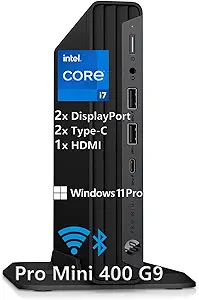 | Best Small Desktop for Multitasking and Light Editing | Processor: Intel i7-12700T | RAM: 32GB DDR4 | Storage: 1TB SSD | VIEW ON AMAZON | See Our Full Breakdown |
| HP ProDesk 600 Desktop Computer with Intel Core i5, 32GB RAM, 1TB SSD, GT 610 |  | Reliable Office Desktop with Decent Power for Light Creative Tasks | Processor: Intel Core i5-10400F | Cores: 6 cores | Threads: 12 | VIEW ON AMAZON | See Our Full Breakdown |
| Dell Precision 3620 Entry Level Music Production Workstation PC |  | Best Budget-Friendly Entry-Level Workstation for Music Production | Processor: Intel i7-6700 4-Core 3.4GHz (up to 4.0GHz Turbo) | Memory: 32GB DDR4 RAM | Storage: 512GB SSD + 2TB HDD | VIEW ON AMAZON | See Our Full Breakdown |
| Apple 2025 MacBook Pro Laptop with M5 Chip, 14.2-inch Liquid Retina XDR Display, 24GB RAM, 1TB SSD, Silver |  | Best Premium Portable for Video and Music Professionals | Processor: Apple M5 chip with 10-core CPU and GPU | Display: 14.2-inch Liquid Retina XDR | Memory: 24GB Unified Memory | VIEW ON AMAZON | See Our Full Breakdown |
| Dell Optiplex 7060 Tower Desktop Computer with Intel i7-8700, 32GB RAM, 1TB SSD, Windows 11 Pro |  | Best Reliable Desktop for Multitasking and Content Creation | Processor: Intel i7-8700 | Memory: 32GB DDR4 | Storage: 1TB SSD | VIEW ON AMAZON | See Our Full Breakdown |
| Dell Precision T7820 Workstation Desktop (Renewed) – Intel Xeon Silver 4210R, 64GB DDR4 RAM, 1TB PCIe NVMe SSD, Windows 11 Pro |  | Best High-End Workstation for Heavy Multitasking and Professional Editing | Processor: Intel Xeon Silver 4210R (10 cores, 2.4GHz base / 3.2GHz boost) | RAM: 64GB DDR4 @ 3200MHz | Storage: 1TB PCIe NVMe SSD | VIEW ON AMAZON | See Our Full Breakdown |
| HP Workstation PC Desktop Computer with NVIDIA Quadro K1200, Intel Core i5, 32GB RAM, 1TB SSD + 4TB HDD, Windows 11 Pro |  | Best Balanced Desktop for Creative Work and Moderate Editing | Processor: Intel Core i5 | RAM: 32GB DDR4 | Graphics Card: NVIDIA Quadro K1200 4GB | VIEW ON AMAZON | See Our Full Breakdown |
| computer for video editing and music production | Processor | Storage | Graphics | RAM |
|---|---|---|---|---|
| Lenovo ThinkStation P3 Tower w | Intel Core Ultra 9 285 vPro | 1 TB SSD M.2 PCIe Gen5 | — | 64 GB DDR5-5600MT/s |
| NIMO 15.6-inch AI Creator Lapt | AMD Ryzen 7 8745HS | 1TB PCIe 4.0 SSD | RDNA 3 Radeon 780M | 32GB DDR5 |
| CPU Solutions VidCore Core Ult | Intel Core Ultra 9 285K, 24-Core | 2TB NVMe SSD | — | 64GB |
| Dell Tower Plus EBT2250 Workst | Intel Ultra 7-265 2.40GHz (up to 5.3GHz, 20 cores) | 1TB PCIe NVMe SSD | GeForce RTX 5060 8GB GDDR7 | — |
| Dell Pro Tower Plus Core Ultra | Intel Core Ultra 7 265 | 1TB PCIe NVMe SSD | Integrated Intel Graphics | — |
| BOSGAME P6 Ryzen 9 6900HX Mini | Ryzen 9 6900HX (8 cores/16 threads, up to 4.9GHz) | 1TB PCIe 4.0 SSD, expandable up to 8TB | Integrated Radeon 680M | 24GB LPDDR5X 4800MT/s |
| NIMO 15.6 AI Creator Laptop | AMD Ryzen 5 6600H, 6 cores, up to 4.5GHz | 512GB PCIe SSD | Radeon 660M integrated | 16GB DDR5 |
| Alienware Aurora Gaming Deskto | Intel Core Ultra 7 265F | — | — | — |
| HP Mini Desktop PC Computer fo | Intel i7-12700T | 1TB SSD | Supports 3x 4K monitors (integrated graphics) | 32GB DDR4 |
| HP ProDesk 600 Desktop Compute | Intel Core i5-10400F | 1TB PCIe NVMe SSD | NVIDIA GeForce GT 610 2GB | 32GB DDR4 |
| Dell Precision 3620 Entry Leve | Intel i7-6700 4-Core 3.4GHz (up to 4.0GHz Turbo) | 512GB SSD + 2TB HDD | Intel HD Graphics 530 | — |
| Apple 2025 MacBook Pro Laptop | Apple M5 chip with 10-core CPU and GPU | 1TB SSD | — | — |
| Dell Optiplex 7060 Tower Deskt | Intel i7-8700 | 1TB SSD | Integrated (Intel UHD 630) | — |
| Dell Precision T7820 Workstati | Intel Xeon Silver 4210R (10 cores, 2.4GHz base / 3.2GHz boost) | 1TB PCIe NVMe SSD | Integrated (Intel Xeon) | 64GB DDR4 @ 3200MHz |
| HP Workstation PC Desktop Comp | Intel Core i5 | — | — | 32GB DDR4 |
More Details on Our Top Picks
Lenovo ThinkStation P3 Tower with Intel Core Ultra 9 285, 64GB DDR5, NVIDIA RTX 2000
The Lenovo ThinkStation P3 Tower stands out for its combination of high-end processing, robust graphics, and expandability, making it ideal for demanding multimedia workflows. Its Intel Core Ultra 9 285 vPro processor paired with 64GB DDR5 RAM ensures smooth handling of large video files and complex audio projects. The NVIDIA RTX 2000 graphics card delivers enough GPU power for GPU-accelerated editing and rendering tasks, surpassing entry-level options like the Dell Pro Tower Plus. While the hefty size and premium price are considerations, this machine offers the kind of reliability and power professionals need. It’s best suited for studios or creative professionals who prioritize top-tier performance and future expandability. However, the absence of an optical drive might inconvenience some users, and its large footprint requires ample workspace.
Pros:- Powerful Intel Core Ultra 9 285 vPro processor and NVIDIA RTX 2000 GPU for demanding tasks
- Fast DDR5 memory and PCIe Gen5 SSD for rapid data access
- Comprehensive port selection including security features
Cons:- Large and heavy design requiring significant space
- Premium components lead to higher overall cost
- No optical drive included
Best for: Creative professionals and small studios needing a future-proof, high-performance editing workstation
Not ideal for: Budget-conscious hobbyists or those with limited space due to its size and cost
- Processor:Intel Core Ultra 9 285 vPro
- RAM:64 GB DDR5-5600MT/s
- Graphics Card:NVIDIA RTX 2000 Ada Generation 16GB GDDR6
- Storage:1 TB SSD M.2 PCIe Gen5
- Operating System:Windows 11 Pro 64
- Dimensions:7.09 x 14.57 x 16.34 inches
Our verdict“This pick is perfect for professionals needing maximum power and expandability, despite its size and cost.”
NIMO 15.6-inch AI Creator Laptop with AMD Ryzen 7 8745HS, 32GB RAM, 1TB SSD
The NIMO 15.6-inch AI Creator Laptop offers a compelling balance of power and portability, making it ideal for creators on the go. Its AMD Ryzen 7 8745HS combined with 32GB DDR5 RAM and a 1TB PCIe 4.0 SSD ensures smooth multitasking and quick access to large media files. Its upgradable hardware supports future-proofing, unlike more fixed configurations like the Alienware Aurora. The FHD display with wide viewing angles enhances editing accuracy, but the lack of a dedicated high-end GPU limits heavy 3D or GPU-accelerated workflows. It’s well-suited for mobile editors or those who need a capable machine outside the studio. However, under sustained heavy loads, battery life may drop, and its bulkier build can hinder portability.
Pros:- Powerful AMD Ryzen 7 8745HS CPU and RDNA 3 Radeon 780M graphics for multitasking
- Large 32GB DDR5 RAM and speedy 1TB SSD support intensive workflows
- Upgradable hardware and immersive FHD display
Cons:- No dedicated high-end GPU for GPU-heavy tasks
- Potentially limited battery life under load
- Bulkier design reduces overall portability
Best for: Content creators and editors needing high performance in a portable form factor
Not ideal for: Heavy 3D rendering or gaming professionals requiring dedicated high-end GPUs
- Processor:AMD Ryzen 7 8745HS
- Graphics:RDNA 3 Radeon 780M
- RAM:32GB DDR5
- Storage:1TB PCIe 4.0 SSD
- Display:15.6-inch FHD
- Battery Charging:100W PD fast charging
Our verdict“This laptop is ideal for mobile creatives who prioritize performance and portability over extreme GPU power.”
CPU Solutions VidCore Core Ultra 9 Video Editing PC
The CPU Solutions VidCore Core Ultra 9 is tailored for professionals who need maximum processing and graphical power. Its Intel Core Ultra 9 285K 24-core processor with up to 5.7 GHz Turbo, combined with 64GB RAM and a 2TB NVMe SSD, supports multi-layered editing, rendering, and audio mixing. The GPU, a NVIDIA Quadro RTX 2000 ADA with 16GB VRAM, excels in GPU-accelerated workflows but falls short for demanding 3D rendering compared to higher-tier professional cards like the RTX 3000 series. The workstation’s cooling and power supply ensure sustained performance, but its high cost makes it more suitable for dedicated studios. This system surpasses the Dell Tower Plus in raw power but demands a significant budget.
Pros:- 24-core Intel Core Ultra 9 285K CPU with high-frequency Turbo boost
- Professional-grade Quadro RTX 2000 ADA GPU with 16GB VRAM
- Fast NVMe SSD and robust cooling for sustained workloads
Cons:- High cost limits accessibility for casual users
- Entry-level Quadro GPU may limit heavy 3D rendering
- Larger size and complexity require dedicated space
Best for: High-end video editors and music producers requiring maximum workstation performance
Not ideal for: Casual hobbyists or those on a tight budget due to its premium price
- Processor:Intel Core Ultra 9 285K, 24-Core
- RAM:64GB
- Storage:2TB NVMe SSD
- Graphics Card:NVIDIA Quadro RTX 2000 ADA, 16GB
- Max Displays:4 (up to 8K)
- Cooling:All-in-one liquid cooler
Our verdict“This workstation is best for professionals who need top-tier CPU and GPU power for demanding editing tasks and can invest accordingly.”
Dell Tower Plus EBT2250 Workstation Desktop (Next-gen XPS)
The Dell Tower Plus EBT2250 offers a balanced mix of power and connectivity, making it suitable for those who need an efficient editing machine without the premium workstation price. Its Intel Ultra 7-265 processor with 20 cores ensures smooth multitasking, while the RTX 5060 8GB GPU supports GPU acceleration but isn’t as robust as higher-end professional cards like the RTX 3000 series. The 32GB DDR5 RAM and 1TB SSD provide ample speed for editing large media files, and the comprehensive port selection—including Thunderbolt 4—enables versatile workflows. Its size and lack of integrated Wi-Fi are minor hurdles for some users, but overall, it balances performance and expandability well.
Pros:- Powerful 20-core Intel Ultra 7-265 CPU and RTX 5060 GPU for demanding workflows
- Expandable 32GB DDR5 RAM and fast 1TB SSD
- Rich connectivity options including Thunderbolt 4
Cons:- No integrated Wi-Fi, relies on Ethernet or external adapters
- Large tower size may not fit compact workspaces
Best for: Creative professionals who need a reliable, expandable desktop at a reasonable price
Not ideal for: Heavy 3D rendering or real-time 8K editing that requires top-tier GPU performance
- Processor:Intel Ultra 7-265 2.40GHz (up to 5.3GHz, 20 cores)
- Graphics:GeForce RTX 5060 8GB GDDR7
- Memory:32GB DDR5
- Storage:1TB PCIe NVMe SSD
- Operating System:Windows 11 Pro-64
Our verdict“This machine offers a strong balance of performance and expandability for professional editing without the high price tag of top-tier workstations.”
Dell Pro Tower Plus Core Ultra 7 256GB SSD Desktop Computer
The Dell Pro Tower Plus provides a solid foundation for entry-level video editing and music production, especially for those new to professional workflows. Its Intel Core Ultra 7 265 processor with 20 cores offers respectable multi-threaded performance, while the integrated graphics and 32GB DDR5 RAM support basic editing tasks. The 1TB SSD ensures quick load times and ample storage, but it lacks dedicated GPU power—only relying on integrated Intel graphics—which makes it less suitable for GPU-accelerated workflows or heavy rendering. The absence of Wi-Fi and a compact chassis could also pose limitations. It’s a good starting point for hobbyists or small startups with limited budgets.
Pros:- 20-core Intel Core Ultra 7 processor for multi-threaded tasks
- Fast 1TB PCIe NVMe SSD for quick performance
- Enterprise security features included
Cons:- No dedicated GPU, limiting GPU-accelerated workflows
- No built-in Wi-Fi, requiring wired Ethernet
- Chassis size may be less flexible in tight spaces
Best for: Beginners or hobbyists starting in video and music editing on a budget
Not ideal for: Heavy-duty professionals or those requiring GPU acceleration for complex projects
- Processor:Intel Core Ultra 7 265
- Memory:32GB DDR5
- Storage:1TB PCIe NVMe SSD
- Graphics:Integrated Intel Graphics
- Ports:3x DisplayPort 1.4a
- Operating System:Windows 11 Pro
Our verdict“This desktop offers a capable setup for entry-level creators who need reliable performance without high-end GPU demands.”
BOSGAME P6 Ryzen 9 6900HX Mini PC, 24GB RAM, 1TB SSD
This mini PC stands out for its impressive Ryzen 9 6900HX processor, which offers near-desktop performance in a small form factor. Compared with larger desktops like the Alienware Aurora, the BOSGAME P6 excels in portability and space-saving design, making it ideal for artists and editors who need power without bulk. Its support for multiple 4K monitors and fast storage ensures smooth multitasking and creative workflows, but upgrade options are limited mostly to storage, and it’s less suited for heavy gaming or high-end GPU tasks. This option makes sense for remote creators or those with limited desk space who still demand high processing power.Pros:- Compact and portable design ideal for travel and small setups
- Powerful Ryzen 9 CPU capable of heavy multitasking and content creation
- Supports three 4K monitors for flexible professional workflows
- Fast PCIe 4.0 SSD and 24GB RAM for quick responsiveness
Cons:- Limited upgrade options for RAM and storage without additional components
- Designed more for light gaming and professional use, not high-end gaming
Best for: Content creators, remote workers, and small-space editors needing portable but powerful hardware
Not ideal for: High-end gamers or users requiring extensive hardware upgrades, due to limited upgrade paths and integrated graphics
- Processor:Ryzen 9 6900HX (8 cores/16 threads, up to 4.9GHz)
- RAM:24GB LPDDR5X 4800MT/s
- Storage:1TB PCIe 4.0 SSD, expandable up to 8TB
- Graphics:Integrated Radeon 680M
- Display Support:3 monitors (4K@60Hz via HDMI, DisplayPort, USB-C)
- Connectivity:Wi-Fi 6E, Bluetooth 5.3, dual USB 3.2 Gen2, USB-C, dual 1Gbps Ethernet
- Noise Level:Under 36dB
- Operating System:Windows 11 Pro, compatible with Ubuntu
Our verdict“This mini PC is best suited for creators and remote workers who need serious processing power in a small footprint.”
NIMO 15.6 AI Creator Laptop, AMD Ryzen 5 6600H, 16GB RAM, 512GB SSD, FHD IPS
The NIMO 15.6-inch AI Creator Laptop offers a compelling balance of performance and portability. Its AMD Ryzen 5 6600H processor is well-suited for editing and music production tasks, especially when compared to more basic laptops. The full HD IPS display provides good color accuracy for creative work, and upgradeability of RAM and SSD means it can evolve with your needs. While it can handle moderate editing and production, the integrated Radeon 660M graphics aren’t ideal for high-end rendering or gaming. This makes it a smart choice for freelancers or students who need a capable, portable editing machine without stepping into high-cost gaming laptops.Pros:- Powerful AMD Ryzen 5 6600H processor with high efficiency
- Upgradeable RAM and SSD for future-proofing
- Full HD IPS display offers good color accuracy
- Versatile port selection including USB-C and HDMI
Cons:- Integrated Radeon graphics limit high-end rendering and gaming
- Battery life may be insufficient for long unplugged sessions
- Design may be bulkier compared to ultraportables
Best for: Freelance editors, students, and casual content creators needing portable editing power
Not ideal for: High-end professionals or gamers who require dedicated GPU performance and extensive upgrade options
- Processor:AMD Ryzen 5 6600H, 6 cores, up to 4.5GHz
- Graphics:Radeon 660M integrated
- RAM:16GB DDR5
- Storage:512GB PCIe SSD
- Display:15.6 inch, 1920 x 1080 FHD IPS
- Battery:53.58Wh
- Ports:2 USB-C, HDMI 2.0, 3 USB-A, Micro SD, 3.5mm audio
Our verdict“This laptop is ideal for mobile creators who need a balanced mix of performance, portability, and upgradeability.”
Alienware Aurora Gaming Desktop with RTX 5070 and Intel Core Ultra 7 265F
The Alienware Aurora stands out for its premium build quality and raw power, especially with its NVIDIA GeForce RTX 5070 and Intel Core Ultra 7 265F. It’s a step above the HP ProDesk in raw performance, making it an excellent choice for demanding video editing and music production that benefits from GPU acceleration. The customizable AlienFX lighting and advanced cooling add to its appeal for enthusiasts, but its size and cost can be drawbacks for those with limited space or tighter budgets. While not the most compact, this desktop suits professionals who prioritize performance and expandability over size.Pros:- High-performance NVIDIA RTX 5070 GPU boosts rendering and GPU-accelerated tasks
- Powerful Intel Core Ultra 7 processor handles complex workflows
- Customizable AlienFX lighting and performance profiles
- Includes onsite support for hassle-free maintenance
Cons:- Higher cost compared to mid-range desktops like the HP ProDesk
- Bulky design may not fit small or cluttered spaces
- Limited details on storage and RAM configurations
Best for: High-end editors and creators who need maximum processing and graphics power with room for upgrades
Not ideal for: Small-space setups or users on a tight budget, due to its size and premium price
- Graphics Card:NVIDIA GeForce RTX 5070
- Processor:Intel Core Ultra 7 265F
- Design:Matte basalt black with customizable AlienFX lighting
- Service:1 Year Onsite Support
Our verdict“This desktop is best for professionals who need maximum power and customization for demanding editing and creative workloads.”
HP Mini Desktop PC Computer for Office Work, Data Processing, Accounting, Video Editing, Intel i7-12700T, 32GB RAM, 1TB SSD, 3x 4K Output, Windows 11 Pro
The HP Mini Desktop packs a punch with a 12th Gen Intel i7-12700T processor and 32GB RAM, making it suitable for multitasking, data processing, and light editing tasks. Its support for three 4K displays enhances productivity, especially compared to larger towers like the Dell ProDesk, which may be overkill for simpler workflows. However, its size limits expansion options, and it lacks a dedicated GPU, restricting high-end graphics work. This mini PC fits well in tight spaces and is perfect for professionals needing reliable performance in a compact form, but it isn’t tailored for heavy-duty rendering or gaming.Pros:- Powerful 12th Gen Intel i7 processor with large 32GB RAM
- Supports three 4K monitors for expansive workspace
- Compact size fits small desks and quiet operation
- Pre-installed with Windows 11 Pro and essential peripherals
Cons:- No dedicated GPU limits high-end graphics and rendering
- Limited upgrade potential due to small form factor
- Price not specified, which could be a concern for budget-conscious buyers
Best for: Small-office professionals and casual creators needing compact multitasking power
Not ideal for: High-end video editors or gamers requiring dedicated GPU performance or extensive upgrades
- Processor:Intel i7-12700T
- RAM:32GB DDR4
- Storage:1TB SSD
- Graphics:Supports 3x 4K monitors (integrated graphics)
- Operating System:Windows 11 Pro
- Size:6.97 inches
Our verdict“This mini PC is ideal for professionals who need reliable multitasking in a small footprint without high-end graphics demands.”
HP ProDesk 600 Desktop Computer with Intel Core i5, 32GB RAM, 1TB SSD, GT 610
The HP ProDesk 600 offers a solid balance of performance and reliability, with a Core i5 processor and 32GB RAM, making it a capable choice for general editing and music production that doesn’t push the limits. Its dedicated NVIDIA GeForce GT 610 provides some GPU acceleration, unlike the integrated graphics in the HP Mini, but falls short for demanding rendering or gaming. Its extensive connectivity options and Windows 11 Pro make it suitable for office environments and light creative work, yet its modest GPU and basic design could limit future expansion or high-intensity tasks. This desktop suits those prioritizing dependability over raw power.Pros:- Decent Intel Core i5 processor with 32GB RAM for multitasking
- Dedicated GT 610 GPU enhances basic graphics tasks
- Extensive connectivity including HDMI, DVI, VGA, and USB-C
- Pre-installed with Windows 11 Pro for productivity
Cons:- Limited GPU power for intensive rendering or gaming
- Microtower form factor might restrict internal upgrades
- Not specified if storage is expandable beyond 1TB
Best for: Professional environments and small studios needing a reliable, upgrade-friendly desktop for light editing
Not ideal for: High-end video editors or 3D artists who require advanced GPU capabilities and faster processors
- Processor:Intel Core i5-10400F
- Cores:6 cores
- Threads:12
- Base Clock:2.9GHz
- RAM:32GB DDR4
- Storage:1TB PCIe NVMe SSD
- Graphics:NVIDIA GeForce GT 610 2GB
Our verdict“This desktop is a dependable choice for professionals doing light editing and music production in a reliable, upgradeable package.”
Dell Precision 3620 Entry Level Music Production Workstation PC
The Dell Precision 3620 stands out as a capable entry-level option for those starting with music production, especially compared to higher-end workstations like the Dell Precision T7820. Its Intel i7-6700 processor and 32GB RAM support multitasking and audio processing well, but the entry-level graphics may limit visual tasks like video editing or 3D work. The combination of a fast 512GB SSD with a large 2TB HDD offers a good balance of speed and storage, yet the renewed condition could pose warranty concerns. This PC makes the most sense for beginners or hobbyists who need a reliable, affordable machine for audio projects, but it may not suffice for intensive video editing or complex visual workflows. Pros: Powerful CPU for music production; Ample RAM supports multitasking; Fast SSD improves load times; Multiple display outputs. Cons: Entry-level graphics limit advanced visual tasks; Renewed product may have limited warranty.
Verdict: A solid choice for beginners focusing on music, but not suited for demanding video editing.Pros:- Powerful Intel i7 processor suitable for music production
- Ample 32GB RAM for multitasking and audio processing
- Fast 512GB SSD for quick boot and application load times
- Supports multiple display outputs
Cons:- Entry-level Intel HD Graphics may bottleneck visual workflows
- Renewed product could have limited warranty coverage
Best for: Aspiring music producers or hobbyists on a budget who need a reliable workstation for audio editing.
Not ideal for: Professional video editors or 3D artists who require high-end graphics and GPU acceleration.
- Processor:Intel i7-6700 4-Core 3.4GHz (up to 4.0GHz Turbo)
- Memory:32GB DDR4 RAM
- Storage:512GB SSD + 2TB HDD
- Graphics:Intel HD Graphics 530
- Operating System:Windows 11 Pro
- Display Outputs:Multiple
Our verdict“Ideal for beginners or hobbyists focused on music, but not designed for intensive video editing or high-end visual work.”
Apple 2025 MacBook Pro Laptop with M5 Chip, 14.2-inch Liquid Retina XDR Display, 24GB RAM, 1TB SSD, Silver
The Apple MacBook Pro M5 delivers unmatched performance with its 10-core CPU and GPU, making it ideal for resource-intensive video editing and music production. Compared with the Dell Precision 3620, this MacBook offers a sleeker design, superior display quality, and seamless integration within the Apple ecosystem, but at a much higher price. Its 24GB of unified memory and 1TB SSD ensure smooth handling of large media files, while the Liquid Retina XDR display provides exceptional color accuracy and contrast for detailed editing. However, the limited port options and premium cost might be drawbacks for some workflows. This pick makes the most sense for creative professionals who prioritize portability, display quality, and ecosystem integration, but less so for those on a tight budget or needing extensive connectivity. Pros: Exceptional performance with M5 chip; Stunning high-brightness display; Seamless Apple ecosystem experience; All-day battery life. Cons: Premium price may be prohibitive; Limited ports for expandability.
Verdict: Perfect for professionals who need a portable powerhouse for video and music, with premium build quality and display.Pros:- Powerful M5 chip with advanced AI capabilities
- Stunning Liquid Retina XDR display with high brightness
- Seamless integration with other Apple devices
- All-day battery life
Cons:- Premium price limits accessibility
- Limited port options may restrict connectivity
Best for: Creative professionals who prioritize portability, display quality, and seamless device integration.
Not ideal for: Budget-conscious users or those needing extensive ports and expandability for complex workflows.
- Processor:Apple M5 chip with 10-core CPU and GPU
- Display:14.2-inch Liquid Retina XDR
- Memory:24GB Unified Memory
- Storage:1TB SSD
- Battery Life:All-day
- Ports:Three Thunderbolt 4, MagSafe 3, SDXC, HDMI, headphone jack
Our verdict“Best suited for professionals seeking a portable, high-quality machine for demanding video and music projects, despite its high cost.”
Dell Optiplex 7060 Tower Desktop Computer with Intel i7-8700, 32GB RAM, 1TB SSD, Windows 11 Pro
The Dell Optiplex 7060 Tower offers a dependable and expandable platform for video editing and music production, especially when compared to the Dell Precision 3620 as a more mainstream, office-oriented machine. Its Intel i7-8700 processor and 32GB RAM support heavy multitasking, making it suitable for running multiple editing and production software simultaneously. The 1TB SSD ensures quick data access and system responsiveness. While it lacks a dedicated GPU, its powerful CPU and large memory buffer handle most audio and editing tasks well, but rendering complex video effects might be slower without a discrete GPU. The bulkier tower design and possible limited warranty on renewed units are considerations. It’s best for those who want a stable, upgradeable desktop for content creation on a budget, but it may not be ideal for high-end visual workflows. Pros: Strong CPU for multitasking; Large 32GB RAM supports heavy workloads; Fast 1TB SSD for quick data access; Reliable Windows 11 Pro OS. Cons: No dedicated GPU limits rendering speed; Bulkier tower takes up space; Renewed product might have warranty concerns.
Verdict: A reliable, expandable desktop suited for multi-application workflows in video and music production, with some limitations for intensive visual effects.Pros:- Powerful Intel i7-8700 processor for multitasking
- Large 32GB RAM supports demanding workflows
- Fast 1TB SSD for system responsiveness
- Pre-installed with Windows 11 Pro
Cons:- Lack of dedicated graphics may slow rendering
- Bulkier tower design occupies more space
- Renewed condition may limit warranty support
Best for: Content creators and professionals who need a dependable, upgradeable desktop for multitasking and moderate editing tasks.
Not ideal for: High-end video editors or 3D artists requiring GPU acceleration and advanced visual processing.
- Processor:Intel i7-8700
- Memory:32GB DDR4
- Storage:1TB SSD
- Graphics:Integrated (Intel UHD 630)
- Operating System:Windows 11 Pro
- Form Factor:Tower
Our verdict“A dependable desktop for multitasking and moderate editing, ideal for users needing expandability without high-end visual processing.”
Dell Precision T7820 Workstation Desktop (Renewed) – Intel Xeon Silver 4210R, 64GB DDR4 RAM, 1TB PCIe NVMe SSD, Windows 11 Pro
The Dell Precision T7820 excels at handling demanding video editing and music production workflows thanks to its Xeon Silver 4210R processor and 64GB RAM, surpassing the capabilities of the Dell Optiplex 7060. Its 1TB PCIe NVMe SSD offers blazing-fast data access, perfect for large media files. The integrated graphics limit visual performance somewhat, but for most audio and editing tasks, this setup provides excellent stability and power. The renewed condition could be a concern for warranty and longevity, and the absence of a discrete GPU restricts high-end visual rendering. This workstation makes the most sense for professionals who need serious multitasking and processing power, especially for large-scale projects requiring extensive RAM and CPU resources. It’s overkill for casual users but ideal for those demanding top-tier performance. Pros: Xeon processor handles heavy multitasking; 64GB RAM supports large projects; Fast PCIe NVMe SSD; Enterprise features like BitLocker. Cons: No discrete GPU limits visual acceleration; Renewed condition may impact warranty; Higher cost.
Verdict: Designed for demanding professional workflows, this workstation suits users who need maximum CPU and RAM power despite the absence of dedicated graphics.Pros:- Powerful Xeon Silver processor for heavy multitasking
- Large 64GB DDR4 RAM supports large-scale projects
- Fast 1TB PCIe NVMe SSD for rapid data access
- Enterprise-grade security features
Cons:- No discrete GPU limits high-performance visual rendering
- Renewed condition may affect warranty
- High price point for some users
Best for: Professional video editors and music producers managing large projects needing extensive processing and multitasking capacity.
Not ideal for: Casual users or those requiring high-end graphics for 3D rendering or GPU-accelerated tasks.
- Processor:Intel Xeon Silver 4210R (10 cores, 2.4GHz base / 3.2GHz boost)
- RAM:64GB DDR4 @ 3200MHz
- Storage:1TB PCIe NVMe SSD
- Graphics:Integrated (Intel Xeon)
- Operating System:Windows 11 Pro
- Condition:Renewed
Our verdict“Best suited for professionals needing maximum processing power and memory, despite limited graphics capabilities and higher cost.”
HP Workstation PC Desktop Computer with NVIDIA Quadro K1200, Intel Core i5, 32GB RAM, 1TB SSD + 4TB HDD, Windows 11 Pro
The HP Workstation PC offers a versatile mix of performance and expandability, suitable for creative professionals doing moderate video editing and music production. Its Intel Core i5 processor and 32GB RAM provide enough power for editing workflows, while the NVIDIA Quadro K1200 GPU supports GPU-accelerated tasks, making it more capable than systems with integrated graphics like the Dell Precision 3620. The dual storage setup—1TB SSD plus 4TB HDD—strikes a good balance for handling large media files efficiently. The inclusion of Wi-Fi 5G and Bluetooth adds connectivity convenience. However, the Quadro K1200 is an older GPU model, and the renewed status may influence warranty support. This system is best for users seeking a dependable, mid-range machine that balances visual and audio editing, but it isn’t designed for heavy 4K rendering or complex visual effects. Pros: Dedicated NVIDIA Quadro GPU for acceleration; Ample 32GB RAM for multitasking; Dual storage for large media files; Wireless connectivity included. Cons: Older GPU limits high-end visual rendering; Renewed condition may restrict warranty; Size requires sufficient space.
Verdict: A well-rounded option for creative workflows that benefit from GPU acceleration without the high cost of top-tier workstations, but not suited for intensive 4K effects.Pros:- Dedicated NVIDIA Quadro K1200 GPU supports acceleration
- 32GB RAM enables smooth multitasking
- Combined SSD and HDD storage for efficiency and capacity
- Windows 11 Pro pre-installed
Cons:- Older Quadro GPU limits performance on demanding visual effects
- Renewed product may have warranty limitations
- Larger size requires ample workspace
Best for: Creative professionals doing moderate video editing and music production who need GPU support without high-end demands.
Not ideal for: High-end visual artists or 3D animators requiring the latest GPU technology and maximum rendering speed.
- Processor:Intel Core i5
- RAM:32GB DDR4
- Graphics Card:NVIDIA Quadro K1200 4GB
- Primary Storage:1TB SSD
- Additional Storage:4TB HDD
- Operating System:Windows 11 Pro
Our verdict“A balanced desktop for creative tasks with GPU support, suitable for moderate editing but not for high-end visual effects or rendering.”

How We Picked
In selecting these 15 computers, I focused on performance benchmarks relevant to video editing and music production, such as CPU and GPU capabilities, RAM capacity, and storage speed. Reliability and build quality were also key, ensuring the systems can handle long editing sessions without overheating or lag. Price-to-performance ratios helped highlight options that offer the most value for creators with different budgets. I prioritized versatile configurations that support popular editing and DAW software, while also considering future-proofing features like expandability and connectivity. The ranking reflects a balance between raw power, usability, and overall value for creative professionals.| computer for video editing and music production | Operating System |
|---|---|
| Lenovo ThinkStation P3 Tower w | Windows 11 Pro 64 |
| NIMO 15.6-inch AI Creator Lapt | — |
| CPU Solutions VidCore Core Ult | — |
| Dell Tower Plus EBT2250 Workst | Windows 11 Pro-64 |
| Dell Pro Tower Plus Core Ultra | Windows 11 Pro |
| BOSGAME P6 Ryzen 9 6900HX Mini | Windows 11 Pro, compatible with Ubuntu |
| NIMO 15.6 AI Creator Laptop | — |
| Alienware Aurora Gaming Deskto | — |
| HP Mini Desktop PC Computer fo | Windows 11 Pro |
| HP ProDesk 600 Desktop Compute | — |
| Dell Precision 3620 Entry Leve | Windows 11 Pro |
| Apple 2025 MacBook Pro Laptop | — |
| Dell Optiplex 7060 Tower Deskt | Windows 11 Pro |
| Dell Precision T7820 Workstati | Windows 11 Pro |
| HP Workstation PC Desktop Comp | Windows 11 Pro |
Factors to Consider When Choosing Computer For Video Editing And Music Production
When choosing a computer for video editing and music production, several factors influence your decision. Understanding your specific needs and workflow can help you select a machine that enhances productivity without overspending. Consider the hardware specifications, software compatibility, and future upgrade options to ensure your investment serves you well over time. Avoid common pitfalls like underestimating storage needs or choosing a system that can’t handle your editing software’s demands.Performance Specifications
For demanding video editing and music production, prioritize a high-performance CPU and GPU. A multi-core processor like Intel i7/i9, AMD Ryzen 7/9, or Apple M-series chips will significantly reduce rendering times and improve real-time editing. A dedicated GPU, such as NVIDIA RTX series or Quadro cards, accelerates rendering and effects processing, especially in 3D or compositing tasks. Balancing CPU and GPU power ensures smooth workflows, but avoid bottlenecks by matching components to your primary editing software’s recommendations.
Memory and Storage
Large projects require ample RAM—16GB is a minimum, but 32GB or more is preferable for complex edits and multitasking. Fast SSD storage accelerates project load times and file transfers; look for NVMe drives over SATA-based SSDs. For extensive media libraries, consider systems with multiple storage options or expandability, so you can add or upgrade drives as your needs grow. Remember, insufficient RAM or slow storage can bottleneck your entire workflow, causing frustration and delays.
Software Compatibility and Ecosystem
Ensure your chosen system supports your primary editing and production software, such as Adobe Premiere, DaVinci Resolve, Ableton Live, or Logic Pro. Mac systems excel with Apple-based software, while Windows machines offer broader compatibility with a variety of plugins and DAWs. Compatibility isn’t just about software; consider driver support and hardware optimization to prevent issues during intensive sessions. Matching your workflow ecosystem to your hardware can save time and reduce headaches.
Connectivity and Expandability
Multiple USB-C, Thunderbolt, and HDMI ports facilitate connecting external drives, audio interfaces, and multiple monitors—crucial for multitasking and immersive editing setups. Check for future expandability options like additional RAM slots or PCIe slots, especially if you anticipate upgrading your system later. Built-in networking features like Wi-Fi 6 and Ethernet ensure fast data transfer, which is essential when working with large media files stored remotely or on networked drives. Overlooking connectivity limits your flexibility and can slow down your workflow.
Build Quality and Reliability
Given the long hours spent editing and producing, durability and cooling are vital. A well-ventilated case and quality components prevent overheating and system crashes. Consider brands known for reliability and good warranty support, especially if investing in a high-end workstation. While premium systems might cost more upfront, their durability and stability can translate into fewer repairs and downtime, making them a worthwhile investment for professional workflows.
Frequently Asked Questions
Should I prioritize a desktop or a laptop for video editing and music production?
The choice depends on your mobility needs and workspace constraints. Desktops generally offer more raw power for the price, greater upgradeability, and better cooling, making them ideal for stationary editing setups. Laptops provide portability, enabling editing on the go, which benefits creators who travel or work in different locations. However, high-performance laptops tend to be more expensive and may have limited upgrade options. Consider your workflow environment to decide whether mobility or maximum power takes priority.
How much RAM do I need for professional video editing and music production?
For most professional workflows, a minimum of 16GB of RAM is necessary to handle large files smoothly, but 32GB or more is preferable for complex projects or multitasking with multiple applications. More RAM helps prevent slowdowns during rendering or when working with high-resolution footage and multiple plugins. Investing in a system with upgrade options can future-proof your setup, allowing you to increase RAM as your projects grow in complexity.
Is a dedicated GPU essential for video editing and music production?
A dedicated GPU significantly accelerates rendering, effects processing, and real-time playback, especially in GPU-accelerated software like Adobe Premiere or DaVinci Resolve. While integrated graphics can suffice for lighter editing or music production, dedicated GPUs drastically reduce rendering times and improve overall workflow efficiency. For high-end editing, effects, or 3D work, a powerful GPU is a wise investment, though it also adds to the overall cost of the system.
What storage setup should I look for in a computer for media projects?
Opt for systems with fast NVMe SSDs as your primary drive to handle active projects, ensuring quick load and save times. Large media libraries benefit from additional storage options like SATA SSDs or HDDs, which are more cost-effective for archiving. An expandable storage configuration allows you to add drives as your collection grows, avoiding the need to replace the entire system later. Prioritizing fast, ample storage minimizes delays caused by slow file access and transfer speeds.
Are high-end workstations worth the extra cost?
High-end workstations provide superior processing power, reliability, and upgradeability, making them a solid choice for professional creators with demanding workflows. While they involve a higher initial investment, their durability, stability, and performance can translate into fewer delays and downtime. For freelancers or studios handling complex projects regularly, these systems can improve productivity and project turnaround times. However, if your workload is lighter, mid-range systems might offer better value without sacrificing performance.
Conclusion
For creators seeking a balance of power and cost, the Lenovo ThinkStation P3 Tower stands out as the best overall choice. Those who need portability should consider the NIMO 15.6-inch AI Creator Laptop for on-the-go editing. Professionals requiring the highest reliability and expandability might prefer premium options like the Apple MacBook Pro or Dell Precision T7820. Budget-conscious users can focus on systems like the HP ProDesk 600 or Dell Optiplex 7060, which deliver solid performance without breaking the bank. Ultimately, your choice should align with your workflow, software needs, and whether mobility or raw power is your priority.
Halloween Picks

Star Wars Yoda and R2-D2 Inflatable Halloween Decor, 6 ft with LEDs, Indoor/Outdoor

9 ft Halloween Inflatable Haunted Castle with Dragon and Ghost

10.5 ft Lighted Pumpkin and Ghost Halloween Inflatable Archway
As an affiliate, we earn on qualifying purchases.