
Get audio and creator gear delivered free with Prime
- Fast, free delivery on millions of items
- Prime Video, Amazon Music and more included
- Member-only deals all year
Complete the kit


Key Takeaways
- The Dell OptiPlex 3060 with 32GB RAM is the standout choice for heavy multi-track projects, offering significantly more headroom than the 8GB or 16GB configurations found in most other budget options.
- Most units in this roundup are renewed enterprise desktops, which means they offer superior build quality and upgradability compared to consumer-grade laptops or prebuilt gaming PCs at the same price point.
- Storage speed is more critical than capacity for DAW performance; models with SSD boot drives (like the OptiPlex 5060) load samples and projects much faster than the single-HDD OptiPlex 9020.
- The HP ProDesk 600 G3 is the only option in this list that includes a monitor, keyboard, and mouse, making it the most turnkey solution for a new studio setup.
- Processor generation matters less than core count for music production; even older quad-core i5 chips (like the i5-6500) perform well for mixing, but newer 6-core chips (i5-8500) handle real-time effects better.
| Dell OptiPlex 5060 Desktop Computer |  | Best Overall Value | Processor: Intel Core i5-8500 (6 Cores) | RAM: 16GB DDR4 | Storage: 500GB SSD + 1TB HDD | VIEW ON AMAZON | See Our Full Breakdown |
| Dell Precision 3620 / T3620 Workstation |  | Best for Heavy Multitasking | Processor: Intel Core i7-6700 (4 Cores) | RAM: 32GB DDR4 | Storage: 512GB SSD + 2TB HDD | VIEW ON AMAZON | See Our Full Breakdown |
| HP ProDesk 600 G3 SFF Bundle |  | Best Complete Starter Kit | Processor: Intel Core i5-6500 (4 Cores) | RAM: 16GB DDR4 | Storage: 256GB SSD | VIEW ON AMAZON | See Our Full Breakdown |
| Lenovo ThinkCentre M710q Tiny |  | Best Compact Space-Saver | Processor: Intel Core i3-6100T | RAM: 8GB DDR4 | Storage: 256GB SSD | VIEW ON AMAZON | See Our Full Breakdown |
| Dell OptiPlex 3050 SFF |  | Best Entry-Level Quad-Core | Processor: Intel Core i5-6500 | RAM: 16GB DDR4 | Storage: 256GB SSD | VIEW ON AMAZON | See Our Full Breakdown |
| Dell OptiPlex 3060 Micro PC |  | Best Compact Starter | Processor: Intel Core i3-8100T 3.1 GHz | RAM: 8GB DDR4 | Storage: 128GB SSD | VIEW ON AMAZON | See Our Full Breakdown |
| Dell OptiPlex 7050 Desktop Computer |  | Best Balanced Value | Processor: Intel Core i5-7500 3.4GHz | RAM: 16GB DDR4 | Storage: 512GB SSD | VIEW ON AMAZON | See Our Full Breakdown |
| Dell OptiPlex 7040 SFF | 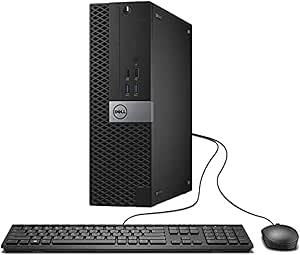 | Best Upgradeable Tower | Processor: Intel Core i5-6500 3.2GHz | RAM: 16GB DDR4 | Storage: 256GB SSD | VIEW ON AMAZON | See Our Full Breakdown |
| Dell OptiPlex 3060 Desktop (i5-8500) |  | Best for Heavy Multitasking | Processor: Intel Core i5-8500 3.2GHz (6-Core) | RAM: 32GB DDR4 | Storage: 1TB SSD | VIEW ON AMAZON | See Our Full Breakdown |
| Dell OptiPlex 9020 Desktop with Monitor |  | Best Complete Kit | Processor: Intel Core i5-4570 3.2GHz (4-Core) | RAM: 8GB DDR3 | Storage: 500GB HDD | VIEW ON AMAZON | See Our Full Breakdown |
| Dell OptiPlex 5050 SFF PC Desktop Computer, 3.4GHz Intel i5-7500, 16GB RAM, 256GB SSD, Windows 11 Pro 64-bit (Renewed) |  | Best for Space-Constrained Home Studios | Processor: Intel Core i5-7500, 3.4 GHz | RAM: 16GB DDR4 | Storage: 256GB SSD | VIEW ON AMAZON | See Our Full Breakdown |
| Prebuilt Desktop Computer PC with Core i5, 8GB RAM, 256GB SSD, Windows 11 Home |  | Best Entry-Level Upgradable Chassis | Processor: Intel Core i5, up to 3.4GHz | RAM: 8 GB DDR3 SDRAM | Storage: 256 GB SSD | VIEW ON AMAZON | See Our Full Breakdown |
| computer for music production on a budget | Processor | RAM | Storage | Connectivity |
|---|---|---|---|---|
| Dell OptiPlex 5060 Desktop Com | Intel Core i5-8500 (6 Cores) | 16GB DDR4 | 500GB SSD + 1TB HDD | WiFi, Bluetooth, LAN |
| Dell Precision 3620 / T3620 Wo | Intel Core i7-6700 (4 Cores) | 32GB DDR4 | 512GB SSD + 2TB HDD | — |
| HP ProDesk 600 G3 SFF Bundle | Intel Core i5-6500 (4 Cores) | 16GB DDR4 | 256GB SSD | WiFi, Bluetooth |
| Lenovo ThinkCentre M710q Tiny | Intel Core i3-6100T | 8GB DDR4 | 256GB SSD | WiFi, Bluetooth |
| Dell OptiPlex 3050 SFF | Intel Core i5-6500 | 16GB DDR4 | 256GB SSD | WiFi, Bluetooth |
| Dell OptiPlex 3060 Micro PC | Intel Core i3-8100T 3.1 GHz | 8GB DDR4 | 128GB SSD | 6x USB 3.0, 1x HDMI |
| Dell OptiPlex 7050 Desktop Com | Intel Core i5-7500 3.4GHz | 16GB DDR4 | 512GB SSD | Wi-Fi 802.11ac, Bluetooth, USB-C |
| Dell OptiPlex 7040 SFF | Intel Core i5-6500 3.2GHz | 16GB DDR4 | 256GB SSD | USB 3.0, HDMI, VGA, Wi-Fi |
| Dell OptiPlex 3060 Desktop | Intel Core i5-8500 3.2GHz (6-Core) | 32GB DDR4 | 1TB SSD | Wi-Fi 6, Bluetooth, USB 3.0 |
| Dell OptiPlex 9020 Desktop wit | Intel Core i5-4570 3.2GHz (4-Core) | 8GB DDR3 | 500GB HDD | Wi-Fi, VGA, DisplayPort, USB 3.0 |
| Dell OptiPlex 5050 SFF PC Desk | Intel Core i5-7500, 3.4 GHz | 16GB DDR4 | 256GB SSD | HDMI, USB, LAN, Wi-Fi 802.11ac, Bluetooth |
| Prebuilt Desktop Computer PC w | Intel Core i5, up to 3.4GHz | 8 GB DDR3 SDRAM | 256 GB SSD | WiFi 6, BT 5.3, HDMI, Ethernet |
More Details on Our Top Picks
Dell OptiPlex 5060 Desktop Computer
This machine strikes a rare balance for budget producers, offering six-core processing that handles heavy DAW sessions better than the quad-core options in this list. The 16GB of DDR4 RAM is the industry standard for running multiple plugins without stuttering, while the dual-drive setup keeps your OS fast and your sample libraries accessible. Compared to the Lenovo ThinkCentre M710q, this Dell provides significantly more headroom for multitasking and future expansion. However, as a renewed unit, you must verify the condition of the internal fans, as older hardware can become noisy—a critical factor for recording vocals.
Pros:- Six-core processor handles heavy plugin loads efficiently
- Dual storage setup balances speed and capacity
- Compact tower form factor fits most home studios
- Windows 11 Pro offers advanced audio management tools
Cons:- Integrated graphics limit visual-heavy workflows
- Renewed units may have aging cooling fans
- Limited PCIe slots for future audio interface upgrades
Best for: Producers who need reliable multitasking power for mixing and mastering without breaking the bank.
Not ideal for: Users who require silent operation for live vocal recording, as older tower fans may be audible.
- Processor:Intel Core i5-8500 (6 Cores)
- RAM:16GB DDR4
- Storage:500GB SSD + 1TB HDD
- Graphics:Intel UHD Graphics 630
- OS:Windows 11 Pro
- Connectivity:WiFi, Bluetooth, LAN
- Ports:10 USB Ports, HDMI, Component
Our verdict“This is the most balanced option for serious hobbyists who need power and storage in one package.”
Dell Precision 3620 / T3620 Workstation
If you run large orchestral templates or dozens of audio tracks, this workstation’s 32GB of RAM sets it apart from every other budget pick here. The Dell Precision T3620 is built for stability, with a larger chassis that typically offers better airflow than the smaller SFF models. While the Dell OptiPlex 5060 uses a newer CPU generation, the Precision’s massive memory buffer makes it superior for complex projects where RAM is the bottleneck. The tradeoff is its bulkier size and older architecture, which may lack the single-core speed needed for real-time low-latency recording compared to newer chips.
Pros:- 32GB RAM handles massive sample libraries easily
- Workstation-grade build quality for long sessions
- Large chassis allows for better cooling and upgrades
- Dual storage ensures fast boot and ample archive space
Cons:- Bulkier form factor takes up significant desk space
- Older i7-6700 CPU has lower single-core performance
- Higher power consumption than modern SFF units
Best for: Musicians working with large sample libraries or complex mixing sessions requiring high RAM.
Not ideal for: Those with limited desk space or who prioritize low-latency real-time recording over track count.
- Processor:Intel Core i7-6700 (4 Cores)
- RAM:32GB DDR4
- Storage:512GB SSD + 2TB HDD
- Graphics:Intel HD Graphics 530
- OS:Windows 11 Pro
- Form Factor:Tower
- Ports:USB 3.0, DisplayPort, HDMI
Our verdict“Choose this if you need maximum RAM for heavy projects and have the space for a larger tower.”
HP ProDesk 600 G3 SFF Bundle
This bundle removes the headache of sourcing peripherals by including a 21.5″ FHD monitor, keyboard, and mouse. For beginners, the HP ProDesk 600 G3 offers a plug-and-play experience that the bare-bones Dell OptiPlex 5060 lacks. The i5-6500 processor is adequate for learning a DAW and basic mixing, though it will struggle with heavy multi-track recording compared to the six-core Dell. The inclusion of a monitor is the key differentiator here, making it a cost-effective solution for setting up a functional studio corner in one purchase.
Pros:- Includes 21.5″ FHD monitor and peripherals
- Small Form Factor saves desk space
- 16GB RAM is sufficient for entry-level production
- Windows 11 Pro provides robust software compatibility
Cons:- 256GB SSD fills up quickly with sample libraries
- Quad-core CPU limits heavy multitasking
- Monitor quality is basic for color-critical work
Best for: Beginners who need a complete workstation setup including a monitor and peripherals.
Not ideal for: Experienced producers who already own high-quality monitors and want more CPU power.
- Processor:Intel Core i5-6500 (4 Cores)
- RAM:16GB DDR4
- Storage:256GB SSD
- Monitor:21.5″ FHD LCD
- OS:Windows 11 Pro
- Connectivity:WiFi, Bluetooth
- Included:Keyboard, Mouse, Monitor
Our verdict“The ideal choice for newcomers who want everything they need to start producing immediately.”
Lenovo ThinkCentre M710q Tiny
The Lenovo ThinkCentre M710q is designed for producers with zero desk space, measuring just a few inches across. It runs quieter than the tower options like the Dell Precision 3620, making it suitable for small rooms where noise matters. However, the 8GB of RAM is a significant limitation; you will hit memory walls quickly when loading plugins. While the i3 processor can handle basic beat-making, it lacks the power of the i5 in the HP ProDesk. This is a machine for minimalists who prioritize footprint over performance headroom.
Pros:- Ultra-compact size fits anywhere
- Quiet operation suitable for home studios
- Includes keyboard and mouse
- Fast SSD boot times
Cons:- 8GB RAM is insufficient for modern DAWs
- Limited upgradeability due to tiny chassis
- Basic i3 processor struggles with heavy loads
Best for: Producers with extremely limited space who work on simple projects or MIDI-heavy tracks.
Not ideal for: Anyone planning to record multiple tracks simultaneously or use large sample libraries.
- Processor:Intel Core i3-6100T
- RAM:8GB DDR4
- Storage:256GB SSD
- OS:Windows 11 Pro
- Form Factor:Tiny
- Connectivity:WiFi, Bluetooth
- Included:Keyboard, Mouse, WiFi Adapter
Our verdict“A space-saving solution for light users, but too constrained for serious music production.”
Dell OptiPlex 3050 SFF
The Dell OptiPlex 3050 offers a solid middle ground with a quad-core i5 and 16GB of RAM, matching the HP’s specs but often at a lower price point. It supports dual 4K displays, allowing you to spread your DAW and mixer across screens, a feature the Lenovo M710q lacks. While it lacks the secondary hard drive found in the Dell OptiPlex 5060, the 256GB SSD is fast enough for OS and active projects. You will need to rely on external drives for sample libraries, but for a starter studio, this provides a reliable and upgradeable foundation.
Pros:- Quad-core i5 handles basic production well
- Supports dual 4K displays for better workflow
- Small Form Factor is desk-friendly
- 16GB RAM provides decent multitasking
Cons:- Single 256GB SSD limits internal storage
- Older generation CPU compared to newer Dell models
- Renewed condition may vary between units
Best for: Budget-conscious users who want a reliable quad-core system with multi-monitor support.
Not ideal for: Those who need large internal storage for sample libraries without external drives.
- Processor:Intel Core i5-6500
- RAM:16GB DDR4
- Storage:256GB SSD
- Graphics:Intel HD Graphics 530
- OS:Windows 11 Pro
- Display Support:Dual 4K via DP/HDMI
- Connectivity:WiFi, Bluetooth
Our verdict“A dependable entry-level choice that balances performance and connectivity for new producers.”
Dell OptiPlex 3060 Micro PC
This micro form factor PC is the smallest option in the lineup, making it ideal for producers with limited desk space. The Intel Core i3-8100T handles basic DAW sessions and plugin processing for simple projects, though it lacks the headroom of the Dell OptiPlex 7050. Its 8GB of RAM is the primary bottleneck; while sufficient for learning, it will struggle with heavy sample libraries or complex multi-track sessions. Compared to the Dell OptiPlex 9020, this unit offers a modern SSD and faster DDR4 memory, ensuring snappier load times despite the lower core count. It is a functional entry point for beginners who prioritize footprint over raw power.Pros:- Extremely compact micro form factor fits anywhere
- Modern SSD storage ensures fast boot and load times
- Supports dual 4K displays for expanded workspace
Cons:- 8GB RAM is insufficient for professional-grade sessions
- 128GB SSD fills up quickly with plugins and samples
- Integrated graphics limit visual workflow efficiency
Best for: Beginners with tight desk space or students needing a portable workstation for basic recording and mixing
Not ideal for: Producers working with large sample libraries or heavy multi-track projects due to limited RAM and processing power
- Processor:Intel Core i3-8100T 3.1 GHz
- RAM:8GB DDR4
- Storage:128GB SSD
- Operating System:Windows 11 Pro
- Graphics:Integrated Intel UHD Graphics
- Connectivity:6x USB 3.0, 1x HDMI
- Form Factor:Micro
Our verdict“A space-saving starter kit for beginners, provided you plan to upgrade storage and memory soon.”
Dell OptiPlex 7050 Desktop Computer
The OptiPlex 7050 strikes a compelling balance between performance and price for budget producers. With 16GB of DDR4 RAM and a 512GB SSD, it comfortably handles mid-sized projects without the storage anxiety found in the Dell OptiPlex 3060 Micro. The Intel Core i5-7500 offers four cores, providing a noticeable step up in multitasking capability over dual-core alternatives. While it lacks the raw power of the Dell OptiPlex 3060 (i5-8500) with 32GB RAM, it remains a robust platform for mixing and mastering. The inclusion of Wi-Fi and Bluetooth simplifies connecting wireless controllers, a convenience missing in many older refurbished units.Pros:- 16GB RAM handles most home studio workflows comfortably
- Large 512GB SSD accommodates substantial sample libraries
- Built-in Wi-Fi and Bluetooth reduce cable clutter
Cons:- TPM 1.2 chip may limit some Windows 11 security features
- Older 7th Gen processor is less efficient than newer generations
- Maximum RAM upgrade path capped at 32GB
Best for: Intermediate hobbyists who need reliable performance for mid-sized projects without breaking the bank
Not ideal for: Users requiring maximum RAM capacity for orchestral templates or heavy virtual instrument loads
- Processor:Intel Core i5-7500 3.4GHz
- RAM:16GB DDR4
- Storage:512GB SSD
- Operating System:Windows 11 Pro
- Graphics:Intel HD Graphics 630
- Connectivity:Wi-Fi 802.11ac, Bluetooth, USB-C
- Form Factor:Small Form Factor
Our verdict“A solid all-rounder that offers enough RAM and storage for serious hobbyist production.”
Dell OptiPlex 7040 SFF
This Small Form Factor unit is defined by its flexibility. Unlike the sealed micro systems, the Dell OptiPlex 7040 features five expansion slots and a traditional tower layout, allowing for future hardware modifications. The Intel Core i5-6500 is a 6th-generation chip, placing it a step behind the 7th Gen Dell OptiPlex 7050 in single-core speed, but it still manages 16GB of RAM effectively. The 256GB SSD is a reasonable middle ground, larger than the Dell OptiPlex 3060 Micro’s drive but smaller than the 7050’s. This machine suits producers who want a desktop that can grow with their needs, offering better thermal management than the tinier options.Pros:- Internal expansion slots allow for future hardware additions
- 16GB RAM provides a stable baseline for DAW performance
- Traditional cooling design handles sustained loads well
Cons:- 6th Gen processor is slower than 7th and 8th Gen alternatives
- 256GB storage requires immediate external drive planning
- Bulky tower design takes up more desk real estate
Best for: Tinkerers and producers who want the ability to add expansion cards or upgrade components later
Not ideal for: Those seeking the absolute lowest latency or highest core count for CPU-intensive rendering tasks
- Processor:Intel Core i5-6500 3.2GHz
- RAM:16GB DDR4
- Storage:256GB SSD
- Operating System:Windows 11 Pro
- Graphics:Intel HD Graphics 530
- Expansion:5 Internal Slots
- Connectivity:USB 3.0, HDMI, VGA, Wi-Fi
Our verdict“The best choice for upgraders, offering a traditional layout and expansion potential at a budget price.”
Dell OptiPlex 3060 Desktop (i5-8500)
This unit is the power user’s pick in this budget bracket, distinguished by its massive 32GB of DDR4 RAM. This capacity allows for running multiple virtual instruments and complex projects without swapping memory to disk, a significant advantage over the Dell OptiPlex 7050’s 16GB. The 1TB SSD eliminates storage concerns entirely, letting you keep all your libraries on fast internal storage. The Intel Core i5-8500 is a 6-core processor, offering superior multitasking performance compared to the 4-core Dell OptiPlex 7040. If your workflow involves heavy sampling or simultaneous DAWs and browsers, this machine provides the headroom others lack.Pros:- 32GB RAM handles large projects and heavy plugins with ease
- 1TB SSD provides ample space for all samples and projects
- 6-core i5 processor offers strong multitasking performance
Cons:- 8th Gen i5 is not as efficient as newer 10th/11th Gen chips
- Integrated graphics may struggle with heavy visualizers
- Higher cost compared to lower-spec refurbished options
Best for: Serious producers and audio engineers who run large sample libraries and heavy multi-track sessions
Not ideal for: Users on a strict minimum budget who do not require high RAM capacity or large internal storage
- Processor:Intel Core i5-8500 3.2GHz (6-Core)
- RAM:32GB DDR4
- Storage:1TB SSD
- Operating System:Windows 11 Pro
- Graphics:Intel UHD Graphics 630
- Connectivity:Wi-Fi 6, Bluetooth, USB 3.0
- Form Factor:Small Form Factor
Our verdict“The most capable machine for heavy workloads, thanks to its generous RAM and massive SSD.”
Dell OptiPlex 9020 Desktop with Monitor
This option is unique because it includes a 20-inch monitor, keyboard, and mouse, making it a true plug-and-play solution. However, the internal specs reflect an older generation: DDR3 RAM and a 500GB HDD instead of an SSD. This mechanical drive will significantly slow down sample loading and project saving compared to the SSDs in the Dell OptiPlex 7050 or 3060. The 4th Gen Intel i5 is functional for basic editing but lacks the efficiency of newer chips. It serves as an emergency or entry-level kit for someone who has absolutely no peripherals, but it requires a quick SSD upgrade to be truly viable for music production.Pros:- Includes a 20-inch monitor, keyboard, and mouse
- Quad-core i5 processor is adequate for basic DAW tasks
- Multiple USB ports for connecting audio interfaces and controllers
Cons:- Slow 500GB HDD significantly impacts load times and workflow
- Older DDR3 RAM is slower and less efficient than DDR4
- 4th Gen processor lacks modern instruction sets for efficiency
Best for: Total beginners who lack a monitor, keyboard, and mouse and need an immediate turnkey solution
Not ideal for: Producers who value speed and workflow efficiency, as the HDD and DDR3 RAM create bottlenecks
- Processor:Intel Core i5-4570 3.2GHz (4-Core)
- RAM:8GB DDR3
- Storage:500GB HDD
- Operating System:Windows 11 Pro
- Included Monitor:20-inch LCD
- Graphics:Intel HD Graphics 4600
- Connectivity:Wi-Fi, VGA, DisplayPort, USB 3.0
Our verdict“A convenient starter kit for those missing all peripherals, though it needs an SSD upgrade for serious use.”
Dell OptiPlex 5050 SFF PC Desktop Computer, 3.4GHz Intel i5-7500, 16GB RAM, 256GB SSD, Windows 11 Pro 64-bit (Renewed)
This compact desktop is ideal for producers with limited desk space who refuse to compromise on core processing power. The Intel Core i5-7500 paired with 16GB of DDR4 RAM handles multi-track sessions in DAWs like Ableton or FL Studio with surprising stability. Compared to the Dell OptiPlex 3050 SFF, this model offers a slightly faster processor generation, resulting in smoother plugin handling during complex mixes. However, the small form factor chassis restricts internal expansion, meaning you cannot add a dedicated GPU or multiple internal drives later. It ships renewed, so while the build quality is robust, the warranty terms vary by seller, unlike some newer prebuilts.Pros:- Compact footprint fits easily on crowded desks
- 16GB RAM supports moderate to heavy plugin loads
- Windows 11 Pro offers advanced security and management features
- Fast SSD boot times reduce workflow friction
Cons:- Limited internal upgrade paths due to SFF design
- Integrated graphics struggle with GPU-accelerated plugins
- Renewed status may imply shorter warranty coverage
Best for: Producers working in small apartments or dorms who need a silent, low-profile machine for recording and mixing.
Not ideal for: Users planning to upgrade to a dedicated graphics card or run heavy video editing alongside audio work.
- Processor:Intel Core i5-7500, 3.4 GHz
- RAM:16GB DDR4
- Storage:256GB SSD
- Operating System:Windows 11 Pro 64-bit
- Graphics:Intel HD Graphics 630
- Dimensions:17.99 x 14.02 x 5.98 inches
- Connectivity:HDMI, USB, LAN, Wi-Fi 802.11ac, Bluetooth
Our verdict“Choose this if you prioritize desk real estate and sufficient RAM for standard music production over future expandability.”
Prebuilt Desktop Computer PC with Core i5, 8GB RAM, 256GB SSD, Windows 11 Home
This machine stands out for its expandable tower design, a significant advantage over the sealed small-form-factor options like the Dell OptiPlex 5050. The 400W power supply and matte black chassis are built to accommodate a dedicated GPU or additional storage later, making it a smart long-term investment for growing producers. However, the 8GB DDR3 RAM is a notable bottleneck; DDR3 is slower and less efficient than the DDR4 found in most other budget picks, potentially causing audio dropouts in larger projects. You will likely need to upgrade the memory immediately. The WiFi 6 connectivity is a modern touch rarely seen at this price point, ensuring faster network transfers for sample libraries.Pros:- Expandable chassis allows for future component upgrades
- WiFi 6 support ensures modern network speeds
- 400W PSU provides headroom for adding a GPU
- Advanced cooling system helps maintain quiet operation
Cons:- 8GB DDR3 RAM is outdated and limits multitasking
- No dedicated graphics card included for GPU-heavy tasks
- Inconsistent listing specs may cause confusion during purchase
Best for: Beginners who want a desktop they can physically upgrade with more RAM or a graphics card in the future.
Not ideal for: Producers who need immediate heavy multitasking capability without spending extra on RAM upgrades.
- Processor:Intel Core i5, up to 3.4GHz
- RAM:8 GB DDR3 SDRAM
- Storage:256 GB SSD
- Operating System:Windows 11 Home
- Graphics:Integrated graphics, supports dedicated GPU
- Power Supply:400W wide-voltage
- Connectivity:WiFi 6, BT 5.3, HDMI, Ethernet
Our verdict“Buy this if you are comfortable upgrading the RAM yourself to unlock its true potential as a scalable workstation.”

How We Picked
I evaluated these twelve desktops based on their ability to run Digital Audio Workstations (DAWs) like Ableton Live, Logic Pro (via emulation), and FL Studio without audio dropouts. The primary criteria were processor architecture (favoring 8th Gen Intel over 6th), RAM capacity (prioritizing 16GB and above for plugin-heavy sessions), and storage configuration (requiring an SSD for the OS and DAW to ensure fast load times). I also considered physical form factor and port availability, as music producers often need multiple USB ports for audio interfaces, MIDI controllers, and external drives. The ranking reflects a balance of performance-per-dollar and future-proofing, placing higher value on units with upgradeable RAM and newer CPU generations.| computer for music production on a budget | Graphics | Operating System |
|---|---|---|
| Dell OptiPlex 5060 Desktop Com | Intel UHD Graphics 630 | — |
| Dell Precision 3620 / T3620 Wo | Intel HD Graphics 530 | — |
| HP ProDesk 600 G3 SFF Bundle | — | — |
| Lenovo ThinkCentre M710q Tiny | — | — |
| Dell OptiPlex 3050 SFF | Intel HD Graphics 530 | — |
| Dell OptiPlex 3060 Micro PC | Integrated Intel UHD Graphics | Windows 11 Pro |
| Dell OptiPlex 7050 Desktop Com | Intel HD Graphics 630 | Windows 11 Pro |
| Dell OptiPlex 7040 SFF | Intel HD Graphics 530 | Windows 11 Pro |
| Dell OptiPlex 3060 Desktop | Intel UHD Graphics 630 | Windows 11 Pro |
| Dell OptiPlex 9020 Desktop wit | Intel HD Graphics 4600 | Windows 11 Pro |
| Dell OptiPlex 5050 SFF PC Desk | Intel HD Graphics 630 | Windows 11 Pro 64-bit |
| Prebuilt Desktop Computer PC w | Integrated graphics, supports dedicated GPU | Windows 11 Home |
Factors to Consider When Choosing Computer For Music Production On A Budget
Selecting a budget computer for music production involves navigating technical specifications that directly impact your creative workflow. Unlike general office computing, audio work demands low-latency processing and high memory throughput. Here are the key factors to weigh before making a purchase.RAM Capacity vs. Plugin Load
Random Access Memory (RAM) is the most common bottleneck in budget music production. While 8GB is sufficient for simple beat-making or recording single instruments, it quickly becomes insufficient when you load large sample libraries like Kontakt or Splice packs. 16GB is the practical minimum for modern production, allowing you to run a DAW and a few heavy plugins simultaneously. If you plan on orchestral scoring or complex electronic tracks with dozens of tracks and effects, 32GB provides essential headroom. Upgrading RAM is often cheaper and easier on these desktop towers than on laptops, so considering the upgrade path is wise if you start with 16GB.
CPU Single-Core vs. Multi-Core Performance
Digital Audio Workstations rely heavily on single-core speed for real-time audio processing, while multi-core performance helps with rendering and complex parallel processing. Newer generations of Intel Core i5 processors (like the 8th Gen i5-8500) offer better single-core efficiency and core counts (6 cores) compared to older 4-core variants (i5-6500). Do not underestimate the processor generation; an 8th Gen i5 will outperform a 6th Gen i7 in many audio tasks due to architectural improvements. If you are choosing between an older high-end CPU and a newer mid-range CPU, the newer mid-range chip is usually the better investment for longevity and driver support.
The Importance of SSD for System and Projects
Hard Disk Drives (HDDs) are slow for random access, which is exactly how DAWs read small audio files and plugin data. Running your operating system and DAW on a Solid State Drive (SSD) is non-negotiable for a smooth experience. It reduces project load times from minutes to seconds and prevents audio dropouts when streaming samples. Many budget desktops come with small SSDs (128GB-256GB) for the OS and larger HDDs for storage. This hybrid configuration is ideal, but ensure the SSD is at least 256GB to accommodate your DAW, plugins, and current projects. Avoid systems with only mechanical drives for your primary audio work.
Form Factor and Upgradability
Most budget-friendly options are Small Form Factor (SFF) or Micro towers. While they save space, they often have limited power supply units and restricted airflow. Before buying, check if the RAM is accessible and if there are free slots for expansion. The Dell OptiPlex series is known for its proprietary but well-documented upgrade paths, allowing you to swap CPUs or add storage later. If you anticipate needing more power in two years, choose a model with a standard motherboard layout or clear upgrade documentation. Micro PCs like the Lenovo Tiny are convenient but often soldered or limited in RAM slots, making them less flexible for long-term growth.
Connectivity for Audio Interfaces and MIDI
A music production PC needs reliable USB ports to connect audio interfaces, MIDI keyboards, and external hard drives. Look for USB 3.0 or 3.1 ports (often blue) for faster data transfer with external SSDs. While USB-C is becoming common, many professional audio interfaces still use USB-A, so having native USB-A ports saves you from using dongles. Also, consider the number of ports; if you have multiple controllers, a hub might be necessary, but native ports offer better stability and lower latency. Ensure the machine has a DisplayPort or HDMI if you use a second monitor for your DAW interface, which is highly recommended for workflow efficiency.
Frequently Asked Questions
Is a renewed business desktop better than a new consumer laptop for music production?
Generally, yes, for static studio setups. Renewed business desktops like the Dell OptiPlex offer superior cooling, easier upgradability, and more stable power delivery than thin consumer laptops, which often throttle performance under sustained load. Laptops are portable but can suffer from thermal issues when rendering long tracks or running heavy plugins. If you do not need to take your music production on the go, a desktop provides better performance per dollar and longer lifespan. However, if portability is a requirement, ensure the laptop has active cooling and at least 16GB of RAM.How much RAM do I actually need for a beginner music producer?
For a beginner starting with electronic music or simple recording, 8GB of RAM is the absolute baseline and can work for basic tasks. However, I strongly recommend 16GB as the sweet spot for budget production. This allows you to run your DAW, a web browser for samples, and several virtual instruments without the system swapping memory to the disk, which causes audio glitches. If you plan to use large sample libraries or work with orchestral music, 16GB might still be tight, making 32GB a worthwhile investment if the budget permits.Can I use these budget PCs for mixing and mastering?
Yes, mixing and mastering are less CPU-intensive than tracking or generating complex synth patches, so these budget PCs handle them well. The main requirement for mixing is a fast drive for loading audio stems and sufficient RAM for holding tracks in memory. A quad-core i5 with 16GB RAM and an SSD will manage a 50-track session with standard EQ and compression plugins without issue. Just ensure your DAW is configured with appropriate buffer sizes to minimize latency during monitoring. For very heavy mastering chains with multiple convolution reverbs and linear phase EQs, a faster single-core CPU helps, but these machines are still capable.Do I need a dedicated graphics card for music production?
No, a dedicated graphics card is rarely necessary for music production unless you are also doing video editing or streaming with heavy visual overlays. Most DAWs rely on integrated graphics for their user interface, which is handled efficiently by Intel HD Graphics 530 or 630 chips found in these CPUs. A dedicated GPU consumes power and generates heat, which can increase fan noise—a major distraction in a recording environment. Stick with integrated graphics to keep the system quiet and cost-effective. If you plan to edit music videos, then look for a system with a discrete GPU, but prioritize CPU and RAM first for audio.What is the biggest risk when buying renewed computers for audio work?
The biggest risk is inconsistent hardware quality or missing drivers from the refurbisher. Ensure the seller offers a warranty and verify that all USB ports and audio outputs function correctly upon arrival. Another risk is outdated BIOS versions, which can affect stability with newer operating systems like Windows 11. I recommend checking if the unit supports TPM 2.0 for Windows 11 compatibility, as some older 6th Gen chips require specific BIOS updates or registry tweaks to install it. Always test your audio interface and DAW immediately upon setup to identify any potential hardware conflicts early.Conclusion
Choosing the right computer for music production on a budget depends on your specific workflow intensity. The Dell OptiPlex 3060 with 32GB RAM is the Best Overall choice for producers who need headroom for complex sessions. For those on the tightest budget who still want reliable performance, the Dell OptiPlex 5060 with 16GB RAM is the Best Value pick. The HP ProDesk 600 G3 is the Best for Beginners because it includes a monitor and peripherals, removing setup friction. If space is at a premium, the Lenovo ThinkCentre M710q Tiny is the Best Compact option, though it offers less upgrade flexibility. Finally, the Dell Precision 3620 is the Best for Large Libraries due to its massive 2TB HDD storage. Evaluate your plugin usage and storage needs to select the model that offers the best balance of performance and capacity.Fall Picks
fall essentials
As an affiliate, we earn on qualifying purchases.