TL;DR

Get audio and creator gear delivered free with Prime
- Fast, free delivery on millions of items
- Prime Video, Amazon Music and more included
- Member-only deals all year
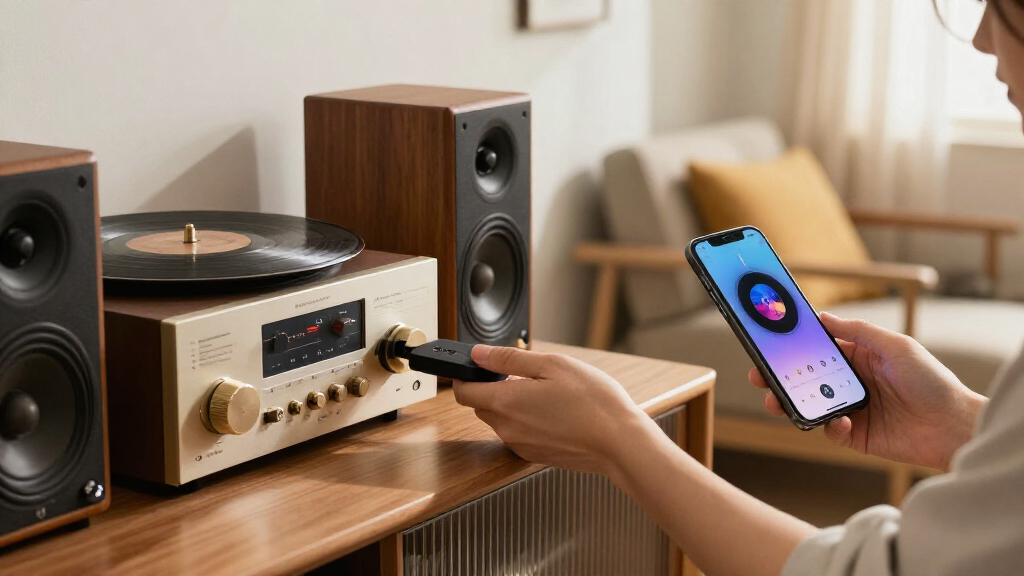
A used Chromecast Audio, available for about $15 according to the source, can add Wi-Fi music streaming to a stereo with an analog or optical input. Its Cast support still works with compatible apps, but Google discontinued the device, and future software or security issues may go unpatched.
A guide published by XDA Developers on October 28, 2026, describes how a used Google Chromecast Audio can add wireless music streaming to a stereo for about $15, avoiding the cost of a newer network streamer. The discontinued device connects to an amplifier over analog or optical audio, though its age and lack of ongoing support carry trade-offs.
The Chromecast Audio is a small, Wi-Fi-connected puck with a micro-USB power port and a combined 3.5mm analog and mini-TOSLINK optical output. The guide says its built-in AKM AK4430 DAC supports audio up to 24-bit/96kHz. A 3.5mm cable can connect it to an amplifier’s AUX input, or a 3.5mm-to-RCA cable can connect it to RCA inputs. With a mini-TOSLINK-to-TOSLINK cable, it sends a digital signal to equipment with an optical input, leaving conversion to the amplifier’s DAC.
Setup involves plugging in the device, using the Google Home app to connect it to Wi-Fi, and assigning it a name. The guide’s author says they have used the device with both a Marantz PM6006 amplifier over optical and a JBL Flip 4 over an AUX cable. Supported services named in the guide include YouTube Music, Spotify, Tidal, Plex and Jellyfin; playback depends on whether an app offers a Cast option.
Unlike Bluetooth playback, casting sends the stream from the service to the Chromecast Audio after the user selects the Cast button. The phone does not have to remain within Bluetooth range for the music to continue. The guide says the dongle can work with iPhones and Android phones when the app supports Cast, and that it does not require new firmware features for compatible apps to send music to it.
FIELD GUIDE / HOME AUDIO / 2026
Give Your Stereo Wireless Music
A used Chromecast Audio can add Wi-Fi streaming to a working stereo for around $15, according to the guide. It is a low-cost route to everyday Cast playback, with clear limits from its discontinued status.
A small bridge for a familiar system
Keep your amplifier and speakers. The Chromecast Audio receives a stream over Wi-Fi and sends sound to an input your stereo already has.
Music over Wi-Fi
Choose Cast in a compatible app. The puck fetches the stream, so playback does not depend on keeping your phone in Bluetooth range.
Simple stereo hookup
Use a 3.5 mm cable to an AUX input, or a 3.5 mm-to-RCA cable for the amplifier’s left and right inputs.
Digital signal path
A mini-TOSLINK-to-TOSLINK cable connects to optical equipment. The amplifier’s DAC handles digital-to-analog conversion.
Analog connection for an amplifier or powered speaker with a 3.5 mm input.
Analog connection for standard red-and-white RCA inputs.
Optical digital connection for equipment with an optical input.
From puck to playback
The guide describes a short setup using Google Home, a suitable power supply, and the Wi-Fi network near the stereo.
Connect power and choose a cable that matches the stereo input.
Use the latest Google Home app to connect the device to Wi-Fi.
Assign a room or device name so it is easy to find when casting.
Open your music app, select Cast, and check the signal where the stereo sits.
The guide gives a 5 V / 1 A power requirement and mentions powering from a mini PC USB port. Whether that works depends on the port and cable; a suitable adapter may be more convenient.
Cast support is the deciding factor
The phone sends the playback request; the device streams over Wi-Fi. Availability depends on the service and app offering a Cast option.
Named as Cast options
The guide lists these services as examples. Check the current app on your device before buying.
Apple Music needs a bridge
The guide says Apple Music lacks a Cast button and AirPlay does not connect directly. Its author uses AirCast in Home Assistant on a mini PC as an AirPlay bridge. This is an additional setup, not built-in support.
For a local library, the guide’s author runs Navidrome on a mini PC and uses NaviBeat, listed at $5.99 one time, to send stream URLs. These are personal setup examples, not requirements for basic Cast playback.
Low price, older platform
Google discontinued Chromecast Audio in 2019. Compatible apps may still cast to it, but future support and long-term reliability are uncertain.
No regular maintenance
Google no longer issues regular updates for the device. The guide says there is no third-party custom firmware to fill that gap.
Past outage, later fix
The guide reports a March 2025 certificate issue that caused an “untrusted device” error. Google later issued a firmware update; factory-reset units needed the latest Google Home app to set up again.
Wi-Fi only
There is no Ethernet port. A weak wireless signal near the stereo may affect performance, and future Cast compatibility is not guaranteed.
The roughly $15 used price and roughly $100 starting point for newer streamers such as the WiiM Mini are figures cited by the guide, not a market-wide survey. Listings, accessories, and condition vary. The guide also cautions that this device “won’t replace a WiiM Ultra.”
Four checks for a used unit
Make sure the low entry price fits your inputs, apps, Wi-Fi, and tolerance for an unsupported device.
- Confirm your stereo has a matching analog or optical input.
- Check whether the listing includes a suitable power adapter and cable.
- Choose a seller with a return policy; used-unit faults and included accessories can vary.
- Verify your intended music app shows Cast, then test Wi-Fi where the stereo will live.
A Low-Cost Route to Stereo Streaming
For someone who already owns a working amplifier and speakers, the device offers a way to add network music playback without replacing the stereo. The guide contrasts its reported used price of about $15 with newer network streamers that start at roughly $100, citing the WiiM Mini as an example. Those prices are the guide’s figures, not a market-wide survey, and used-device listings can vary.
The practical difference is that casting lets the stereo receive music over Wi-Fi rather than depending on a phone’s Bluetooth connection and proximity. That can make an existing setup more convenient for everyday listening. But the Chromecast Audio is not presented as a full substitute for a newer streamer: it lacks features and connections that some current products may offer, and its long-term reliability is uncertain because it is no longer maintained.
Popular right now

Bose QuietComfort Wireless Noise-Cancelling Over-Ear Headphones, Black

Bose QuietComfort Wireless Bluetooth Headphones with Active Noise Cancellation, Mic, USB‑C Charging, Deep Bass, 24‑Hour Battery – White Smok

Samsung 42-Inch S90H OLED 4K Smart TV Bundle
As an affiliate, we earn on qualifying purchases.
How the Discontinued Device Still Works
Google discontinued Chromecast Audio in 2019, but the guide reports that used units can still be found. Its continued usefulness rests on the fact that Cast support is built into compatible apps: the service and app handle the casting request, while the dongle receives and plays the stream. The device’s age does not, by itself, prevent an app that still supports Cast from sending audio to it.
Some listening setups need an additional workaround. According to the guide, Apple Music lacks a Cast button, and AirPlay does not directly communicate with Chromecast devices. The author uses AirCast in Home Assistant, running on a mini PC, to expose Chromecast-capable players as AirPlay targets. For locally stored music, the author runs Navidrome on the same mini PC and uses NaviBeat, listed in the guide at $5.99 as a one-time purchase, to send stream URLs to the Chromecast Audio. These are examples of the author’s setup, not requirements for basic Cast playback.
The guide also describes powering the puck from a mini PC’s USB port, provided the cable can supply power. It says the device’s stated power requirement is 5V/1A. A separate adapter may still be more convenient or appropriate depending on the USB port and cable used.
“The guide describes a used Chromecast Audio as a way to give an existing stereo “a way to receive music from your phone.””
— XDA Developers guide
Support and Used-Unit Risks
The device’s future compatibility is not guaranteed. The guide says Google no longer maintains the Chromecast Audio or issues regular updates, so it is unclear whether future security problems will receive fixes or whether Cast support could change for the older hardware. It also says there is no third-party custom firmware available to address that gap.
A past outage illustrates the potential for service-side problems: in March 2025, an expired intermediate certificate authority caused Chromecast Audio and second-generation Chromecast devices to display an “untrusted device” error, according to the guide. It says Google later issued a firmware update for Chromecast Audio. Owners who had factory-reset their devices before the fix needed the latest Google Home app to set them up again. The source does not establish how common used-device faults are, or whether every current listing includes a working power adapter and cable.
The dongle also has no Ethernet port and depends on Wi-Fi, so performance may suffer where the wireless signal is weak. Buyers should treat the roughly $15 price as an approximate figure, check what accessories are included, and consider the seller’s return policy.
Check the Setup Before Buying
There is no announced product update or new support milestone in the guide. For anyone considering a used unit, the immediate next steps are practical: check that the listing includes a suitable power adapter and cable, confirm the stereo has a compatible analog or optical input, and choose a seller who accepts returns. The guide recommends setting up a purchased device with the latest Google Home app.
After setup, buyers can test their intended music apps to confirm that a Cast button appears and that the home Wi-Fi connection is stable where the stereo sits. People who rely on Apple Music or a local library may need extra software and hardware, as in the guide’s mini-PC example. Whether the low purchase price makes sense depends on those requirements and on accepting that an unsupported device may not receive fixes if a new problem emerges.
Key Questions
What does a Chromecast Audio do?
It connects to an amplifier or speaker over an analog 3.5mm or optical output and can receive music from apps that support Google Cast. It adds streaming connectivity; it does not replace the stereo’s amplifier or speakers.
Does a phone have to stay near the stereo while music plays?
Not as it would with Bluetooth playback. With Cast, the phone sends the playback request and the Chromecast Audio fetches the stream over Wi-Fi. The app and service must support Cast.
Can it play Apple Music directly?
The guide says Apple Music does not offer a Cast button and AirPlay does not directly connect to Chromecast devices. Its author uses AirCast in Home Assistant on a mini PC to bridge AirPlay to a Chromecast Audio; that is an additional setup, not built-in Apple Music support.
Is a used Chromecast Audio still a safe long-term purchase?
That cannot be guaranteed. Google discontinued the device and no longer maintains it, so future security fixes and compatibility changes are uncertain. Weak Wi-Fi can also cause interruptions, and used units may differ in condition and included accessories.
What should I check before buying one?
Check that your stereo has a compatible AUX, RCA or optical input, and verify whether the listing includes a working power adapter and cable. The guide also recommends a seller that accepts returns and using the latest Google Home app for setup.
Source: XDA Developers