
Wireless studio headphones can make recording, editing, DJ practice, and instrument sessions easier, but Bluetooth delay and sound coloration matter when timing and mix decisions count. My best overall pick is the Audio-Technica ATH-M50xBT2 for its studio-focused design and flexibility; the AIAIAI TMA-2 Studio Wireless stands out for buyers prioritizing a purpose-built wireless workflow, while the AOC Auris 1000 targets guitarists who need low-latency amp monitoring. The central tradeoff is convenience versus dependable timing and wired-style monitoring, with comfort, connection options, and intended use also shaping the choice. Read on for how all 11 models compare and which type of buyer each one suits.

Get audio and creator gear delivered free with Prime
- Fast, free delivery on millions of items
- Prime Video, Amazon Music and more included
- Member-only deals all year
Complete the kit


Key Takeaways
- The ATH-M50xBT2 is the most balanced studio-oriented option in this group, while the wired ATH-M50x cannot serve as a wireless substitute despite sharing the family name.
- Wireless purpose matters more than the word “studio” in a product name: the AOC Auris 1000 is aimed at low-latency guitar practice, while several OneOdio and PUPGSIS models lean toward DJ-style versatility.
- A wired fallback changes the usefulness of wireless headphones for recording and editing; check whether the specific model supports wired listening and whether that connection suits your gear.
- Bluetooth convenience does not automatically mean reliable live monitoring. For playing along with an instrument or tracking, low-latency systems or a cable may be a better fit than ordinary Bluetooth.
- The lineup spans very different priorities: the ATH-M20xBT is a simpler entry point, the AIAIAI TMA-2 is the premium-focused pick, and the ATH-M50xBT2 offers the strongest all-around case.
| Audio-Technica ATH-M50xBT2 Wireless Over-Ear Headphones, Black |  | Best Overall Wireless Studio Pick | Driver size: 45 mm | Battery life: Up to 50 hours | Rapid charging: Up to 3 hours of use from a 10-minute charge | VIEW LATEST PRICE | See Our Full Breakdown |
| Audio-Technica ATH-M50x Professional Studio Monitor Headphones | 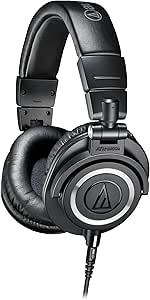 | Best for Wired Monitoring | Driver type and size: 45 mm dynamic | Frequency response: 20 Hz–28,000 Hz | Impedance: 38 ohm | VIEW LATEST PRICE | See Our Full Breakdown |
| PUPGSIS PG-MXPRO Wireless DJ Headphones, Black |  | Best for Multi-Mode DJ Setups | Wireless modes: 2.4 GHz and Bluetooth 5.3 | Wired connection: AUX | Driver size: 50 mm | VIEW LATEST PRICE | See Our Full Breakdown |
| Lewitt LW6 Wireless Studio Headphones |  | Best for Low-Latency Studio Monitoring | Design: Over-ear | Wireless audio: Uncompressed PCM | Latency: Under 6 ms | VIEW LATEST PRICE | See Our Full Breakdown |
| Audio-Technica ATH-M20xBT Wireless Over-Ear Headphones, Black |  | Best Long-Battery Entry Pick | Driver size: 40 mm | Connectivity: Bluetooth and wired connection via 1.2 m cable | Multipoint pairing: Connects to two devices | VIEW LATEST PRICE | See Our Full Breakdown |
| OneOdio Studio Max 1 Wireless DJ and Wired Studio Headphones |  | Best for Single-Ear DJ Monitoring | Driver size: 50 mm | Bluetooth version: 5.2 listed in specs | Bluetooth range: 10 meters | VIEW LATEST PRICE | See Our Full Breakdown |
| OneOdio A70 Bluetooth Over-Ear Headphones |  | Best Value for Wireless-to-Wired Flexibility | Driver size: 40 mm neodymium | Wireless playtime: Up to 72 hours | Wired connections: 3.5 mm and 6.35 mm | VIEW LATEST PRICE | See Our Full Breakdown |
| TALIX H30 Hi-Res Bluetooth Over-Ear Headphones – Purple |  | Best for ANC and Long Listening Sessions | Driver type and size: Dynamic, 40 mm | Battery life: 110 hours; 65 hours with ANC | Fast charge: 5 minutes for 4 hours of playback | VIEW LATEST PRICE | See Our Full Breakdown |
| AIAIAI TMA-2 Studio Wireless Over-Ear Headphones |  | Best for Low-Latency Wireless Production | Connectivity: W+ Link, Bluetooth 5.3, and detachable cable | Latency: Under 10 ms via W+ Link | Playback time: Over 20 hours | VIEW LATEST PRICE | See Our Full Breakdown |
| AOC Auris 1000 2.4 GHz Wireless Over-Ear Headphones for Guitar Amp – 20 ms Low Latency |  | Best for Wireless Instrument Practice | Wireless connectivity: 2.4 GHz transmitter and Bluetooth 5.3 | Latency: 20 ms via 2.4 GHz | Battery life: 40 hours in 2.4 GHz mode; 55 hours in Bluetooth mode | VIEW LATEST PRICE | See Our Full Breakdown |
| OneOdio Studio Max 2 Wireless DJ Headphones |  | Best for Low-Latency Wireless Monitoring | Driver size: 45 mm | Frequency response: 20 Hz–40 kHz | Audio codec: LDAC | VIEW LATEST PRICE | See Our Full Breakdown |
| wireless studio headphone | Battery life | Driver size |
|---|---|---|
| Audio-Technica ATH-M50xBT2 Wir | Up to 50 hours | 45 mm |
| Audio-Technica ATH-M50x Profes | — | — |
| PUPGSIS PG-MXPRO Wireless DJ H | Up to 60 hours Bluetooth; up to 30 hours 2.4 GHz | 50 mm |
| Lewitt LW6 Wireless Studio Hea | — | — |
| Audio-Technica ATH-M20xBT Wire | Up to 60 hours | 40 mm |
| OneOdio Studio Max 1 Wireless | Up to 120 hours Bluetooth; 50 hours with dongle | 50 mm |
| OneOdio A70 Bluetooth Over-Ear | — | 40 mm neodymium |
| TALIX H30 Hi-Res Bluetooth Ove | 110 hours; 65 hours with ANC | — |
| AIAIAI TMA-2 Studio Wireless O | — | — |
| AOC Auris 1000 2.4 GHz Wireles | 40 hours in 2.4 GHz mode; 55 hours in Bluetooth mode | — |
| OneOdio Studio Max 2 Wireless | Up to 120 hours | 45 mm |
More Details on Our Top Picks
Audio-Technica ATH-M50xBT2 Wireless Over-Ear Headphones, Black
The ATH-M50xBT2 is the most balanced choice here for buyers who want a familiar studio-monitor sound without staying tethered. Its 45 mm drivers and deep, accurate bass make it suited to checking mixes and enjoying everyday listening, while up to 50 hours of battery life reduces charging interruptions. Unlike the wired ATH-M50x, this model adds Bluetooth multipoint and beamforming microphones, so it can move between a computer and phone more conveniently. The Lewitt LW6 is the more purpose-built option for low-latency wireless monitoring, but its stated range is only 5 m; the M50xBT2 is a better fit for general wireless use. Its tradeoff is that Bluetooth is not the same as a dedicated, low-latency studio link, and a full charge takes 3.5 hours.
Pros:- Clear sound with deep, accurate bass from 45 mm drivers
- Up to 50 hours of battery life
- Multipoint pairing connects two Bluetooth devices at once
- Beamforming microphones help clarify calls
Cons:- Bluetooth does not provide the specified under-6-ms monitoring latency of the Lewitt LW6
- A full battery charge takes 3.5 hours
Best for: Home-recording musicians who want a familiar monitor-style sound, long battery life, and the convenience of switching between a computer and phone.
Not ideal for: Mixers who need specified ultra-low-latency wireless monitoring; the Lewitt LW6 is more directly designed for that workflow.
- Driver size:45 mm
- Battery life:Up to 50 hours
- Rapid charging:Up to 3 hours of use from a 10-minute charge
- Multipoint pairing:Connects to two Bluetooth devices at once
- Microphones:Dual microphones with beamforming technology
- Charging connector:USB-C
- Included accessories:USB charging cable, audio cable, and pouch
Our verdict“Choose the ATH-M50xBT2 for versatile wireless listening and studio-style sound, but pick the Lewitt LW6 when low-latency monitoring is the priority.”
Audio-Technica ATH-M50x Professional Studio Monitor Headphones
The ATH-M50x is the clearest fit for studio work where a dependable wired connection matters more than wireless freedom. Its 45 mm dynamic drivers, sound-isolating earcups, and 90-degree swivel support listening checks and one-ear monitoring without requiring Bluetooth. Compared with the wireless ATH-M50xBT2, this version gives up battery-powered convenience and multipoint pairing, but the detachable cable and wired design make it a straightforward choice for recording setups. The Lewitt LW6 offers wireless monitoring with specified latency under 6 ms, so it suits people who need to move around more; the ATH-M50x is better for a fixed desk or tracking position. Its meaningful limitation is just that: it is not wireless, and it has no stated water resistance.
Pros:- 45 mm dynamic drivers deliver clear sound with deep, accurate bass
- Sound-isolating over-ear design
- 90-degree swiveling earcups support one-ear monitoring
- Detachable cable and aluminum enclosure suit regular studio use
Cons:- Wired connection does not provide wireless listening
- Not water resistant
Best for: Studio musicians and engineers who work at a desk or recording station and prefer wired monitoring with swiveling cups for one-ear checks.
Not ideal for: Buyers who specifically need wireless mobility or Bluetooth multipoint; the ATH-M50xBT2 adds those features.
- Driver type and size:45 mm dynamic
- Frequency response:20 Hz–28,000 Hz
- Impedance:38 ohm
- Sensitivity:99 dB
- Wearing style:Over-ear
- Earcup swivel:90 degrees
- Cable:Detachable
- Enclosure material:Aluminum
Our verdict“Pick the ATH-M50x for wired studio monitoring and one-ear listening, not for a wireless workflow.”
PUPGSIS PG-MXPRO Wireless DJ Headphones, Black
The PUPGSIS PG-MXPRO stands apart from the Audio-Technica ATH-M50xBT2 by offering three connection routes: 2.4 GHz, Bluetooth 5.3, and AUX. That flexibility is useful for a DJ or home creator who wants one headset for wireless monitoring, general listening, and a wired fallback. Its 180-degree rotating cups support single-ear monitoring, while the foldable build and case make it easier to carry than a fixed studio setup. Battery life is listed as up to 60 hours over Bluetooth and 30 hours on 2.4 GHz, so the mode used affects how often it needs charging. The Lewitt LW6 specifies under-6-ms latency for studio monitoring; the PG-MXPRO instead emphasizes connection choices and portability, without a stated latency figure or active noise cancellation.
Pros:- 2.4 GHz, Bluetooth 5.3, and AUX provide multiple connection options
- Up to 60 hours of Bluetooth or 30 hours of 2.4 GHz playback
- 180-degree rotating earcups support single-ear monitoring
- Foldable design and included storage case aid portability
Cons:- Battery life varies substantially by wireless connection mode
- No active noise cancellation is specified
- Wireless monitoring latency is not specified
Best for: Mobile DJs and home creators who need Bluetooth for daily listening, 2.4 GHz for compatible wireless gear, and AUX as a wired backup.
Not ideal for: Mix engineers who need documented ultra-low-latency wireless performance or active noise cancellation; neither is specified for this model.
- Wireless modes:2.4 GHz and Bluetooth 5.3
- Wired connection:AUX
- Driver size:50 mm
- Frequency response:20 Hz–40 kHz
- Battery life:Up to 60 hours Bluetooth; up to 30 hours 2.4 GHz
- Ear cup rotation:180 degrees
- Ports:3.5 mm and 6.35 mm
- Included accessories:2.4G transmitter, adapters, cables, storage case, and user manual
Our verdict“Choose the PG-MXPRO for connection flexibility and portable DJ use, but favor the Lewitt LW6 when published low-latency monitoring is the deciding factor.”
Lewitt LW6 Wireless Studio Headphones
The Lewitt LW6 is the specialist choice for recording and monitoring without a cable. Its uncompressed PCM wireless audio and specified latency under 6 ms are aimed at keeping headphone monitoring responsive, a more studio-focused promise than the Bluetooth-first Audio-Technica ATH-M50xBT2. USB-C and 3.5 mm analog connections also give it a wired route, while included software adds custom EQ profiles, virtual studio monitors, a loudness guard, and monitoring tools. That focus comes with a practical constraint: the stated wireless range is just 5 m / 16 ft, so it is better suited to a nearby transmitter than moving around a large room. The PG-MXPRO offers Bluetooth and 2.4 GHz modes for broader use, but does not list comparable latency figures.
Pros:- Uncompressed PCM wireless audio
- Under-6-ms latency is suited to real-time monitoring
- USB-C and 3.5 mm analog connectivity
- Included software offers custom EQ and monitoring features
Cons:- Wireless range is limited to 5 m / 16 ft
- Battery life is not specified in the supplied product details
Best for: Recording musicians and mix engineers who want wireless monitoring with specified low latency and software tools for shaping their listening setup.
Not ideal for: Listeners who need to roam beyond a small studio area or want a stated long battery runtime; the listed range is 5 m and battery life is not provided.
- Design:Over-ear
- Wireless audio:Uncompressed PCM
- Latency:Under 6 ms
- Range:5 m / 16 ft
- Connectivity:USB-C and 3.5 mm analog
- Warranty:2 years
- Included items:RealSound transmitter, USB-C and analog cables, adapters, and transport pouch
Our verdict“Choose the LW6 for nearby, low-latency wireless studio monitoring, but look to the ATH-M50xBT2 for a more clearly documented everyday battery-and-Bluetooth setup.”
Audio-Technica ATH-M20xBT Wireless Over-Ear Headphones, Black
The ATH-M20xBT is the accessible wireless choice in this Audio-Technica group, prioritizing long runtime and simple everyday usability over the more monitor-focused feature set of the ATH-M50xBT2. Its 40 mm drivers are tuned for detailed audio with enhanced bass, and up to 60 hours of battery life means fewer charging stops than the M50xBT2’s stated 50 hours. Multipoint pairing and low-latency mode add practical value for switching between devices and keeping video in sync. A wired cable is included as a fallback, though the product specifies no noise control, unlike the sound-isolating wired ATH-M50x. This is better framed as a wireless listening option with studio-inspired styling than a dedicated low-latency mixing headset: it has no specified 2.4 GHz link or monitoring latency figure.
Pros:- Up to 60 hours of battery life
- Bluetooth multipoint connects two devices
- Included cable supports wired listening
- Low-latency mode helps keep audio and video in sync
Cons:- No noise control is specified
- No dedicated 2.4 GHz connection or numerical wireless monitoring latency is listed
Best for: Budget-conscious home listeners and beginning creators who want long battery life, device switching, and a wired backup for casual studio-adjacent use.
Not ideal for: Mixers who need sound isolation or documented low-latency wireless monitoring; the ATH-M50x is wired and isolating, while the Lewitt LW6 specifies under-6-ms wireless latency.
- Driver size:40 mm
- Connectivity:Bluetooth and wired connection via 1.2 m cable
- Multipoint pairing:Connects to two devices
- Battery life:Up to 60 hours
- Rapid charging:Up to 3 hours of use from a 10-minute charge
- Charging connector:USB-C
- Weight:7.6 ounces
- Noise control:None
Our verdict“Pick the ATH-M20xBT for long-lasting everyday wireless listening and a wired backup, but choose a more studio-focused option for isolated or latency-critical monitoring.”
OneOdio Studio Max 1 Wireless DJ and Wired Studio Headphones
The Studio Max 1 is the most DJ-oriented pick here: its 180-degree rotating ear cups make single-ear monitoring practical, while Bluetooth, wired connections, and a low-latency transmitter cover different listening setups. Its claimed 20 ms latency and 50 mm drivers suit cueing and casual production better than the more everyday-focused OneOdio A70. Battery life is a standout for long sessions, reaching up to 120 hours over Bluetooth, though use with the dongle is listed at 50 hours. The foldable build, travel case, and included adapters add useful portability. Tradeoffs include protein-leather cushions that may feel unsuitable during extended wear, plus conflicting Bluetooth-version information in the product details. I’d choose it for DJ flexibility, not as a substitute for a wired reference monitor.
Pros:- Rotating ear cups support single-ear monitoring
- Bluetooth and wired connections, including 3.5 mm and 6.35 mm
- Long listed battery life, with up to 120 hours in Bluetooth mode
- Foldable design includes a travel case and audio adapters
Cons:- Bluetooth version information conflicts between the description and product details
- Protein-leather cushions may not suit every listener for long sessions
Best for: DJs and home producers who want rotating cups, wireless freedom, and wired connections for studio gear
Not ideal for: Listeners who need verified wireless specifications or dislike protein-leather ear cushions
- Driver size:50 mm
- Bluetooth version:5.2 listed in specs
- Bluetooth range:10 meters
- Latency:20 ms
- Battery life:Up to 120 hours Bluetooth; 50 hours with dongle
- Connections:Bluetooth, 3.5 mm, and 6.35 mm
- Audio features:Hi-Res Audio, LDAC, and LC3
- Ear cup rotation:180 degrees
Our verdict“Choose the Studio Max 1 if hands-on DJ monitoring and flexible connections matter more than unambiguous specs or a different cushion material.”
OneOdio A70 Bluetooth Over-Ear Headphones
The OneOdio A70 is a straightforward choice for listeners who want one foldable headset for wireless listening and studio equipment. Its 3.5 mm and 6.35 mm cables make it easier to connect to common audio sources than a Bluetooth-only pair, while up to 72 hours of listed wireless playtime reduces charging interruptions. Compared with the more DJ-focused Studio Max 1, the A70 gives up rotating ear cups and a low-latency transmitter, but it includes a built-in microphone and audio sharing for broader everyday use. The 40 mm drivers and over-ear fit make it a practical general-purpose option rather than the most specialized tool for monitoring. The main caveat is that the stated battery figure is described as playtime, and the supplied details do not clarify listening conditions or wireless latency.
Pros:- Includes both 3.5 mm and 6.35 mm wired connections
- Up to 72 hours of listed wireless playtime
- Foldable over-ear design with memory cotton and protein-leather materials
- Built-in microphone and audio-sharing support
Cons:- No low-latency wireless specification is provided
- Battery-life conditions are not clarified in the supplied details
Best for: New home-studio users and casual listeners who need wireless playback plus cables for mixers, interfaces, or other audio gear
Not ideal for: DJs and musicians who need specified low-latency wireless monitoring or rotating ear cups for cueing
- Driver size:40 mm neodymium
- Wireless playtime:Up to 72 hours
- Wired connections:3.5 mm and 6.35 mm
- Microphone:Built-in HD microphone with noise reduction
- Fit:Over-ear
- Weight:8.96 ounces
- Warranty:24 months
Our verdict“Pick the A70 for an accessible, flexible headset that handles everyday wireless listening and wired studio connections without DJ-specific features.”
TALIX H30 Hi-Res Bluetooth Over-Ear Headphones – Purple
The TALIX H30 stands apart from the more production-minded OneOdio Studio Max 1 by prioritizing hybrid noise cancellation and long-haul listening over DJ controls. Its stated battery life reaches 110 hours, or 65 hours with ANC enabled, and a five-minute charge is listed to provide four hours of playback. That makes it a strong fit for travel between listening sessions, while the bass-boost mode offers a way to emphasize low frequencies. The 40 mm dynamic drivers and stated frequency response up to 40 kHz support its hi-res positioning, but those specifications alone do not establish a neutral monitoring sound. The supplied connectivity lists USB-C for wired use and charging, with no traditional 3.5 mm or 6.35 mm input specified. I’d favor it for noise reduction, not for instrument monitoring.
Pros:- Hybrid ANC is stated to reduce ambient sound by up to 90%
- Long listed battery life, including 65 hours with ANC
- Five-minute quick charge is listed to provide four hours of playback
- Foldable design and memory-foam protein-leather ear pads
Cons:- No weight specification is supplied
- No 3.5 mm or 6.35 mm connection is listed for traditional studio gear
- ANC and bass boost prioritize listening features over a stated neutral monitoring profile
Best for: Traveling music makers and listeners who want long battery life, ANC, and a bass-boost option in an over-ear wireless pair
Not ideal for: Studio users who require a specified 3.5 mm or 6.35 mm input, or need documented weight before buying
- Driver type and size:Dynamic, 40 mm
- Battery life:110 hours; 65 hours with ANC
- Fast charge:5 minutes for 4 hours of playback
- Bluetooth version:6.0
- Noise cancellation:Hybrid ANC, up to 90% reduction
- Frequency response:Up to 40 kHz
- Impedance:16 ohms
- Connectivity:USB-C for wired use and charging
Our verdict“Choose the TALIX H30 for noise-canceling, extended wireless listening rather than a conventional wired studio-monitoring setup.”
AIAIAI TMA-2 Studio Wireless Over-Ear Headphones
For music makers who need wireless monitoring with a clearly stated delay figure, the AIAIAI TMA-2 Studio Wireless is the most focused option in this group. Its W+ Link connection is specified at under 10 ms latency, lower than the 20 ms figures listed for the OneOdio Studio Max 1 and AOC Auris 1000. Bluetooth 5.3 adds a separate route for everyday listening and calls, while app EQ lets buyers adjust the sound rather than relying on a fixed profile. Memory-foam cushions, a padded headband, and a listed 227 g weight support longer sessions. The compromise is connection flexibility: the supplied details mention a detachable cable but specify no headphone jack, so buyers should verify how that cable connects to their equipment. Playback is over 20 hours, shorter than the long-runtime OneOdio options.
Pros:- W+ Link latency is specified at under 10 ms
- Bluetooth 5.3 supports everyday wireless listening and calls
- Detailed, balanced sound can be adjusted with app EQ
- 227 g weight, memory-foam cushions, and padded headband
Cons:- No headphone jack is specified in the supplied details
- Playback time is over 20 hours, shorter than several alternatives in this roundup
Best for: Producers and instrumentalists who want a dedicated low-latency wireless link, app-based EQ, and a lightweight over-ear fit
Not ideal for: Buyers who need a specified headphone jack or want battery life closer to the OneOdio Studio Max 1 or A70
- Connectivity:W+ Link, Bluetooth 5.3, and detachable cable
- Latency:Under 10 ms via W+ Link
- Playback time:Over 20 hours
- Driver type:Dynamic
- Impedance:32 ohms
- Weight:227 g
- Noise control:Sound isolation
- Included items:Cable, protective pouch, and W+ Link transmitter
Our verdict“Choose the TMA-2 Studio Wireless if sub-10 ms wireless monitoring matters more than maximum battery life or a clearly specified headphone jack.”
AOC Auris 1000 2.4 GHz Wireless Over-Ear Headphones for Guitar Amp – 20 ms Low Latency
The AOC Auris 1000 is aimed squarely at players who want to move around while practicing with an instrument. Its dedicated 2.4 GHz transmitter is specified at 20 ms latency and works by plug and play, avoiding the pairing steps associated with Bluetooth. Bluetooth 5.3 covers phone listening, while the included 3.5 mm and 6.35 mm cables keep guitar amps and other legacy gear in the mix. Compared with the AIAIAI TMA-2 Studio Wireless, the AOC’s latency is higher than the AIAIAI’s under-10-ms figure, but it offers simpler instrument-focused setup and longer stated battery life. The 50 mm neodymium drivers are positioned for transparent audio, though the supplied information does not detail a reference tuning profile. Its 40-hour 2.4 GHz runtime is lower than its Bluetooth runtime.
Pros:- Dedicated 2.4 GHz link is specified at 20 ms latency
- Plug-and-play transmitter avoids pairing menus for instrument use
- Bluetooth 5.3 adds a wireless option for mobile devices
- Includes 3.5 mm and 6.35 mm audio cables
Cons:- Listed 2.4 GHz battery life is 40 hours, less than the 55-hour Bluetooth figure
- The supplied details do not specify a reference tuning profile
- Only listed in black
Best for: Guitarists, keyboardists, and drummers who want plug-and-play wireless practice with cables available for existing audio equipment
Not ideal for: Producers who need the lowest specified wireless latency or buyers seeking detailed sound-profile and fit information
- Wireless connectivity:2.4 GHz transmitter and Bluetooth 5.3
- Latency:20 ms via 2.4 GHz
- Battery life:40 hours in 2.4 GHz mode; 55 hours in Bluetooth mode
- Drivers:50 mm neodymium
- Audio cables included:3.5 mm and 6.35 mm
- Weight:3.04 ounces
- Color:Black
Our verdict“Pick the Auris 1000 for convenient wireless instrument practice and legacy-cable support, but choose the AIAIAI if sub-10-ms latency is the priority.”
OneOdio Studio Max 2 Wireless DJ Headphones
The Studio Max 2 is the most connection-flexible pick in this roundup for DJs and creators who want wireless monitoring without giving up wired options. Its stated 9 ms latency is aimed at keeping audio and action closely aligned, while 2.4 GHz wireless, Bluetooth 6.0, and wired connections let you choose the link that fits the job. Compared with the AOC Auris 1000, which lists 20 ms latency, OneOdio claims a faster response; the AOC’s guitar-amp focus may still suit players seeking that specific setup. The 45 mm drivers, LDAC support, and 20 Hz–40 kHz response target detailed listening, but the listed specs alone do not establish neutral studio tuning. Up to 120 hours of playback is a standout, though battery and latency figures come from the product description, and no active noise cancellation is mentioned.
Pros:- Claimed 9 ms latency is suited to DJ monitoring, editing, and gaming.
- 2.4 GHz wireless, Bluetooth 6.0, and wired connections offer flexible setups.
- LDAC support, 45 mm drivers, and a listed 20 Hz–40 kHz frequency response target detailed playback.
- Up to 120 hours of playback, plus a stated five-minute charge for nine hours of use.
Cons:- No active noise cancellation is listed for blocking room noise.
- The latency and battery figures are product-description claims rather than independently verified data.
- The specifications do not establish a neutral response for critical studio mixing.
Best for: DJs and home creators who want low-latency wireless monitoring, multiple connection choices, and long sessions between charges.
Not ideal for: Engineers who need verified neutral monitoring or listeners who require active noise cancellation for noisy rooms.
- Driver size:45 mm
- Frequency response:20 Hz–40 kHz
- Audio codec:LDAC
- Latency:9 ms
- Connectivity:2.4 GHz wireless, Bluetooth 6.0, and wired
- Wired connections:3.5 mm and 6.35 mm jacks
- Battery life:Up to 120 hours
- Quick charge:Five minutes of charging provides nine hours of playback
- Design:Over-ear with 180° swivel earcups
Our verdict“Choose the Studio Max 2 if low-latency wireless options and extended playback matter more than noise cancellation or documented neutral tuning.”
How We Picked
I ranked these headphones by how well their stated design and connection options fit actual studio-adjacent work: editing, recording, monitoring, DJ use, and instrument practice. I weighed wireless connection type and latency claims, wired-listening flexibility, comfort-oriented design, and how clearly each model suits a particular workflow. A headphone built for guitar-amp practice should not outrank a more versatile production option for general studio use, even if its latency is a better match for that specific task.
The order also reflects the limits of the product information available: a wireless label alone does not prove studio-accurate tuning, and features such as “Hi-Res” or a DJ designation are not substitutes for dependable monitoring. Models with clearer studio utility and fewer use-case restrictions rank higher; specialized or less clearly documented options rank lower, though they may be the better pick for a narrow need. The wired ATH-M50x remains in the roundup as a useful comparison, but its lack of wireless operation limits its fit for this category.
Factors to Consider When Choosing Wireless Studio Headphones
Before choosing, match the headphones to the signal path and task you actually use. Wireless studio headphones can be practical for listening, editing, and untethered practice, but no single connection type suits every recording setup.
Match Wireless Type to the Job
Bluetooth is handy for playback and casual editing, but latency can make a performance feel disconnected from what you hear. A dedicated 2.4 GHz system may be a better fit for live instrument monitoring when its transmitter works with your equipment. Do not assume that “wireless” means suitable for tracking vocals or playing in time. Check the specific connection method, supported devices, and any stated latency figures before buying. For critical timing, a cable or a purpose-built low-latency link is often the safer choice. The AOC guitar-amp model illustrates why intended use can matter more than broad studio branding.
Decide Whether You Need a Wired Fallback
A cable can keep headphones useful when a battery runs down, wireless interference appears, or an interface lacks the right wireless output. Check whether wired playback works with the headphones powered off, since designs differ. Also confirm the connector type and whether the package or your existing setup includes the cable and any needed adapter. A wired fallback is especially useful for recording sessions where a connection interruption would break concentration. Buyers who only listen from a phone may value it less than those switching between an interface, instrument, and mobile device. Do not treat a wired model such as the ATH-M50x as a wireless alternative merely because a Bluetooth version shares its name.
Separate Listening Enjoyment From Mix Decisions
Headphones that sound exciting for music playback are not automatically reliable for judging tonal balance in a mix. Extra bass or treble can lead you to compensate in the opposite direction, so check how the tuning suits your monitoring habits and compare mixes on other playback systems. Product labels such as “studio,” “monitor,” and “Hi-Res” do not by themselves establish neutrality. For detailed editing, consistency and repeatable listening matter more than a list of audio terms. If a model is primarily described for DJ use, consider whether its presentation and features align with your production work. A practical approach is to use headphones for edits and checks, then verify important mix decisions elsewhere.
Prioritize Comfort for Session Length
Clamping force, ear-cup depth, weight, and heat buildup can matter more than a small feature difference during long sessions. A snug fit may help block room noise, but excessive pressure can make extended editing uncomfortable. Over-ear designs vary in how well they fit different head shapes and whether the ear pads leave enough room around the ears. If possible, check the return terms and try the headphones through a session-length listening period. Also look into replacement pads and whether the headband or other wear parts can be maintained. A comfortable model is more likely to stay useful than one with impressive specifications that becomes tiring to wear.
Check Compatibility Before Paying for Convenience
Wireless headphones need a compatible source, and a studio interface may not behave like a phone or laptop. Confirm whether the headphones pair directly with your device or require a transmitter, and check which input or output your gear provides. Shared spaces can bring wireless congestion, while walls and distance can affect connection stability. If you plan to monitor a microphone, check for sound leakage as well as isolation; open or leaky designs can send playback into the recording. Buyers using several devices should check how pairing and source switching work rather than assuming seamless handoff. A little setup checking can prevent a convenient-looking purchase from becoming awkward in the studio.
Pay More for a Real Workflow Benefit
A higher-tier model makes sense when its construction, replaceable parts, connection flexibility, or specific low-latency system addresses a problem you encounter regularly. Paying extra for wireless playback alone may bring little benefit if you mostly work beside an interface and can use a cable. New producers often gain more from a dependable wired fallback and comfortable fit than from niche connectivity features they will rarely use. For a dedicated wireless studio routine, a premium modular or purpose-built design may justify its added cost through serviceability or a closer match to the workflow. Compare the full setup, including transmitter needs and accessories, rather than judging the headphones in isolation. The best value is the option that solves your actual constraint without adding features you will not use.
Frequently Asked Questions
Can I use Bluetooth headphones to monitor while recording vocals?
You can use Bluetooth headphones to listen during a session, but delay may make live monitoring distracting or throw off timing. For vocal recording, a wired connection is generally the more dependable choice unless your wireless setup is specifically designed for low latency. Also check how much sound leaks from the ear cups, since a microphone may pick up playback. If you want wireless convenience between takes, keep a cable available for recording itself. The right choice depends on whether you are monitoring a live performance or listening back to an existing take.
Is a wired studio headphone still worth considering in a wireless roundup?
Yes, if you want to compare familiar studio-style construction or need a dedicated wired pair for work where latency matters. The ATH-M50x is not a wireless headphone, so it cannot replace the ATH-M50xBT2 for untethered listening. It can still make sense as a separate monitoring option for an interface or mixer. Treat it as a wired alternative, not a wireless model with a missing feature. If one pair needs to cover both cable-free listening and studio monitoring, choose a model with wireless operation and a compatible wired mode.
Does a low-latency guitar headphone system work like ordinary Bluetooth?
Not necessarily. A purpose-built 2.4 GHz system, such as the AOC Auris 1000, is designed around instrument monitoring and may behave differently from Bluetooth headphones paired to a phone. Check whether it includes or requires a transmitter and whether that transmitter matches your amp or processor output. Its stated latency is relevant to timing, but connection stability and compatibility still matter. For music streaming and general device use, Bluetooth may be more convenient; for playing along with an amp, a dedicated link can be the more suitable tool.
Should I choose a DJ-style wireless model for mixing music?
A DJ-oriented headphone can work for listening and cueing, but that label alone does not tell you whether its sound is suitable for making balanced production decisions. Check for the connections you need, the comfort of the fit, and whether it can be used wired with your mixer or interface. Bluetooth delay can also complicate real-time cueing, depending on the setup. If your main job is mixing tracks, prioritize repeatable tonal balance and a reliable wired option over DJ branding. If you also practice or listen casually, a versatile DJ model may cover more of your routine.
What should I check before choosing the ATH-M50xBT2 over the ATH-M20xBT?
Start with the work you need the headphones to do, not just the shared brand name. The ATH-M50xBT2 is the stronger general-purpose studio-oriented choice in this roundup, while the ATH-M20xBT is a simpler entry point for buyers who want wireless over-ear listening without prioritizing the broader feature set. Compare connection options, comfort, and how you plan to use them with your recording gear. If you need precise live monitoring, check latency and wired-use details rather than assuming either model will behave like a dedicated low-latency system. Choose the less complex option when it meets your needs; pay for the higher-tier model only if its extra flexibility matters to your workflow.
Conclusion
For most buyers seeking one wireless pair for studio-adjacent listening and flexible everyday use, I recommend the Audio-Technica ATH-M50xBT2 as best overall. The Audio-Technica ATH-M20xBT is my best value and beginner-oriented pick for a simpler entry into wireless over-ear headphones, while the AIAIAI TMA-2 Studio Wireless is the best premium choice for buyers drawn to a dedicated, higher-end wireless workflow. Guitarists who need a specific amp-practice solution should look first at the AOC Auris 1000, and DJ-focused buyers can compare the OneOdio and PUPGSIS options based on their connection needs. If wireless operation is not a requirement, the wired ATH-M50x remains a separate option, not a substitute for a Bluetooth model. Pick according to your source gear and monitoring task: for recording in time, favor a cable or purpose-built low-latency system; for untethered listening, choose the wireless model whose fit and features match your routine.
Halloween Picks

Jenaai 5.3-Foot Motion-Activated Halloween Animatronic Skeleton

DomKom 6-Foot Halloween Inflatable Ghosts Roasting Marshmallows

HOPOCO Halloween Pumpkin Fog Machine with 12 LED Colors & Remote Control
As an affiliate, we earn on qualifying purchases.