
TL;DR

Get audio and creator gear delivered free with Prime
- Fast, free delivery on millions of items
- Prime Video, Amazon Music and more included
- Member-only deals all year
Wireless microphone systems for singers send audio from a handheld microphone or bodypack transmitter to a receiver connected to your mixer or speaker. Sound, range, and reliability depend on the microphone capsule, radio conditions, receiver and antenna placement, and local frequency rules. Choose a compatible system for your venue, coordinate frequencies, test it onstage, and keep a charged spare battery ready.
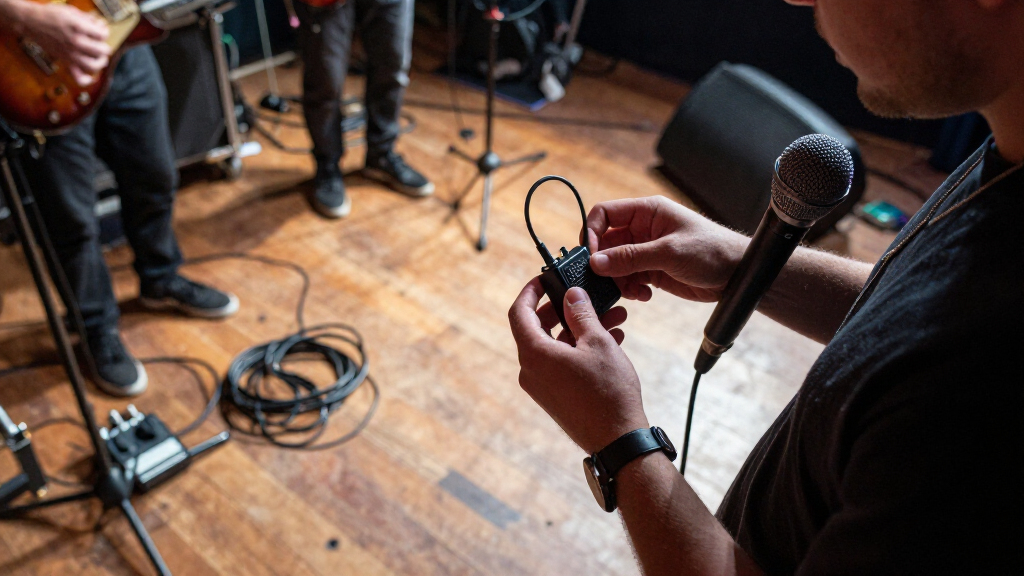
A typical setup has a handheld or bodypack transmitter, a compatible receiver, and an audio connection to a mixer or powered speaker.
Test the capsule with your voice; tone, pickup pattern, feedback resistance, and handling noise all matter.
Treat advertised range as an ideal-condition figure and walk the full stage during sound check.
Check current local frequency rules and coordinate wireless microphones and in-ear systems together.
Confirm battery runtime in real use and keep a charged spare battery or compatible transmitter ready.
What a wireless microphone system needs to get your voice to the speakers
A wireless microphone system sends your voice from a transmitter to a receiver, which connects to a mixer or powered speaker. The typical setup uses a handheld microphone with a built-in transmitter, a receiver near the sound system, and an audio cable from that receiver to the mixer. A bodypack transmitter is another option, usually paired with a headset or lavalier microphone. For a singer who works the stage, a handheld transmitter keeps the mic familiar while letting singers move freely onstage without a cable running from the microphone to the sound system. At a wedding gig, for example, you can step down from the stage for a chorus without dragging a cable through the front row. That freedom also adds a few responsibilities: the microphone depends on batteries and a radio link, and you need to keep its signal clear as you move. A cable can tug or limit movement, but it does not need frequency coordination or a transmitter battery. The parts must work together. Transmitters and receivers generally need to be compatible within the same system or product family, so check compatibility before buying an extra handheld or bodypack. The receiver is the bridge back to the wired sound system; its output, antenna setup, and placement influence whether the voice reaches the mixer steadily. A wireless mic therefore replaces one cable with a small system whose pieces all need to suit the gig.How to choose a system that fits your voice and venue
Wireless microphone systems for singers work well when you match the complete kit to your voice, stage, and local radio conditions. Start with the microphone and where you perform; then compare the receiver, battery plan, and setup tools. A tiny receiver may suit a solo café act, while a touring band may need rack gear and better antenna placement. The tradeoff is practical: a compact kit is easier to carry and set up, while larger systems may offer more control and better ways to manage antennas and multiple channels.- Test the microphone capsule. Its tone, pickup pattern, feedback resistance, and handling noise matter as much as the wireless link. Sing a loud chorus and a quiet verse into the actual capsule, not just a demo recording. A capsule that flatters your voice at rehearsal volume may behave differently when monitors are loud; testing helps you hear whether you can control dynamics without fighting harshness or feedback.
- Check the legal frequency band. Bands differ by country and share space with broadcast, mobile, and other services. Verify current local rules and availability for the places where you perform. A system that works at home may not be legal or usable on tour, so portability across regions can matter as much as sound quality.
- Match features to your gig. Frequency scanning, channel coordination, remote control, or encryption may help, depending on the system and your needs. For one mic at a weekly rehearsal, simple controls may matter more than network features. For several wireless devices, coordination tools can save setup time and reduce the chance that one device disrupts another.
- Price the whole setup. Include transmitter, receiver, capsule, batteries or charging dock, and any antenna equipment. Compare the complete cost, not just the box with the biggest range number. A low purchase price can be offset by replacement batteries or missing accessories, while a more expensive kit may be worthwhile if its workflow solves a real need.
Why a range number won’t predict every dropout
A wireless microphone’s usable range depends on the system, venue, obstructions, antenna setup, and radio interference, so an advertised maximum is not a guarantee. A clear path across a quiet rehearsal room can behave differently from a crowded venue filled with people, walls, and other transmitters. A range figure is best treated as a comparison under specified conditions, not a promise that every point inside that distance will work during a show. For instance, if you put the receiver behind a metal stage rack and your body blocks the signal as you cross the stage, you may hear a dropout even though you’re within the advertised distance. Metal and walls can weaken or reflect radio signals, and your body can absorb some of the signal too. Place the receiver where it can “see” the performance area, and follow the manufacturer’s guidance for antenna orientation and distance. Improving the path between transmitter and receiver can matter more than buying a model with a larger maximum-range claim. With a rack system at a larger venue, properly placed or remotely mounted antennas can help. They let the receiver pick up the signal from a better position when the rack itself is tucked away, though they add equipment and setup choices. Do a sound check from the far corners and behind likely obstructions; the stage center alone doesn’t tell the whole story. If reception fails in a particular spot, move the receiver or antenna first and repeat the walk test before assuming the system lacks enough range.Digital or analog: compare the tradeoffs before you buy
Digital and analog wireless systems can both suit singers; neither format wins every job. Compare the actual system’s sound, latency, coordination features, power options, and price. Digital systems convert the microphone signal into data for transmission, which can add processing delay. Many singers won’t notice a small delay, but it can feel distracting when your voice returns quickly through in-ear monitors. Analog avoids that same digital conversion delay, though it still has its own system design and radio characteristics to consider.| What to compare | Digital system | Analog system |
|---|---|---|
| Sound | Can sound very close to a wired mic; capsule and design still shape the result. | Can also sound natural; system quality and setup matter. |
| Latency | May add a small delay from conversion and transmission. | Does not add the same digital conversion delay. |
| Setup tools | Some models offer scanning, apps, remote control, or encryption. | Features vary; check the actual system rather than assuming. |
| Best comparison | Try it with your monitoring and venue needs. | Weigh its sound and workflow against current options. |
How to avoid interference before the first song
To reduce dropouts, coordinate frequencies, place the receiver and antennas carefully, check batteries, and test in the actual venue. Other wireless microphones, in-ear monitors, Wi-Fi, and broadcast services can affect reception, especially when several devices share a busy room. Coordination matters because choosing a frequency for one microphone in isolation does not show whether it will work alongside the rest of the stage equipment.- Scan the venue’s radio environment. Use the system’s scanning tools or compatible software if available, then follow its guidance to find workable frequencies. The scan gives you a snapshot of what is present where and when you take it; new devices or changes in the room can affect conditions later.
- Coordinate every channel. If the band uses several microphones and in-ear systems, plan their frequencies together. A frequency that works for one unit may conflict with another. Coordinating the full set helps avoid problems caused by devices interacting even when each one appears to have a clear channel on its own.
- Position the receiver and antennas. Keep reception paths as clear as practical, and use appropriate antenna placement for larger or more complex stages. The goal is to give the transmitter a dependable path to the receiver across the places you actually perform.
- Walk the stage while listening. Test the edges, entrances, and the spot where you plan to sing with your back turned. Those checks reveal weak areas that a stationary sound check can miss.
- Recheck after setup changes. Moving the receiver or adding another wireless device can change performance; run the test again. A small change in placement can improve reception, but it can also create a new dead spot.
Make batteries and checks part of your set routine
A battery plan keeps a low-power warning from becoming the loudest moment in your set. Runtime varies with the transmitter, battery type, settings, and battery age, so check the manufacturer’s figures and test performance under real conditions rather than relying on a label alone. When a battery runs low, the transmitter may stop working at the worst possible point; a spare turns that failure into a quick pause instead of a search for supplies. A rechargeable transmitter and charging dock can make regular gigs easier, while replaceable batteries can offer a quick swap. Rechargeable gear reduces repeated battery purchases, but you need to remember to charge it and confirm it is ready before leaving. Replaceable batteries make swapping straightforward, but you need to bring compatible spares and handle them consistently. Either way, learn how to read the transmitter’s status indicator and carry a charged spare battery or compatible transmitter for long sets. For a three-hour wedding set, check charge before sound check and keep the spare within reach of the sound technician. Build three quick checks into your routine: confirm the transmitter and receiver link, check battery status, and listen while walking the stage. A link check catches connection problems before the audience arrives; the walk test checks reception where you will move. Mute switches and easy-to-read status indicators are useful, but only if you know where they are before the lights go down.What to remember before your next wireless gig
The best wireless system is the one that performs reliably in your venue and feels right in your hand. Range claims and feature lists can help narrow a search, but the capsule, frequency rules, antenna placement, and battery routine decide how well the system serves you onstage. Each affects a different part of the performance: the capsule shapes your sound, local rules determine where you can operate, antenna placement supports reception, and battery checks help keep the signal going through the set. Picture the chorus from the opening: you step off the riser, the receiver stays in a clear spot, and your charged spare waits near the mixer. That freedom comes from matching the gear to the room and checking it before the audience arrives. The goal is not simply to move farther; it is to move confidently without losing the sound you and the audience depend on.Frequently Asked Questions
Do wireless microphones sound as good as wired microphones?
Many quality systems can sound very similar to a wired mic. The capsule, system design, setup, and radio conditions all affect the result, so compare them with your voice and monitoring.
How far can a wireless microphone reach?
It depends on the system and the room. Treat the advertised maximum as an ideal-condition estimate, then test the actual stage for obstructions and interference.
Which frequency band should I choose?
Choose a band that is legal and available where you perform. Radio rules and frequency use vary by country and can change, so check current local information before buying or touring.
Can I use several wireless microphones at once?
Usually, if the systems use compatible, coordinated frequencies. Usable channel count depends on the equipment and the local radio environment; scan and coordinate all mics and in-ear systems together.
Can I use any transmitter with any receiver?
No. A transmitter and receiver generally need to be compatible within the same system or product family. Check the manufacturer’s compatibility details before adding a spare or replacement unit.
Conclusion
Choose a compatible system that is legal where you perform, test its capsule with your voice, and walk the full stage before the first song. Keep a charged spare close. Then you can leave the cable behind and let the chorus carry you wherever the room calls.Halloween Picks
halloween
As an affiliate, we earn on qualifying purchases.