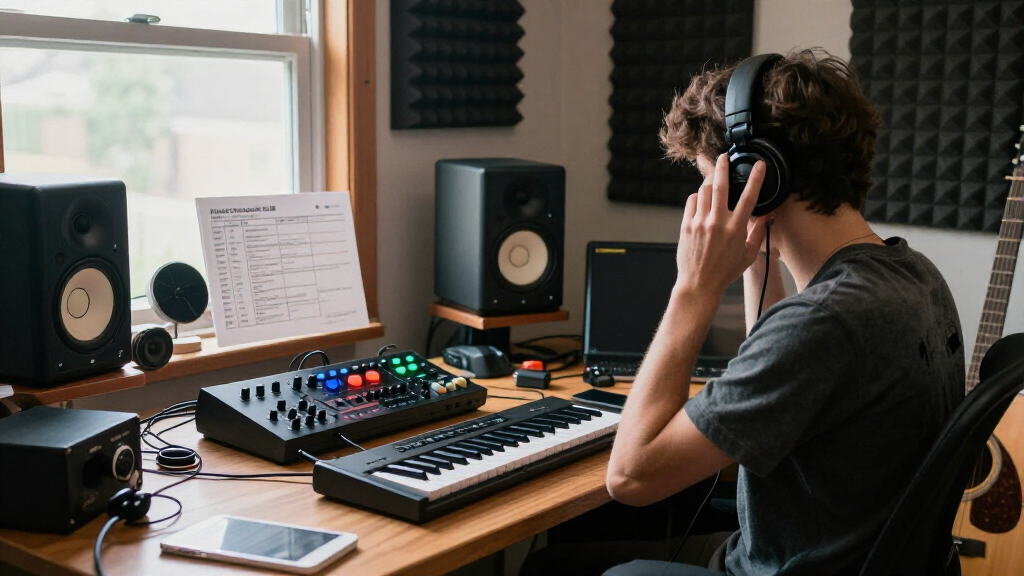

Building a music studio requires careful selection of gear that matches your creative needs and space. Whether you’re a beginner or an experienced producer, understanding the essentials can help you make smart choices and avoid common pitfalls like overpaying for features you don’t need or choosing incompatible equipment.

Get audio and creator gear delivered free — and shop member deals
- Fast, free delivery on millions of items
- Access to Prime Big Deal Days deals on October 6–7
- Prime Video, Amazon Music and more included
This checklist is organized by key categories: microphones, audio interfaces, studio monitors, headphones, MIDI controllers, and soundproofing. Each section highlights top picks with detailed insights into their performance and suitability. Use this guide to compare options, check for compatibility, and ensure you’re investing in gear that truly enhances your music production experience.
Microphones
The microphone is the cornerstone of your recording setup. The Shure SM4 XLR Studio Condenser Microphone Kit is known for its clarity and reliability, making it a popular choice for both vocals and instruments. When selecting a microphone, consider the polar pattern, sensitivity, and compatibility with your audio interface. Many beginners overlook the importance of matching the microphone’s impedance and connector type to their existing gear, potentially leading to poor sound quality or the need for additional adapters.
Pay attention to the room environment—condenser mics like the SM4 excel in controlled spaces but can pick up unwanted noise in untreated rooms. Properly positioning the mic and using a pop filter can significantly improve recording quality. Also, be aware of the power requirements—this model is XLR, so you’ll need a compatible audio interface with phantom power.
What to look for:
- XLR connection compatibility
- Appropriate polar pattern (cardioid, omnidirectional, etc.)
- Frequency response suited for vocals/instruments
- Included accessories (pop filter, shock mount)
Shure SM4 XLR Studio Condenser Microphone Kit for Recording

The Shure SM4 is a studio condenser microphone featuring a dual-diaphragm capsule for natural audio reproduction, superior noise rejection, and a large sweet spot to reduce proximity effect. It includes an integrated pop filter, shock mount, and protective case, making it ideal for professional recording and streaming setups.
Pros:
- Excellent noise rejection and interference shielding
- High SPL handling for loud instruments
- All-metal durable construction
- Includes essential accessories for professional use
Cons:
- No specific frequency response details provided
- Requires XLR connection and additional equipment for use
Best for: Vocals and studio instrument recordings
Not ideal for: Field recording or outdoor use
Bottom line: A versatile mic perfect for studio vocals and instruments
Audio Interfaces
The audio interface connects your microphones and instruments to your computer, making it a vital part of your setup. The Focusrite RedNet PCIeNX offers low-latency performance and high-quality digital conversion, crucial for professional-sounding recordings. Many users make the mistake of choosing an interface based solely on the number of inputs or outputs, without considering latency, driver stability, and compatibility with their DAW software. Ensuring your interface supports your workflow is key to avoiding frustration during recording or mixing sessions.
Check the connection type—PCIe interfaces like the RedNet provide fast, reliable connections but require compatible hardware slots. Compatibility with your computer’s OS and software is equally important. Also, consider the preamp quality—good preamps can make a significant difference in sound clarity and dynamic range. If you plan to expand your setup later, look for interfaces with additional I/O options.
What to look for:
- Low latency performance
- Compatibility with your computer and DAW
- Adequate input/output options for your needs
- High-quality preamps
Focusrite RedNet PCIeNX Low-Latency Dante PCIe Interface

The Focusrite RedNet PCIeNX is a high-performance audio interface supporting 128×128 channels at up to 192kHz with ultra-low latency. It offers flexible connectivity with dual Ethernet RJ-45 ports, supports standards like AES67 and SMPTE ST 2110, and is compatible with Windows and Mac systems including Apple Silicon.
Pros:
- Supports high-channel-count Dante audio with ultra-low latency
- Flexible dual Ethernet connections for switched and redundant modes
- Compatible with latest Windows and Mac systems, including Apple Silicon
- Supports industry standards like AES67 and SMPTE ST 2110
Cons:
- Requires a PCIe or Thunderbolt slot, limiting portability
- Advanced features may require paid upgrades
- Complex setup may be challenging for beginners
Best for: Professional studio recording
Not ideal for: Basic home setups or portable recording
Bottom line: Reliable, low-latency interface for serious recording
Studio Monitors
Choosing studio monitors is vital for accurate mixing and mastering. The Edifier R2750DB MKII offers a balanced sound profile with 144W RMS, making it a reliable choice for detailed listening. Many newcomers mistake consumer speakers for studio monitors, which can lead to misjudged mixes. True studio monitors should provide a flat frequency response, so you hear your recordings as they really sound, not as they are colored or enhanced.
Placement and room acoustics also play a big role in monitor performance. Keep monitors at ear level, with proper spacing from walls to avoid bass build-up or reflection issues. The MKII’s wooden cabinet and power output ensure clear sound reproduction, but always test monitors in your space before making a final decision. Compatibility with your audio interface and power supply is straightforward, but check the size and weight for your setup.
What to look for:
- Flat frequency response
- Adequate power output (W RMS)
- Size suitable for your space
- Good connectivity options
Edifier R2750DB MKII 3-Way Powered Bookshelf Speakers, 144W RMS, Walnut

The Edifier R2750DB MKII are versatile active bookshelf speakers featuring a 3-way design with a 7-inch woofer, mid-range, and silk-dome tweeter. They offer high-resolution audio, multiple wired and wireless connectivity options, and customizable sound settings, making them suitable for studio, home entertainment, and desktop use.
Pros:
- High-resolution audio certification with detailed sound quality
- Flexible connectivity options including Bluetooth, HDMI, Optical, and Coaxial
- Customizable sound with app-based EQ and multiple presets
- Powerful 144W RMS output suitable for various setups
Cons:
- May be complex for users unfamiliar with multiple input options
- Bulkier size might require ample space
- Premium price point
Best for: Accurate mixing and listening
Not ideal for: Primary monitoring in large, untreated rooms
Bottom line: Reliable monitors for precise studio listening
Headphones
The right studio headphones can make or break your mixing process. The HD 480 PRO Professional Closed-Back Studio Headphones deliver accurate sound isolation and flat response, which are essential for critical listening. Many users overlook the importance of closed-back design for tracking and mixing, risking sound leakage that can interfere with recordings. Comfort is also key—long sessions demand headphones with a comfortable fit and durable construction.
When selecting headphones, ensure they are compatible with your gear and provide enough frequency response to hear all the details. Properly breaking in new headphones can improve sound quality, and selecting a pair with replaceable cables or ear pads extends their lifespan. For different uses, consider whether you need over-ear or on-ear models, based on comfort and sound isolation needs.
What to look for:
- Flat frequency response
- Closed-back design
- Comfortable fit for long sessions
- Durable build and replaceable parts
HD 480 PRO Professional Closed-Back Studio Headphones, Black
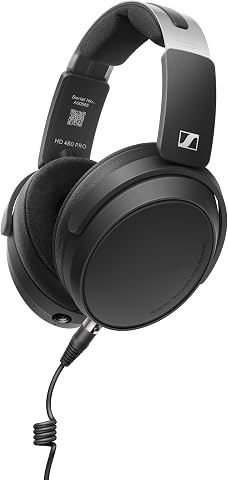
The Sennheiser HD 480 PRO headphones deliver accurate, full-spectrum sound with German engineering, featuring a closed-back design for noise control and all-day comfort. They are versatile for studio mixing, monitoring, and mobile production, with durable construction and accessible features.
Pros:
- Accurate, full-spectrum sound quality
- Comfortable fit for extended use
- Versatile for studio and mobile use
- Durable and accessible design
Cons:
- Bulkier design may be less portable
- Closed-back design can cause some ear heat
- Requires proper fit for optimal noise isolation
Best for: Mixing and critical listening
Not ideal for: Outdoor or casual listening
Bottom line: Accurate sound reproduction for studio work
MIDI Controllers
The MIDI controller is your bridge for creating melodies, beats, and automation. The Akai Professional APC40 MKII is tailored for Ableton Live users, offering intuitive controls like knobs, pads, and faders. Many producers underestimate the importance of layout and compatibility, which can hinder workflow. Choosing a MIDI controller with fingertip controls and software integration can streamline your process, making idea execution faster and more intuitive.
Ensure the controller’s compatibility with your DAW and operating system. The size and number of controls should match your creative style—whether you prefer clip launching, parameter tweaking, or beat programming. Also, check for power options—USB-powered units like the MKII are easy to integrate, but some may require external power sources. Compatibility with plugins and custom mappings can further enhance your productivity.
What to look for:
- Compatibility with your DAW
- Number and type of controls (pads, knobs, faders)
- Ease of use and layout
- Power source (USB preferred)
Akai Professional APC40 MKII – USB MIDI Controller with Ableton Live Lite

The Akai APC40 MKII is a versatile USB MIDI controller designed for seamless integration with Ableton Live, offering hands-on control of clip launching, mixing, and effects. It features a 5×8 clip matrix, assignable crossfader, knobs, faders, and includes Ableton Live Lite software for music production and performance.
Pros:
- Seamless integration with Ableton Live for intuitive control
- Versatile controls for music production and live performance
- Includes comprehensive software suite for immediate use
Cons:
- Requires Ableton Live for full functionality
- May have a learning curve for beginners
- Limited to Ableton Live software ecosystem
Best for: Beatmaking and live performance
Not ideal for: Basic MIDI needs or non-DAW use
Bottom line: Streamlined MIDI control for producers
Soundproofing
Soundproofing is often overlooked but is crucial for creating a professional-sounding studio environment. The Focusound 52 Pack Soundproof Foam Panels provide effective acoustic treatment with their pyramid design, helping to reduce reflections and echoes. Many mistakenly rely solely on thick curtains or carpets, which do little to control sound reflections in a dedicated studio space. Proper sound absorption improves the accuracy of your monitors and microphones, leading to better mixes.
When choosing soundproof panels, consider the size of your room and the placement of panels—corner bass traps, wall panels, and ceiling treatments all contribute to a balanced acoustic environment. The material quality and installation ease are also important; look for panels that are fire-resistant and easy to mount. Remember, soundproofing is an investment in your craft, not just a way to muffle noise from outside.
What to look for:
- Effective sound absorption properties
- Appropriate size and thickness
- Ease of installation
- Material safety and durability
Focusound 52 Pack Soundproof Foam Panels, 12" x 12" x 2" Pyramid Acoustic Panels

This set includes 52 pyramid-shaped acoustic foam panels designed to absorb sound, reduce echo, and improve audio quality in various spaces. Made of high-density, flame-retardant polyurethane foam, they are easy to install and suitable for studios, game rooms, and bedrooms.
Pros:
- Effective sound absorption with pyramid design
- High-density, flame-retardant foam for safety
- Easy to install with included adhesive dots
- Suitable for various acoustic treatment applications
Cons:
- Foam panels may require proper handling to prevent damage
- Limited color options
Best for: Reducing room reflections
Not ideal for: Complete soundproofing for loud environments
Bottom line: Essential acoustic treatment for professional sound
Starting your music studio with budget-conscious choices can be both smart and rewarding. Prioritize the essentials, like a quality microphone and reliable audio interface, before expanding into monitors, headphones, and soundproofing. Remember, building a studio is a gradual process—each piece of gear should serve your current needs while allowing room for future upgrades.
Stay focused on your goals, and don’t hesitate to test gear in person whenever possible. With thoughtful selection and a clear plan, your dream studio will become a reality, ready to produce your best music yet. Happy recording!
Halloween Picks
halloween
As an affiliate, we earn on qualifying purchases.